LC-32LE40E-LC-42LE40E
8
Preparation
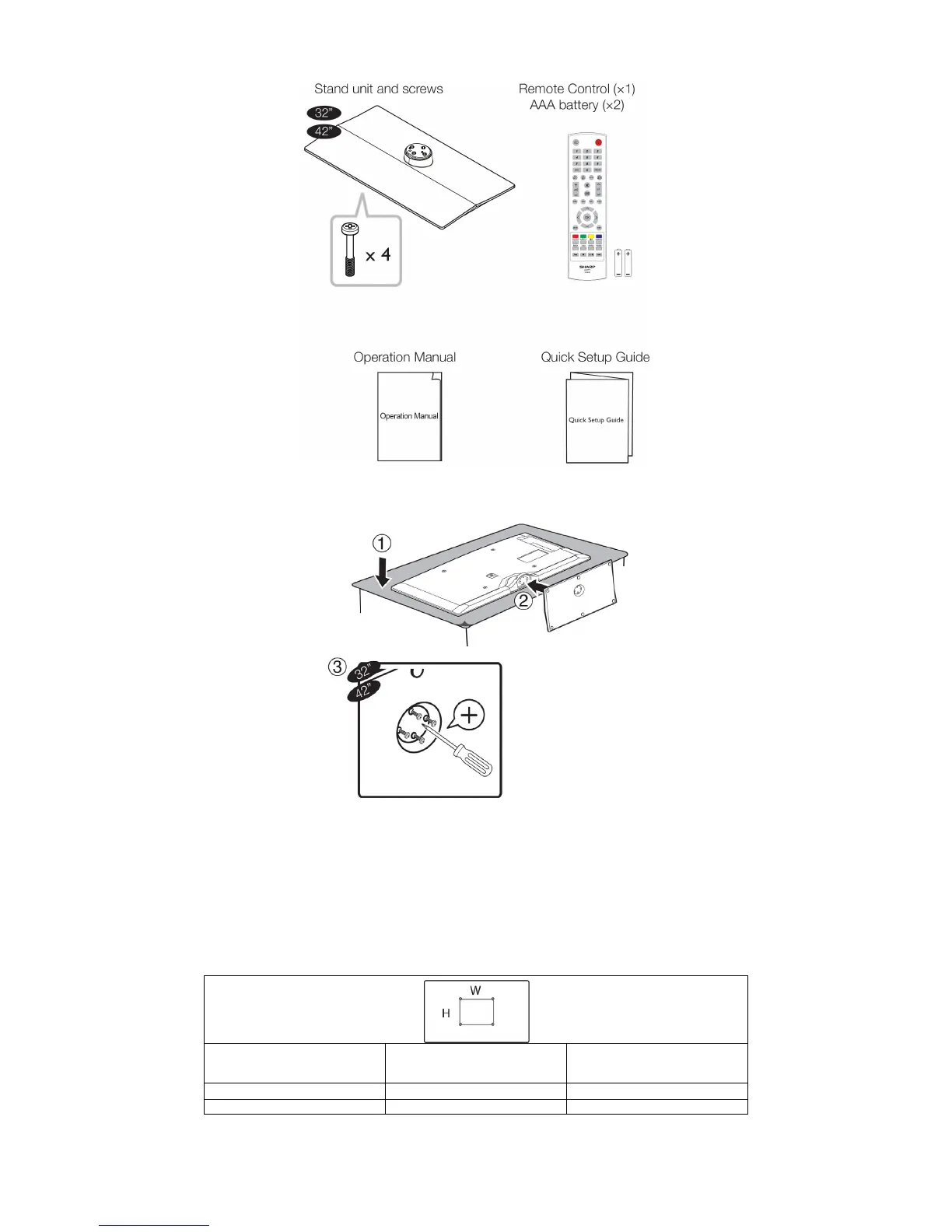
Supplied Accessories
Mount the TV base
1. Put the TV with its face down on a safe surface covered by a soft and smooth cloth. 2. Adjust the TV base to the bottom of the TV. Please be sure the
arrow heads are facing front.
3. Fasten the screws by using a cross-head screwdriver (not supplied).
NOTE
• To detach the TV stand, do these steps in reverse order.
Wall Mounting
TV screen size
VESA-compatible wall bracket
(W x H)
Screw type (Metric)
32” 200 x 100 mm 4 x 10 mm
42” 400 x 400 mm 4 x 10 mm
Note
• At the time of purchasing wall bracket, please check if there is enough space between the wall bracket and TV terminals for the terminal connection













 To Next Page