LC-40D68UT
6 – 1
LC-40D68UT
Service Manual
CHAPTER 6. TROUBLESHOOTING TABLE
[1] TROUBLESHOOTING TABLE
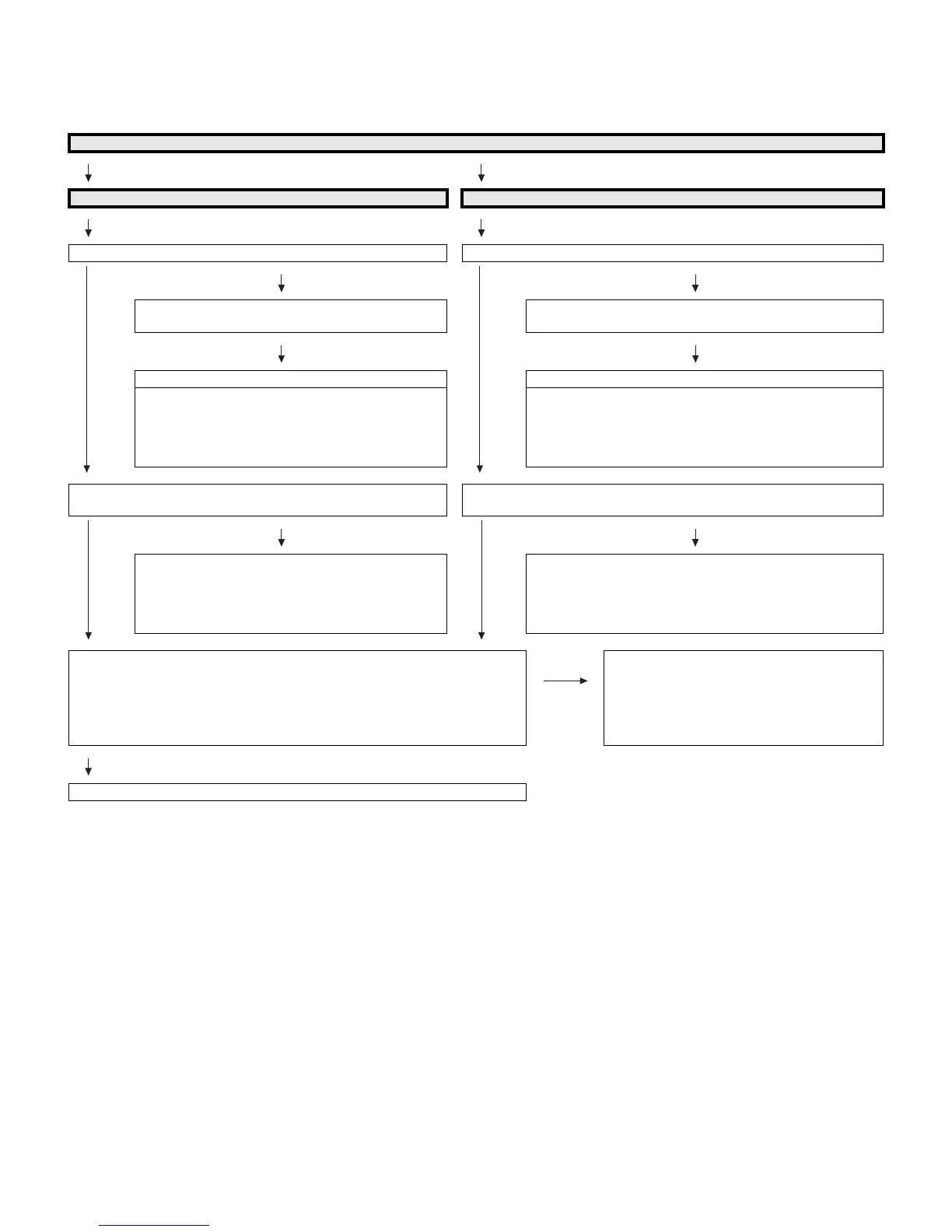
No video (1)
COMPOSITE: No external input video [INPUT-1] COMPOSITE: No external input video [INPUT-3]
Is INPUT-1 selected on the input select menu screen? Is INPUT-3 selected on the input select menu screen?
YES
NO
YES
NO
Select INPUT-1 on the input select menu screen for
the right input signal.
Select INPUT-3 on the input select menu screen for the right
input signal.
NO NO
Does the INPUT-1 V1_PLUG detection function? Does the INPUT-3 V3_PLUG detection function?
Check the line between pin (2) of input terminal (J509)
and pin (L1) of IC8001 (CPU).
1) J509: pin (2)
2) SC501/SC601: pin (20)
3) IC8001: pin (L1)
Check the line between pin (7) of input terminal (J501) and pin
(M1) of IC8001(CPU).
1) J501: pin (7)
2) SC501/SC601: pin (19)
3) IC8001: pin (M1)
Is there the COMPOSITE signal input at pin (A12) of IC8001
(CPU)?
Is there the COMPOSITE signal input at pin (A11) of IC8001 (CPU)?
YES
NO
YES
NO
Check the line between pin (3) of J509 and pin (A12) of
IC8001.
1) J509: pin (3)
2) SC501/SC601: pin (12)
3) IC8001: pin (A12)
Check the line between pin (6) of J501 and pin (A11) of
IC8001.
1) J501: pin (6)
2) SC501/SC601: pin (10)
3) IC8001: pin (A11)
Are the LVDS signal outputs at the LVDS 1st channel and 2nd channel of
IC8001?
LV0OUT0P/M (N19/N20), LV0OUT1P/M (N21/N22), LV0OUT2P/M (P19/P20),
LV0OUT3P/M (R19/R20), LV0OUT4P/M (R21/R22), LV0CK0P/M (P21/P22),
LV1OUT0P/M (J21/J22), LV1OUT1P/M (K19/K20), LV1OUT2P/M (K21/K22),
LV1OUT3P/M (L21/L22), LV1OUT4P/M (M21/M22), LV1CK0P/M (L19/L20)
NO Check IC8001 and its peripheral circuits.
(IC8251, etc.)
YES
Check the panel module.





 To Next Page