EasyManua.ls Logo

Sharp LC-52LE920UN - Page 20

Sharp LC-52LE920UN
80 pages
Print Icon
To Next Page IconTo Next Page
To Previous Page IconTo Previous Page
Loading...
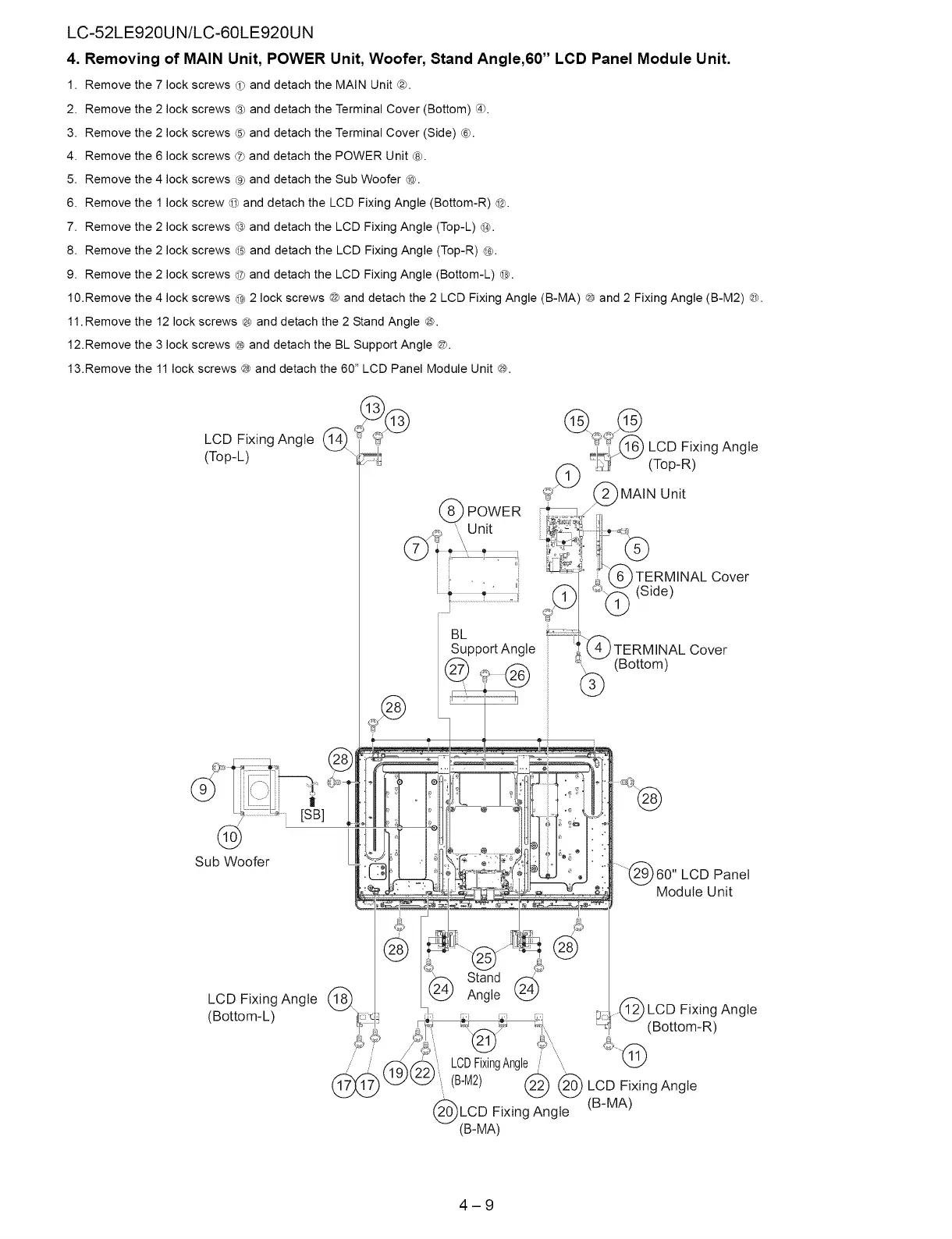
LC-52LE920UN/LC-60LE920UN
4.
Removing
of
MAIN
Unit,
POWER
Unit,
Woofer,
Stand
Angle,60”
LCD
Panel
Module
Unit.
1.
Remove
the
7
lock
screws
@
and
detach
the
MAIN
Unit
@.
.
Remove
the
2
lock
screws
@
and
detach
the
Terminal
Cover
(Bottom)
®.
.
Remove
the
2
lock
screws
© and
detach
the
Terminal
Cover
(Side)
©.
.
Remove
the
6
lock
screws
@
and
detach
the
POWER
Unit
©.
2
3
4
5.
Remove
the
4
lock
screws
@
and
detach
the
Sub
Woofer
@.
6.
Remove
the
1
lock
screw
@
and
detach
the
LCD
Fixing
Angle
(Bottom-R)
@.
7.
Remove
the
2
lock
screws
@ and
detach
the
LCD
Fixing
Angle
(Top-L)
@.
8.
Remove
the
2
lock
screws
@ and
detach
the
LCD
Fixing
Angle
(Top-R)
@.
9.
Remove
the
2
lock
screws
@ and
detach
the
LCD
Fixing
Angle
(Bottom-L)
©.
10.Remove
the
4
lock
screws
@
2
lock
screws
@ and
detach
the
2
LCD
Fixing
Angle
(B-MA)
@
and
2
Fixing
Angle
(B-M2)
@.
11.Remove
the
12
lock
screws
®@
and
detach
the
2
Stand
Angle
®.
12.Remove
the
3
lock
screws
@
and
detach
the
BL
Support
Angle
@.
13.Remove
the
11
lock
screws
@
and
detach
the
60”
LCD
Panel
Module
Unit
@.
LCD
Fixing
Angle
ee
‘eA
(Top-L)
(Top-R)
TERMINAL
Cover
(Bottom)
Sub
Woofer
60"
LCD
Panel
Module
Unit
LCD
Fixing
Angle
(Bottom-L)
Ee
LCD
Fixing
Angle
Oa
r
a
(Bottom-R)
&
LCD
Fixing
Angle
\ ~
a)
DQ)
(B-M2)
(22)
Gi)
LCD
Fixing
Angle
Geo
Fixing
Angle
(B-MA)
(B-MA)

Related product manuals