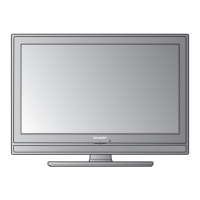
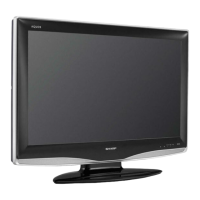
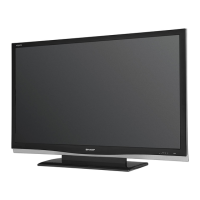
This document is a service manual for the Sharp LC-65LE541U_FPTW 65-inch LCD TV, which utilizes an AUO T650HVN05.5 panel.
The LC-65LE541U_FPTW is a 65-inch LCD TV designed for home entertainment, offering a range of features for viewing and multimedia use. It includes a built-in TV channel selector, supporting both analog and digital TV viewing. For high-definition content, it features HDTV, composite/component video, and HDMI inputs. Audio output options include an audio line out and an audio optical out. The TV is equipped with an auto-adjust function for automatic screen display adjustments and a smoothing function to enhance the display of texts and graphics, even when lower resolution images (below 1920x1080) are magnified. Power saving is a key feature, with standby consumption less than 0.5W. The On-Screen Display (OSD) allows users to customize various settings such as color, brightness, contrast, sharpness, backlight, sound, TV channel programs, aspect ratio, and gamma, with an option to reset all settings.
Important Technical Specifications:
TFT LCD Characteristics:
- Panel Model: T650HVN05.5
- Display Pixels: 1428.48 (H) x 803.52 (V)
- Active Screen Size: 65.00 inches
- Color Depth: 10 bit, 1.07 Billion colors
- Pixel Pitch: 0.744 mm
- Luminance of White: 350 cd/m² (Typical); 280 cd/m² (Min)
- Contrast Ratio: 4000:1 (Typical)
- Color Coordinates (Typical ±0.030):
- White: x=0.28, y=0.29
- Red: x=0.6454, y=0.3327
- Green: x=0.2880, y=0.6524
- Blue: x=0.1519, y=0.0424
- 1x USB
- 3x HDMI with HDCP (CEC, 1 ARC, 1 MHL)
- 1x RCA (Component)
- 1x Composite Video and Stereo Audio (shared with Component)
- 1x Tuner
- 1x Stereo RCA Jack (R/L) (with Component-RCA & Composite-RCA)
Output Connectors:
- SPDIF Out (Optical Audio)
- 1x Stereo RCA (R/L)
Power Supply:
- Input Voltage: 120Vac, 60Hz
- Input Current: 2.2 A
- Power Consumption (w/set): 240W (max), with audio full output
- Standby (w/set): <1.0W (at 120 Vac input)
Speaker:
- Output: 10W (max) X 2 (6Ω)
Environment:
- Operating Temperature: 0~35°C (Ambient)
- Operating Humidity: 10%~90% (Non-condensing)
- Operating Altitude: 0 - 14,000 feet (Non-Operating)
Dimensions (Unit: mm):
- Display Module: Height 848.6, Width 1458.6, Depth 69.9
- Display Module + Base: Height 890.5, Width 1458.6, Depth 348.7
Weight (Physical weight):
- Net: 23.0 ± 1kg (without Base)
- Gross: 25.0 ± 1kg (with Base)
- Total Weight: 32 ± 1kg
Usage Features:
The TV offers a user-friendly interface for control and navigation:
- LED Indicator: A white LED indicates power on, while off signifies AC power off.
- Side Control Panel: Includes buttons for Power, Menu, Channel selection (up/down), Volume adjustment (up/down), and Input selection.
- Power On: A short press of the Side button powers on the TV from an off state.
- MENU: Activates and exits the On-Screen Display (OSD).
- Channel Selection:
CH^ and CHV buttons increase and decrease channels, respectively. When OSD is active, these buttons navigate up and down.
- Volume Adjustment:
VOL+ and VOL- buttons adjust volume smoothly. When OSD is active, these buttons navigate left and right.
- Input Change/Confirmation: Cycles through input sources (TV, AV/Component, HDMI 1, HDMI 2, HDMI_SIDE). Confirms options when OSD is active.
- OSD Adjustment (Main MENU):
- INPUT: Selects input source (TV, AV IN, Component, HDMI-1, HDMI-2, HDMI-3 (SIDE)).
- PICTURE: Adjusts AV Mode (User/Standard/Energy Star/Movie/Game/DYNAMIC/Sport), Backlight (0-100), Contrast (0-100), Brightness (0-100), Color (0-100), Tint (-50-50), Sharpness (0-20), Size & Position, Color Temperature (Custom/Cool/Nature/Warm, with Red/Green/Blue Gain and Offset adjustments), and Advanced Picture settings (Enhance, Active Contrast).
- AUDIO: Configures Surround (Off/Movie/News), Auto Volume Control (Off/On), Bass (-12-12), Treble (-12-12), Balance (-10-10), Lip Sync (0-5), TV Speakers (Off/On), Audio Only, Digital Audio Out (Dolby Digital/PCM), Analog Audio Out (Fixed/Variable), and Equalizer Settings (120Hz, 500Hz, 1.5KHz, 5KHz, 10KHz adjustments).
- SETUP: Manages Name Input (source labels), CEC Link Settings (function, system audio control, device search), Menu Language (English/French/Spanish), Time & Local Setting (time zone, daylight saving), Parental Controls (password, rating, channel locks, unrated shows, change password, reset parental settings), Power Indicator (Off/On), Easy Setup, System Informations, and Reset All Settings.
- CLOSED CAPTION: Controls Analog Closed Caption (Off/CC1/CC@/CC3/CC4) and Digital Closed Caption (Off/CC1/CC2/CC3/CC4/CS1/CS2/CS3/CS4/CS5/CS6), including Digital CC Options (Caption Style, Text Size, Font, Color, Opacity, BG Color, BG Opacity, Windows Color, Window Opacity).
- VIEW MODE: Selects display modes (Normal, Wide, Zoom, Panoramic).
- CHANNEL: Manages TV Mode (Antenna/Cable), Auto Channel Scan, Partial Channel Scan, Find Channel, Skip/Favorite Channel, Analog MTS (Mono/Stereo/SAP), and Digital MTS.
- SLEEP TIMER: Sets a timer for Off, 30, 60, 90, 120, or 180 Minutes.
- Media Playback: Supports Photo, Music, and Video media playback from a USB disk.
Maintenance Features:
The manual provides detailed information for troubleshooting and servicing the device:
- Troubleshooting Flowcharts: Dedicated flowcharts guide technicians through diagnosing issues related to:
- TV, Composite, Video display not working correctly.
- HDMI display not working correctly.
- DC-DC Converter issues (checking voltage levels at various pins).
- Audio not displaying correctly.
- Factory/Service Mode: Instructions are provided to access special menus for advanced diagnostics and adjustments.
- Enter Factory Menu: From an input source (TV, AV IN, Component, or HDMI), not in Setup Wizard or MMP, press MENU, then enter password
<2, 4, 8, 9>.
- Enter Service Menu: From an input source (TV, AV IN, Component, or HDMI), not in Setup Wizard or MMP, press MENU, then enter password
<4, 3, 9, 8>.
- Firmware Update: A clear procedure is outlined for updating the TV's firmware using a USB flash drive:
- Prepare a FAT32-formatted USB flash stick.
- Copy the "MERGE.bin" upgrade file to the USB stick.
- Unplug the AC cable to power off the TV.
- Insert the USB flash stick into the TV.
- Plug in the AC cable.
- The TV will automatically start reading the USB stick and updating the firmware. It is crucial not to unplug the AC cable or remove the USB stick while the LED indicator is blinking.
- Once the LED indicator stops blinking, remove the USB stick.
- The firmware update is complete, and the TV can be powered on.
- Precautions: The manual emphasizes several precautions for handling and mounting the TFT LCD module, including:
- Mounting using four corners/sides to avoid uneven stress.
- Ensuring sufficient strength of the mounting case.
- Attaching a transparent protective plate to protect the polarizer.
- Adopting a radiation structure for temperature specification.
- Avoiding acetic acid or chlorine-type materials for the cover case.
- Not touching or rubbing exposed polarizers with hard objects.
- Cleaning dusty surfaces gently with absorbent cotton soaked in petroleum benzine or normal-hexane, avoiding acetone, toluene, and alcohol.
- Wiping off saliva or water drops immediately to prevent deformation and color fading.
- Not opening the case due to delicate internal circuits.
- Minimizing spike noise to ±200mV.
- Being aware of temperature effects on response time and brightness.
- Avoiding condensation at sudden temperature changes.
- Preventing remnant images from fixed patterns displayed for long periods.
- Ensuring proper grounding and shielding for high-frequency circuits to minimize electromagnetic interference.
- Avoiding mechanical/acoustical impact to the LCM.
- Using machine screws for fastening steel components.
- Not setting the LCD on its edge.
- Electrostatic Discharge Control: Personnel must be grounded via wrist bands, and interface pins should not be touched directly.
- Strong Light Exposure: Avoid strong light exposure to prevent degradation of the polarizer and color filter.
- Storage: Store modules in a dark place, between 5°C and 35°C at normal humidity, and in their original containers to prevent contact with other objects.
- Handling Protection Film: Peel off slowly and carefully by electrically grounded personnel with ion-blown equipment to prevent static electricity. Remove any residual glue with absorbent cotton soaked in normal-hexane.
- Data Protection: The device includes features to prevent accidental erasure or programming, such as command length checking, Write Enable Latch (WEL) bit control, Deep Power Down Mode, and Block Lock Protection (Software Protected Mode and Hardware Protected Mode).
The manual also includes detailed block diagrams, power trees, and circuit diagrams for various components like the main board (MSD8220LB), MEMC (MST7438BB), audio amplifier (TAS5707L), and flash memory (MX25L3206EM2I-12G), along with a comprehensive spare parts list.

 Need help?

 To Next Page
 General