EasyManua.ls Logo

Sharp PA-3000 - Page 11

Sharp PA-3000
28 pages
Print Icon
To Next Page IconTo Next Page
To Previous Page IconTo Previous Page
Loading...
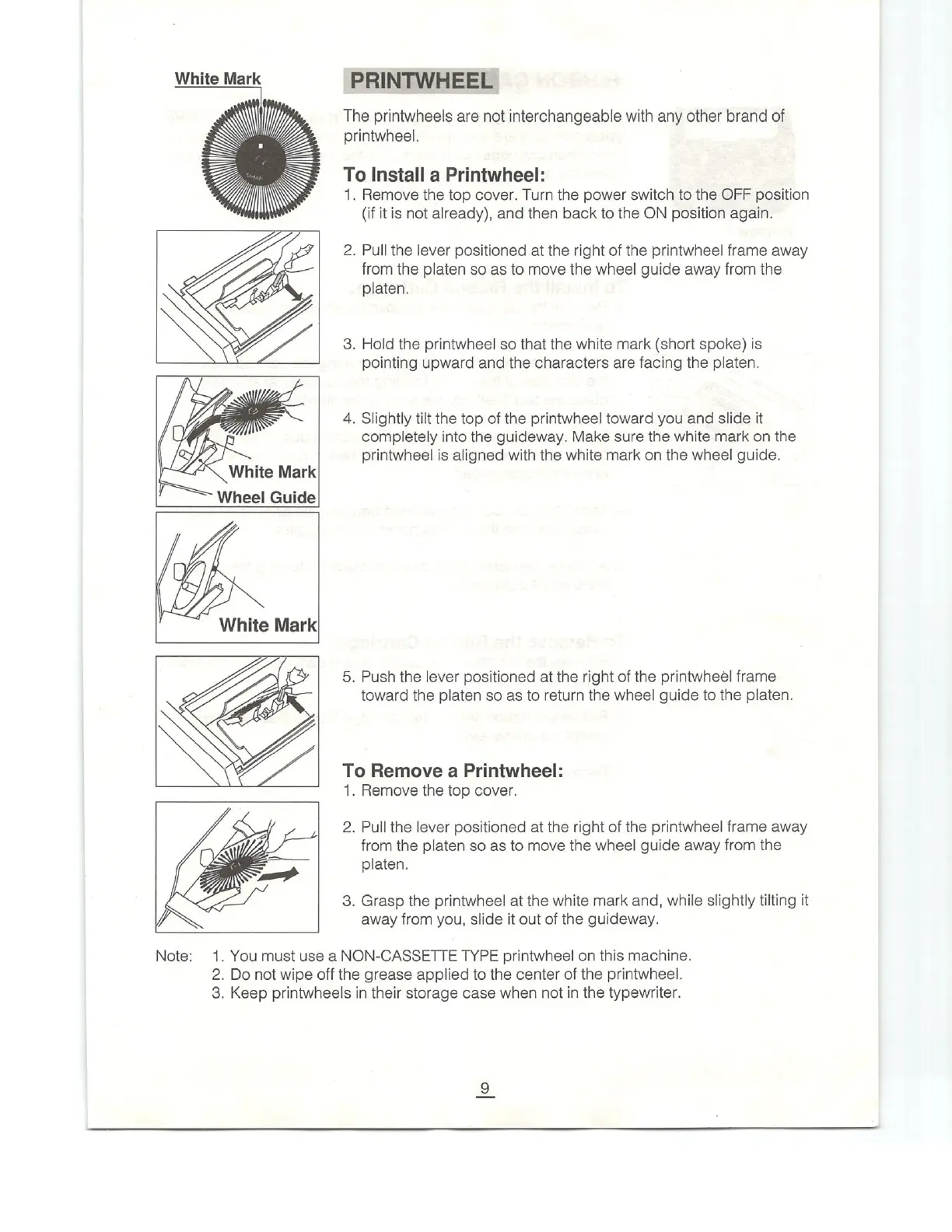
White
Mark
=
Wheel
Guide
White
Mark
Note:
PRINTWHEEL
The printwheels
are
not
interchangeable
with
any
other
brand
of
printwheel.
To
Install
a
Printwheel:
1.
Remove
the
top
cover.
Turn
the
power
switch
to
the
OFF
position
(if
it
is
not
already),
and
then
back
to
the
ON
position
again.
2.
Pull
the
lever
positioned
at
the
right
of
the
printwheel
frame
away
from
the
platen
so
as
to
move
the
wheel
guide
away
from
the
platen.
3.
Hold
the
printwheel
so
that
the
white
mark
(short
spoke)
is
pointing
upward
and
the
characters
are
facing
the
platen.
4,
Slightly
tilt
the
top
of
the
printwheel
toward
you
and
slide
it
completely
into
the
guideway.
Make
sure
the
white
mark
on
the
printwheel
is
aligned
with
the
white
mark
on
the
wheel
guide.
5.
Push
the
lever
positioned
at
the
right
of
the
printwheél
frame
toward
the
platen
so
as
to
return
the
wheel
guide
to
the
platen.
To
Remove
a
Printwheel:
1.
Remove
the
top
cover.
2.
Pull
the
lever
positioned
at
the
right
of
the
printwheel
frame
away
from
the
platen
so
as
to
move
the
wheel
guide
away
from
the
platen.
3.
Grasp
the
printwheel
at
the
white
mark
and,
while
slightly
tilting
it
away
from
you,
slide
it
out
of
the
guideway.
1.
You
must
use
a
NON-CASSETTE
TYPE
printwheel
on
this
machine.
2.
Do
not
wipe
off
the
grease
applied
to
the
center
of
the
printwheel.
3.
Keep
printwheels
in
their
storage
case
when
not
in
the
typewriter.

Related product manuals