EasyManua.ls Logo

Sharp PA-3000 - Getting Started; Keyboard Cover; Top Cover

Sharp PA-3000
28 pages
Print Icon
To Next Page IconTo Next Page
To Previous Page IconTo Previous Page
Loading...
GETTING
STARTED
|
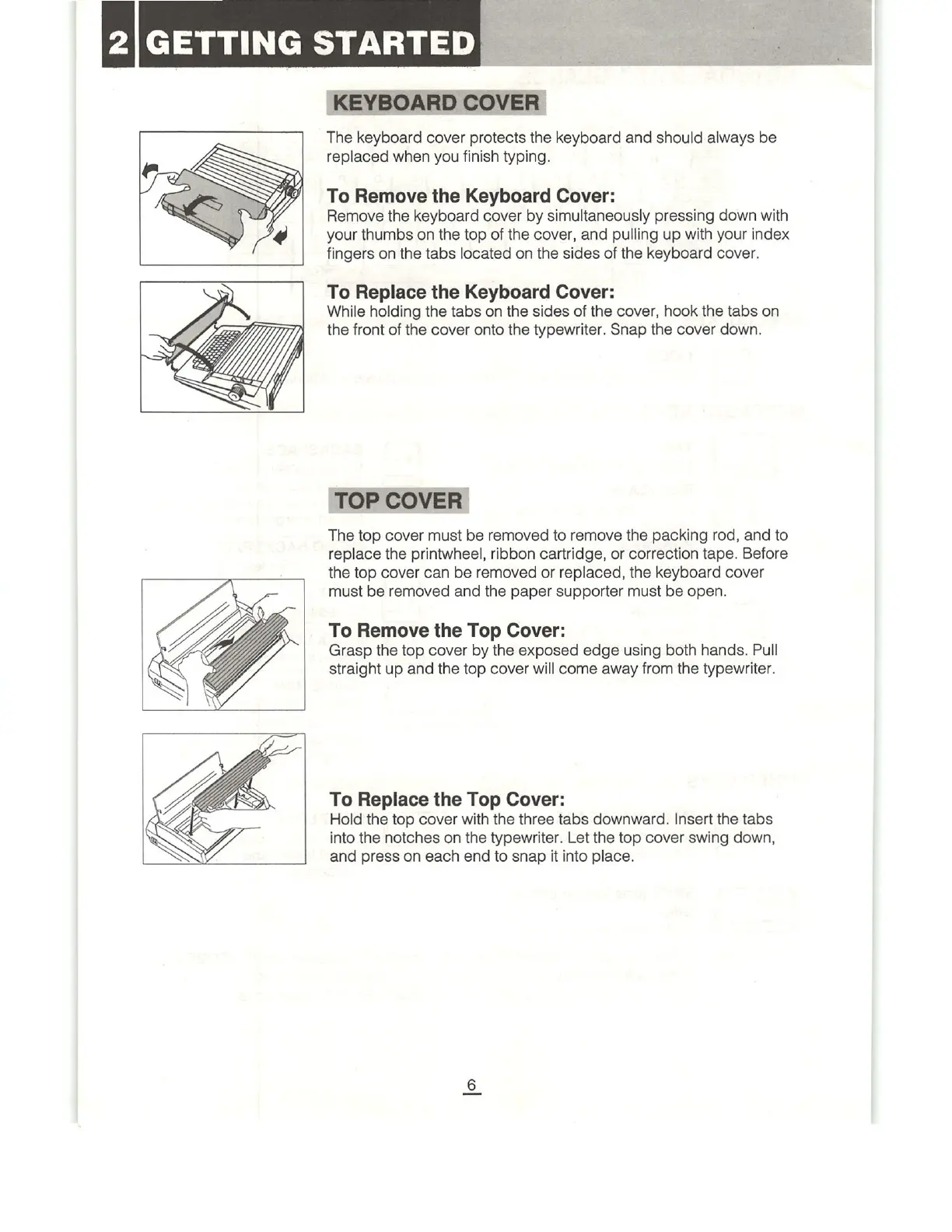
KEYBOARD
COVER
The
keyboard
cover
protects
the
keyboard
and
should
always
be
replaced
when
you
finish
typing.
To
Remove
the
Keyboard
Cover:
Remove
the
keyboard
cover
by
simultaneously
pressing
down
with
your
thumbs
on
the
top
of
the
cover,
and
pulling
up
with
your
index
fingers
on
the
tabs
located
on
the
sides
of
the
keyboard
cover.
To
Replace
the
Keyboard
Cover:
While
holding
the
tabs
on
the
sides
of
the
cover,
hook
the
tabs
on
the
front
of
the
cover
onto
the
typewriter.
Snap
the
cover
down.
TOP
COVER
The
top
cover
must
be
removed
to
remove
the
packing
rod,
and
to
replace
the
printwheel,
ribbon
cartridge,
or
correction
tape.
Before
the
top
cover
can
be
removed
or
replaced,
the
keyboard
cover
must
be
removed
and
the
paper
supporter
must
be
open.
To
Remove
the
Top Cover:
Grasp
the
top
cover
by
the
exposed
edge
using
both
hands.
Pull
straight
up
and
the top
cover
will
come
away
from
the
typewriter.
To
Replace
the
Top
Cover:
Hold
the
top
cover
with
the
three
tabs
downward.
Insert
the
tabs
into
the
notches
on
the
typewriter.
Let
the
top
cover
swing
down,
and
press
on
each
end
to
snap
it
into
place.

Related product manuals