EasyManua.ls Logo

Sharp PA-3000 - Page 9

Sharp PA-3000
28 pages
Print Icon
To Next Page IconTo Next Page
To Previous Page IconTo Previous Page
Loading...
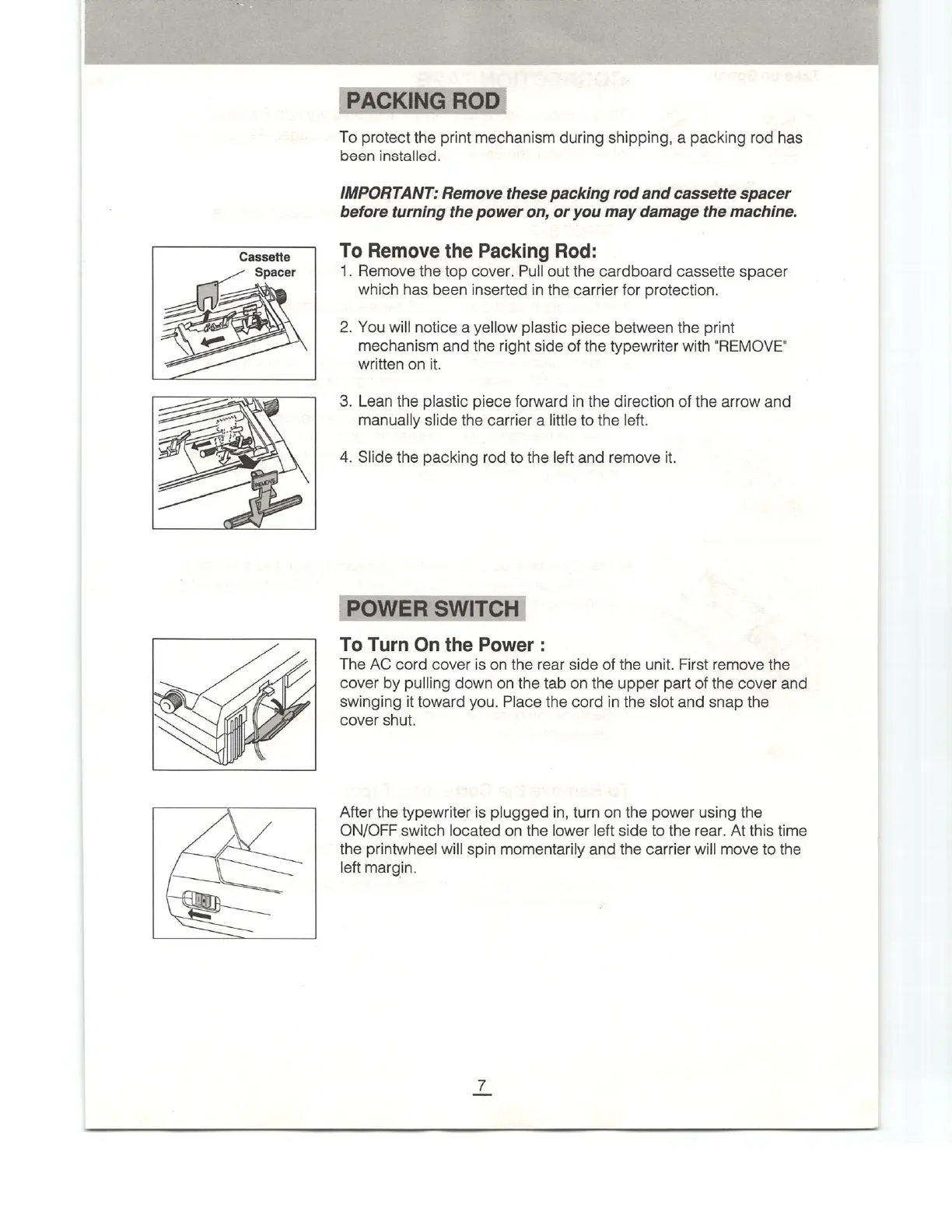
Cassette
To
protect
the
print
mechanism
during
shipping,
a
packing
rod
has
been
installed.
IMPORTANT:
Remove
these
packing
rod
and
cassette
spacer
before
turning
the
power
on,
or
you
may
damage
the
machine.
To
Remove
the
Packing
Rod:
1.
Remove
the
top
cover.
Pull
out
the
cardboard
cassette
spacer
which
has
been
inserted
in
the
carrier
for
protection.
2.
You
will
notice
a
yellow
plastic
piece
between
the
print
mechanism
and
the
right
side
of
the
typewriter
with
"REMOVE"
written
on
it.
3.
Lean
the
plastic
piece
forward
in
the
direction
of
the
arrow
and
manually
slide
the
carrier
a
little
to
the
left.
4.
Slide
the
packing
rod
to
the
left
and
remove
it.
To
Turn
On
the
Power
:
The
AC
cord
cover
is
on
the
rear
side
of
the
unit.
First
remove
the
cover
by
pulling
down
on
the
tab
on
the
upper
part
of
the
cover
and
swinging
it
toward
you.
Place
the
cord
in
the
slot
and
snap
the
cover
shut.
After
the
typewriter
is
plugged
in,
turn
on
the
power
using
the
ON/OFF
switch
located
on
the
lower
left
side
to
the
rear.
At this
time
the
printwheel
will
spin
momentarily
and
the
carrier
will
move
to
the
left
margin.

Related product manuals