EasyManua.ls Logo

Sharp PA-3000 - Part Names and Functions

Sharp PA-3000
28 pages
Print Icon
To Next Page IconTo Next Page
To Previous Page IconTo Previous Page
Loading...
PART
NAMES
AND
FUNCTIONS
Before
you
begin,
take
the
time
to
familiarize
yourself
with
the
parts
of
the
typewriter
and
their
functions.
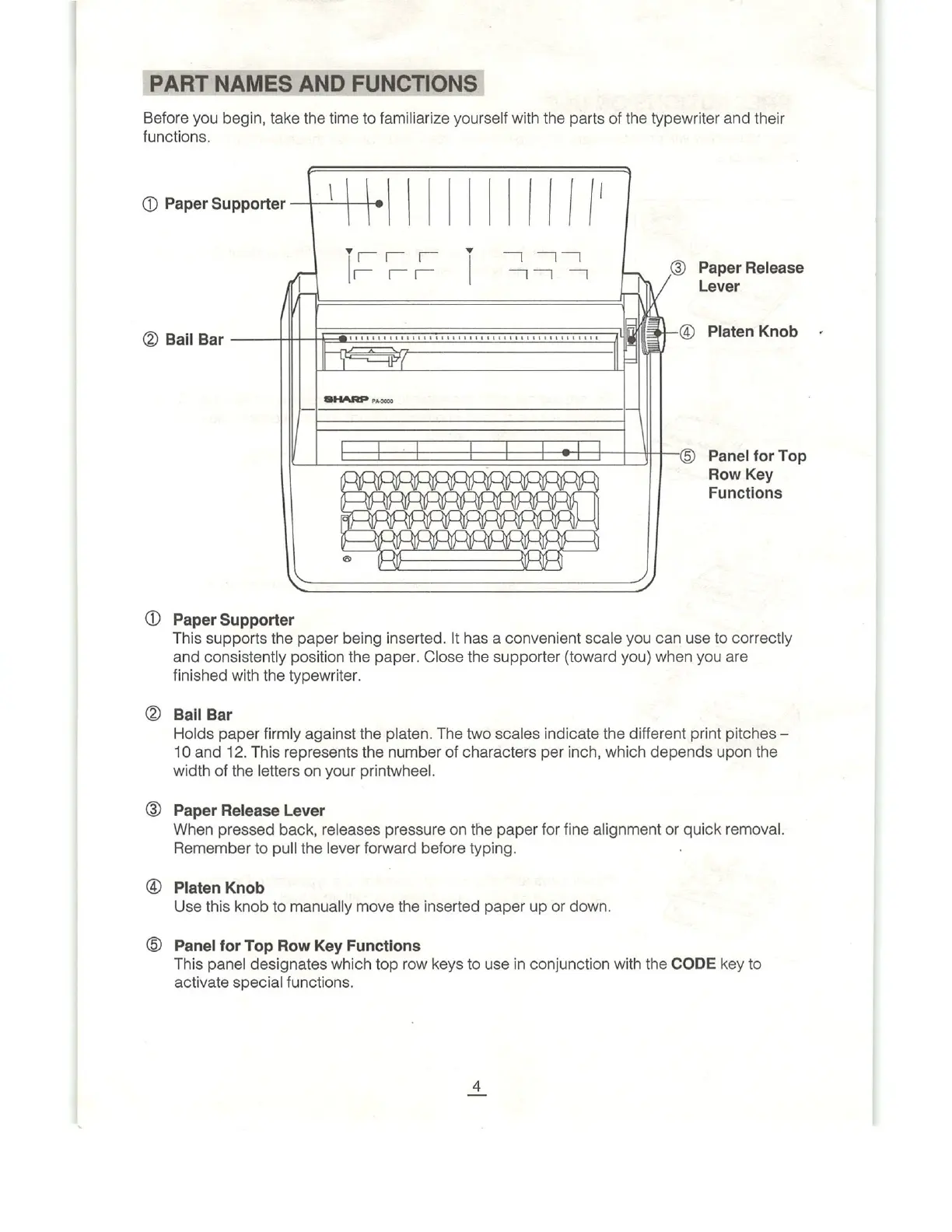
(@
Paper
Supporter
[P
=
e
e
e
L
|
N
&
®
Paper
Release
Lever
B
Bl
Bk
——
e
J
@
Platen
Knob
&=
SHARP
000
| | [ I |
e
|
I
I
| ]
=7
{rT—®
Panel
for
Top
Row
Key
Functions
@
Paper
Supporter
This
supports
the
paper
being
inserted.
It
has
a
convenient
scale
you
can
use
to
correctly
and
consistently
position
the
paper.
Close
the
supporter
(toward
you)
when
you
are
finished
with
the
typewriter.
@
Balil
Bar
Holds
paper
firmly
against
the
platen.
The
two
scales
indicate
the
different
print
pitches
10
and
12.
This
represents
the
number
of
characters
per
inch,
which
depends
upon
the
width
of
the letters
on
your
printwheel.
@
Paper
Release
Lever
When
pressed
back,
releases
pressure
on
the
paper
for
fine
alignment
or
quxck
removal.
Remember
to
pull
the
lever
forward
before
typing.
@
Platen
Knob
Use
this
knob
to
manually
move
the
inserted
paper
up
or
down.
®
Panel
for
Top
Row
Key
Functions
This
panel
designates
which
top
row
keys
to
use
in
conjunction
with
the
CODE
key
to
activate
special
functions.

Related product manuals