EasyManua.ls Logo

Sharp PA-3000 - Special Key; Movement Keys; Other Keys

Sharp PA-3000
28 pages
Print Icon
To Next Page IconTo Next Page
To Previous Page IconTo Previous Page
Loading...
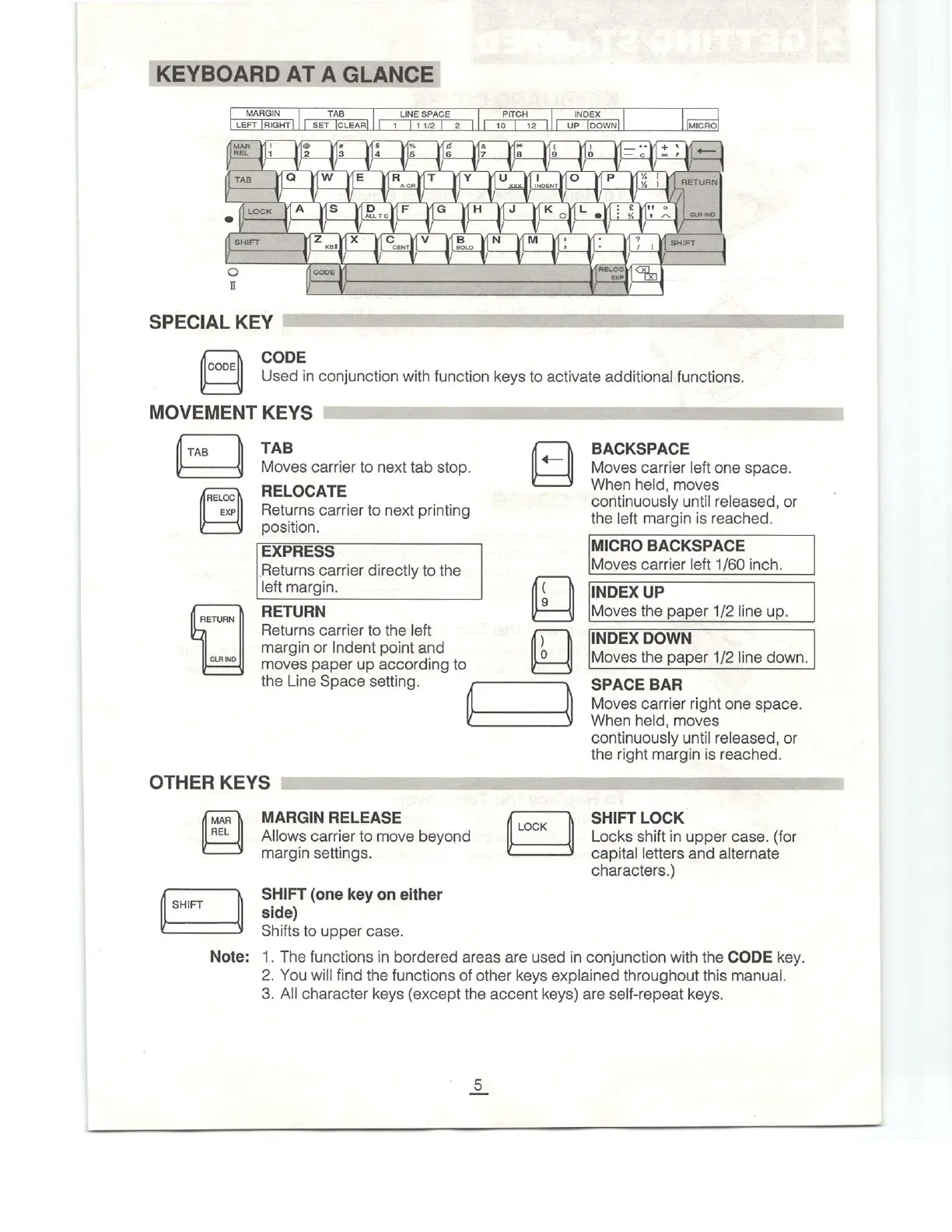
KEYBOARD
AT
A
GLANCE
MARGIN
TAB
LEFT
|RIGHT]
|
|
SET
[cLEAR]
LINE
SPACE
PITCH
INDEX
1
[112]
2
||[
10
| 12
]|[
ur
[oown|
MICRO]
SPECIAL
KEY
CODE
CODE
Used
in
conjunction
with
function
keys
to
activate
additional
functions.
MOVEMENT
KEYS
TAB
TAB
Moves
carrier
to
next
tab
stop.
RELOC
EXP
|l
RETURN
CLRIND
RELOCATE
Returns
carrier
to
next
printing
position.
EXPRESS
Returns
carrier
directly
to
the
left
margin.
RETURN
Returns
carrier
to
the
left
margin
or
Indent
point
and
moves
paper
up
according
to
the
Line
Space
setting.
OTHER
KEYS
MAR
REL
SHIFT
Note:
MARGIN
RELEASE
Allows
carrier
to
move
beyond
margin
settings.
SHIFT
(one
key
on
either
side)
Shifts
to
upper
case.
LOCK
BACKSPACE
«—
:
Moves
carrier
left
one
space.
C——
When
held,
moves
continuously
until
released,
or
the
left
margin
is
reached.
MICRO
BACKSPACE
Moves
carrier
left
1/60
inch.
g
INDEX
UP
Moves
the
paper
1/2
line
up.
)
)
[INDEX
DOWN
0
_JI
[Moves
the
paper
1/2
line
down.
SPACE
BAR
Moves
carrier
right
one
space.
When
held,
moves
continuously
until
released,
or
the
right
margin
is
reached.
SHIFT
LOCK
Locks
shift
in
upper
case.
(for
capital
letters
and
alternate
characters.)
1.
The
functions
in
bordered
areas
are
used
in
conjunction
with
the
CODE
key.
2.
You
will
find
the
functions
of
other
keys
explained
throughout
this
manual.
3.
All
character
keys
(except
the
accent
keys)
are
self-repeat
keys.

Related product manuals