EasyManua.ls Logo

Sharp PC-1500 - Page 127

Sharp PC-1500
169 pages
Print Icon
To Next Page IconTo Next Page
To Previous Page IconTo Previous Page
Loading...
A
ll
and more about Sharp PC-1500
at
http://www.PC-1500.info
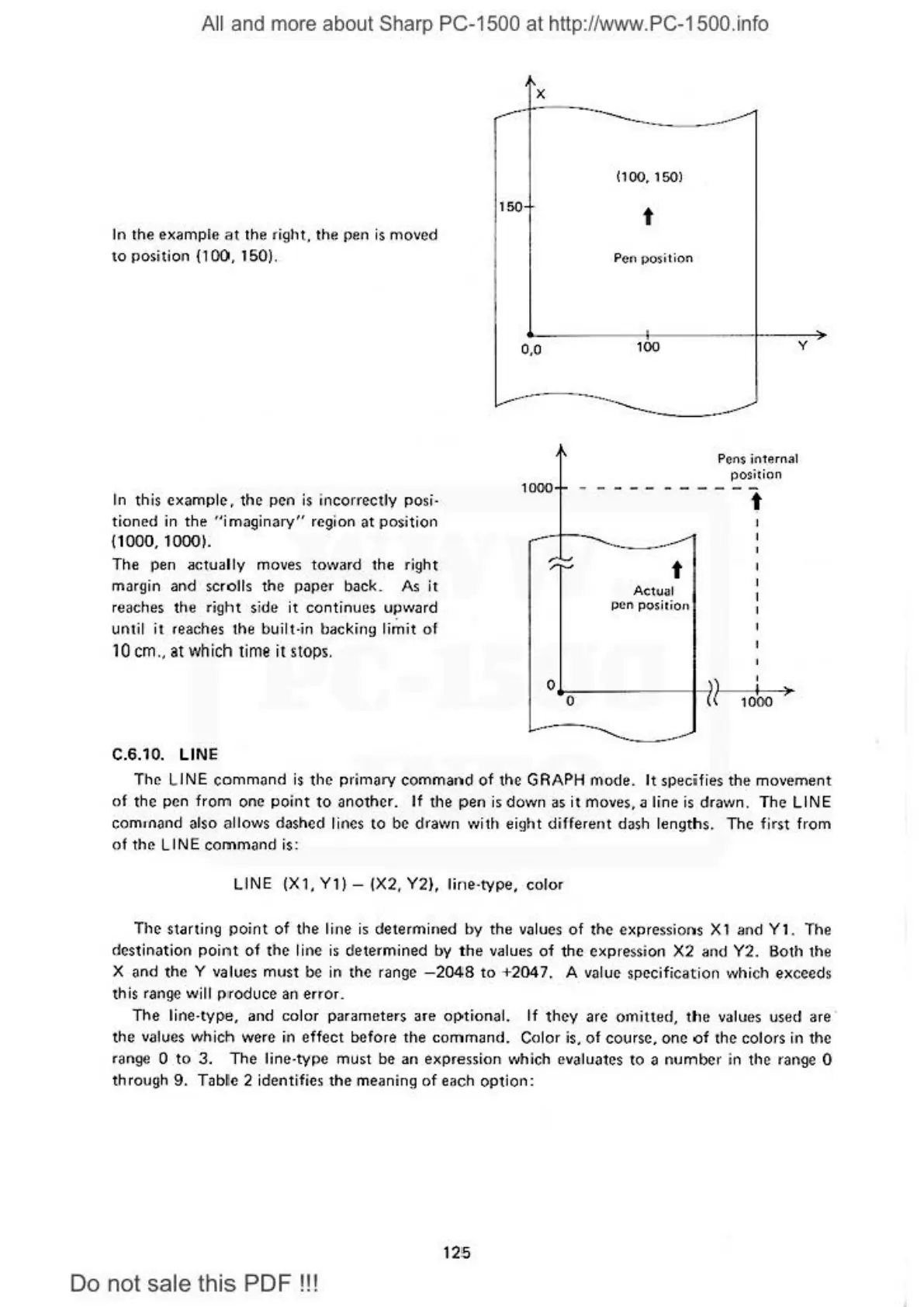
In
the example
at
the right, the
pe
n
is
moved
to
po
s
it
ion
{100.
150).
In
this
example , the pen
is
incorrectly
po
si-
tion
ed
in
the "imaginary"
rcg
i on at
posi
tion
(
1000
, 10001.
The pen actually moves
to\¥
a
rd
t
he
right
margin and scrolls t
he
p
ape
r
back
.
As
it
re
aches the
rig
ht
si
de
it
continue
s
UJ!
..
..,ard
unt
il
it re
ac
hes
the built
-in
bac
ki
ng
li
mi
t of
10
cm
.. at which t
ime
il slops.
C.6.10. LINE
x
(100,
150)
150
t
L -
----
1
---
- -
-1--
--
o.o
100 y
P
en
$
in
ter
nal
position
1000
--
---------
---
,.
t
Actu
ul
pen posiiion
0.1.-
0-
----
-t-~
,
,
)
1-~-
~~
1000
---
~
--
-
·
The LINE c
ommand
is
the
pr
imary c
om
mar>d
of
the GRAPH mode.
It
specifies
th
e movem
ent
of the pen fr
om
one
point
to
another.
If
the pen
is
down
as
it
moves
, a line
is
drawn. The L
INE
comonand also al l
ow
s dashed
li
nes to
be
drawn with ei
\Jh
t different dash length
s.
The first from
of
the
LINE
command
is:
LINE
(Xl,
Yl)-
(X2. Y2), lin
t
ype,
color
The
starting
po
i
nt
of
the line is
determ
ined
by
the
va
lues of the expressi
ons
Xl
and
Yl
. The
destination
poimt of
the
li
ne is
de
termined by
the
values
of
the
expre
ssi
on
X2 and Y2. Both the
X and
the Y values must
be
in the range
-2
048
to +2047. A
va
lue specification which exceeds
this
ra
nge will p
Jo
duce
an
er
ror.
Th
e li
ne
-type, and color pa
rarn
ct
ers
are
op
t
io
nal.
If
they are
otn
itted,
tt1e
values
used
a
re
th
e values which were in effect before the
command.
Color i
s.
of
course. one o f the
co
lors in
th
e
range 0 to
3.
The
li
ne-type
mus
t
be
an
exp
ression vfll ich evaluates
to
a numt>er in
the
range 0
through 9.
Tab
le 2 id
en
ti
fie
s
the
meaning
of
each
option:
125
Do
not sale this PDF
!!!

Table of Contents

Other manuals for Sharp PC-1500

Related product manuals