EasyManua.ls Logo

Sharp PC-1500 - Page 135

Sharp PC-1500
169 pages
Print Icon
To Next Page IconTo Next Page
To Previous Page IconTo Previous Page
Loading...
A
ll
and more about Sharp PC-1500
at
http://www.PC-1500.info
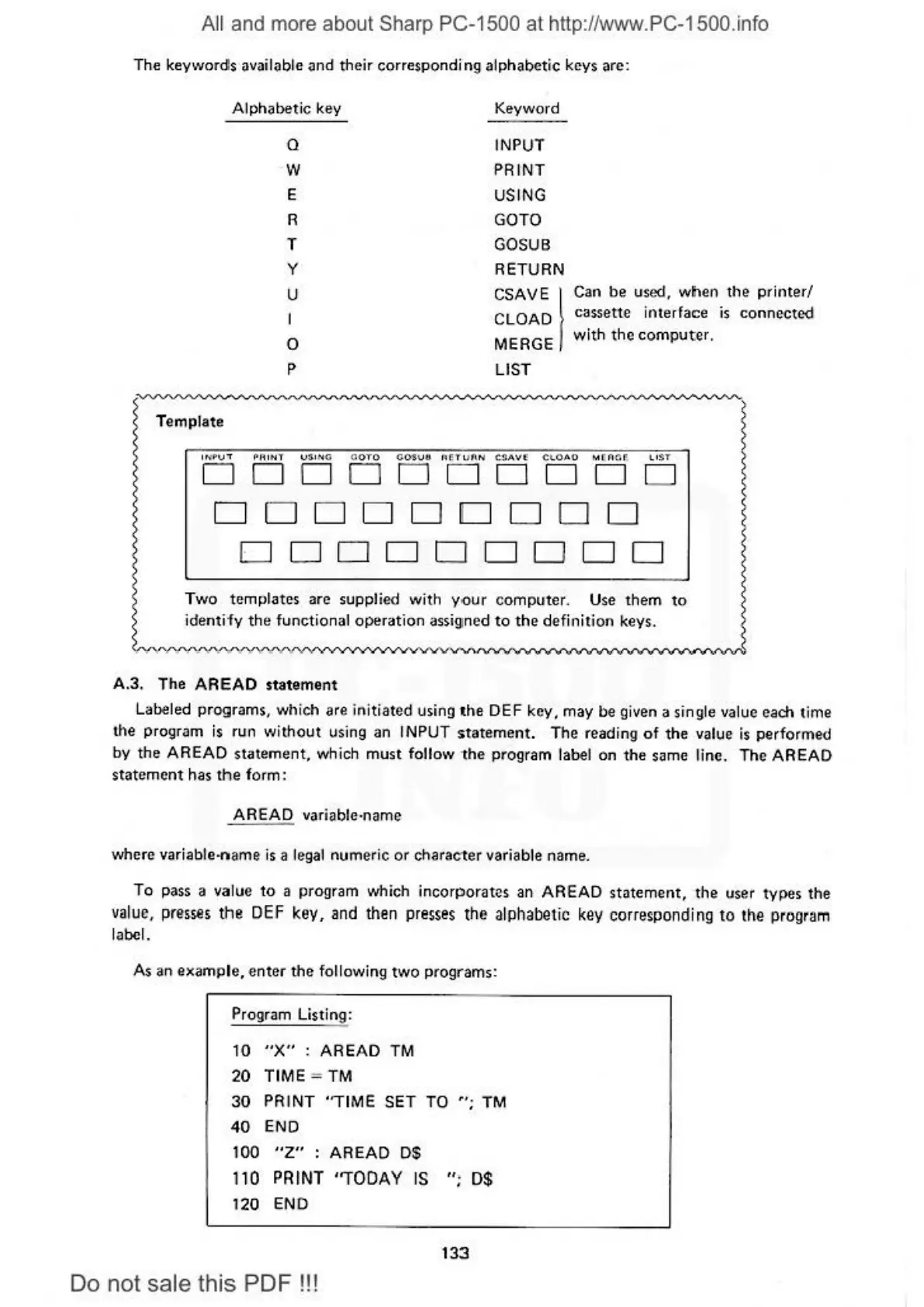
The ke
yw
o
rdls
available
and
th
eir
corresponding alphab
etic
key
s arc:
Alphabetic
key
0
·w
E
R
T
y
Keyword
INPUT
PRINT
US
ING
GOTO
GOSUB
RE
TUR
N
u
I
0
p
CSAVE I
CLOAD
MERGE
LIST
Can be used,
when
th
e
printer/
cassette i
nte
rface
is
con
nected
with
th
e
computer.
~
~
Template I
1..-
1>v
'T
PR
INT V$NO
<I
OTO
COS
V ll AllT
UA
H C!lA
Vf
Ct.OAO
MllOCll' t.
ST
DDDDD
DDDD
D
D D
DDDDD
DD
DDD
D
DDDDD
Two
templates are supplied wi
th
you
r computer. Use
th
em
to
i
dent
ify
th
e
func
tional
op
eration assigned
to
the
de
fi
nition keys.
A.3.
The
AREAD
statement
l
Labeled programs. which are ini
ti
ated using
the
DEF k
ey.
may
be
given a single value each time
the program
is run
without
using
an
IN
PUT
statement.
The
reading of the value is
performed
by
the
AREAD
statement.
which
must
follow
the
program la
be
l
on
t
he
same line. The AREAD
s
ta
te
me
nt
has
the
form :
AREAD
vari
ab
le·name
where variable-n
ame
is a legal
nume
ri
c
or
character
variable n
ame
.
Ta
pass a value to a
prog
ram which i
ncor
porate
s an
AREAD
statement.
th
e user
type
s the
va
lue
, presses
the
DEF
key,
and
then
presses
the
al
phabet
ic
key
corresponding
to
the program
laool.
As
an
examp
l
e,
en
ter
the
following t
wo
prog
ra
ms:
Prog
ram
Listi
ng:
10
"X"
: AREAD
TM
20
TIME ;
TM
30
PRINT
"T
IM
E
SET
TO
";
TM
40
END
100
"Z"
:
AREAD
DS
1
10
PR
INT "TODAY IS
";
0$
120
END
133
Do
not sale this PDF
!!!

Table of Contents

Other manuals for Sharp PC-1500

Related product manuals