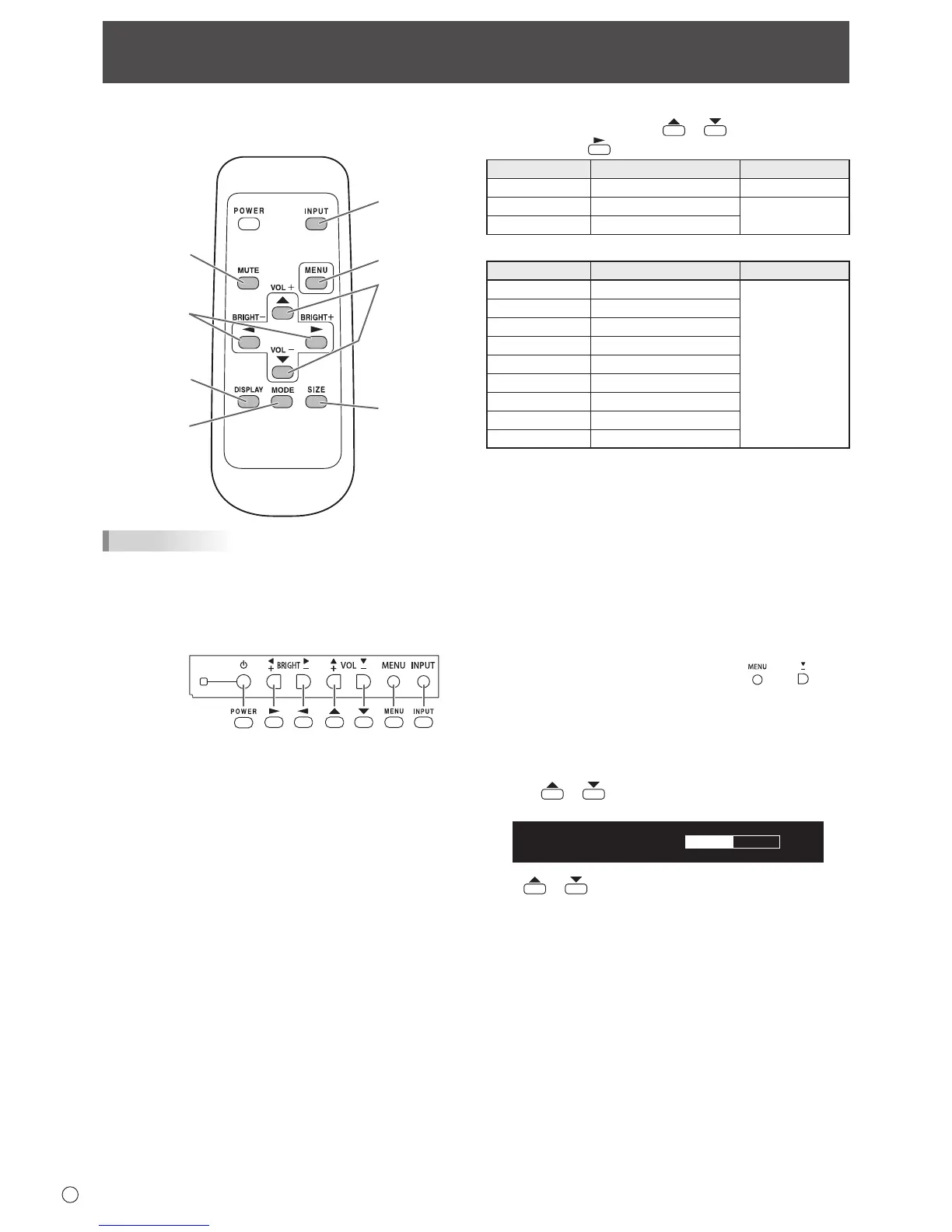
TIPS
• Youcanperformoperationofthemonitorwiththerear
buttons.Utilizethebuttonsbelongingtothemonitorthat
you would like to operate.
• Operationbyusingthebuttonsontherearsideofthe
product will perform the same functions.
This manual assumes that this product will be used with
theremotecontrolunitbuttons,exceptwherespecically
noted.
1. INPUT (Input mode selection)
The menu is displayed. Press
or to select the input
mode, and press
to enter.
Input mode Video Audio
PCD-SUB PCD-subinputterminal
Audio input terminal
PCHDMI
PC/AVHDMIinputterminal
*1
*2
AVHDMI
PC/AVHDMIinputterminal
*1
When the PN-ZB02 (optional) is attached
Input mode Video Audio
PCDVI-D
PC/AVDVI-Dinputterminal
*3
*2
PCHDMI
PC/AVHDMIinputterminal
*1
PCD-SUB
PCD-subinputterminal
PCRGB
PCRGBinputterminals
*4
AVDVI-D
PC/AVDVI-Dinputterminal
*3
AVHDMI
PC/AVHDMIinputterminal
*1
AVCOMPONENT
AVcomponentinputterminals
*4
AVS-VIDEO AVS-videoinputterminal
AVVIDEO AVvideoinputterminal
*1 SelecttheterminaltobeusedinHDMIofINPUTSELECT.
(See page 26.)
*2 SelecttheterminalforAUDIOSELECTwhichisusedfor
audio input. (See page 26.)
*3 SelecttheterminaltobeusedinDVIofINPUTSELECT.
(See page 26.)
*4 SelecttheterminaltobeusedinBNCofINPUTSELECT.
(See page 26.)
2. MUTE
Turns off the volume temporarily.
PresstheMUTEbuttonagaintoturnthesoundbacktothe
previous level.
If using the monitor buttons, either hold both
and at the
sametimeorselectMUTEAUDIOfromtheOPTIONmenu.
3. MENU
Displaysandturnsoffthemenuscreen(seepage22).
4. VOL +/- (Volume adjustment)
Pressing
or displaystheVOLUMEmenuwhenthe
menu screen is not displayed.



 To Next Page