24
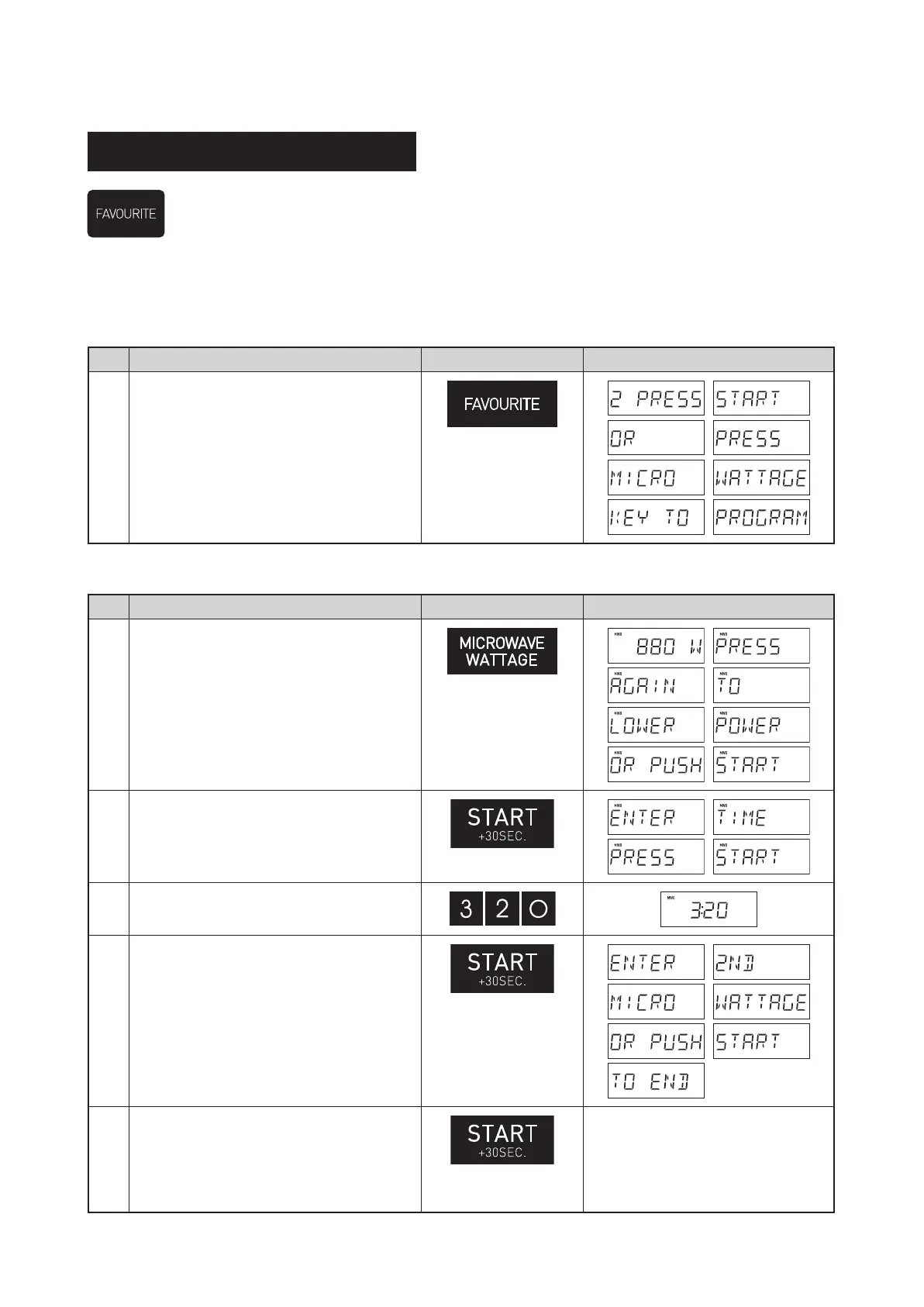
* Suppose you want to set the following procedure as Favourite 2.
Cook food for 3 minutes and 20 seconds at 880W.
Step Procedure Pad Order Display
1
Press the FAVOURITE pad twice.
× 2
If the procedure has been set, press START/+30SEC. to use it. If not, continue to set the procedure.
Only one or two stages can be set.
Step Procedure Pad Order Display
2
Select desired power level by pressing
the MICROWAVE WATTAGE pad.
× 3
3
Press the START/+30SEC. pad.
4
Enter desired cooking time.
5
Press the START/+30SEC. pad.
6
Press the START/+30SEC. pad to save
as FAVOURITE 2 and to operate.
To add another stage to the program
repeat steps 2 to 5.
Convenience (FAVOURITE)
The favourite function allows you to store 3 frequently used microwave power levels and cook times to make
cooking/reheating more convenient.
R-321CAF.indb 24 2023/10/26 14:40:54


 To Next Page