Operations - Sales Entries
Page / 8
Designs and specifications are subject to change without notice.
05/2002
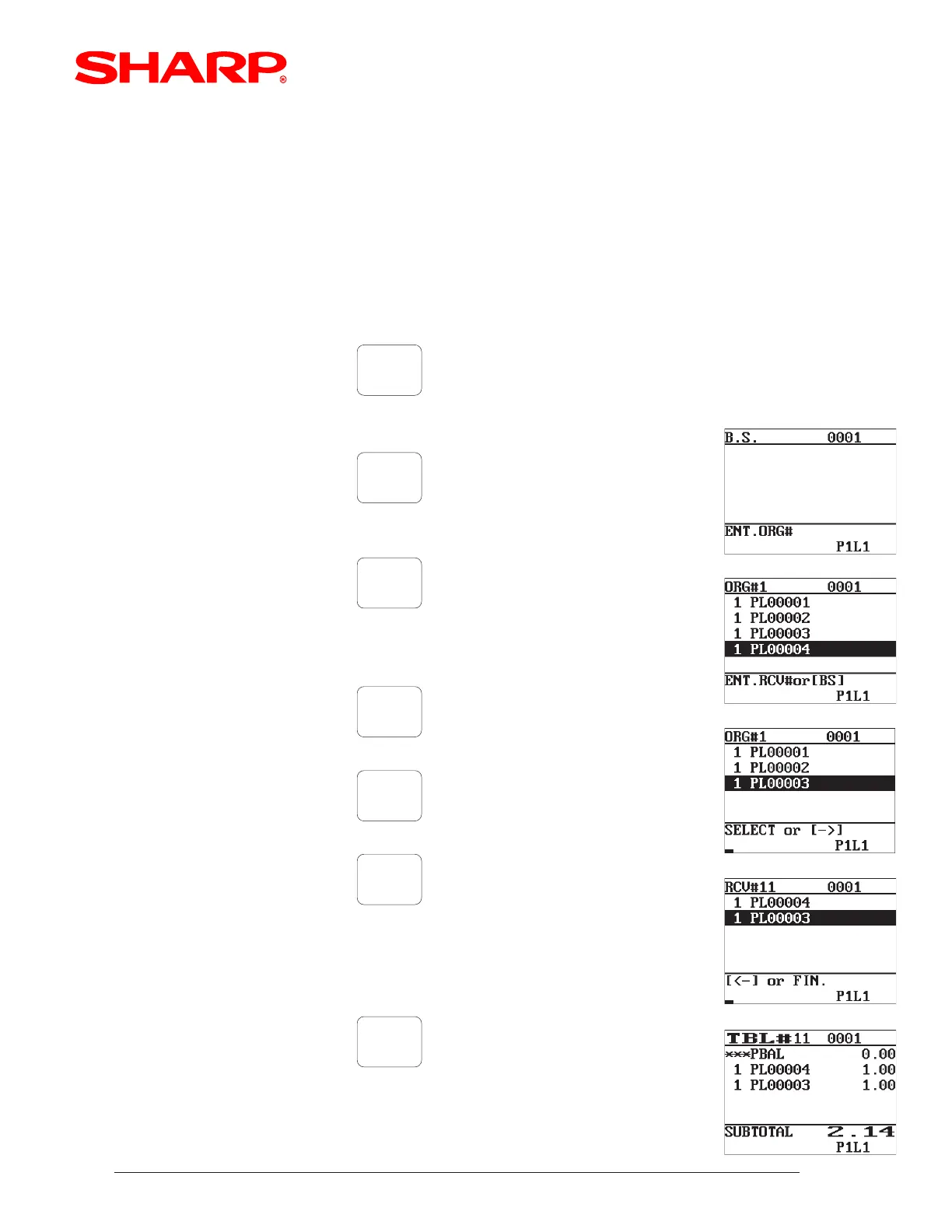
[ Example Payment Operation - Bill Separate]
If it is necessary to provide multiple payments of a single guest check, then the [B.S.] function is
recommended. Please note that it is also recommended that the [CH-TIP] entry is performed using
the [EDIT TIP] function after the a Guest Check has been stored in the Closed Check file.
GLU
( GLU codeTable #)
< ENTER. ORG# is prompted >
< ENTER. RCV# is prompted>
GLU
xxxx
SBTL
( Amount Tender)
B.S.
1
2
3
4
5
6
"Select the items to be separated
using the cursor and depressing the
[ENTER] key for each item"
*** Repeat Steps 3 through 6 for each Seat # within the order
to review the separated items
VISA
"After Approval, the system returns
to the Open Guest Check -
ENT.RCV# prompt"
B.S.
to finalize the operation













 To Next Page