10
Dimensions: 257 ⳯ 182 mm
FLE (M) Sdn. Bhd.VC-A420U (10-15)
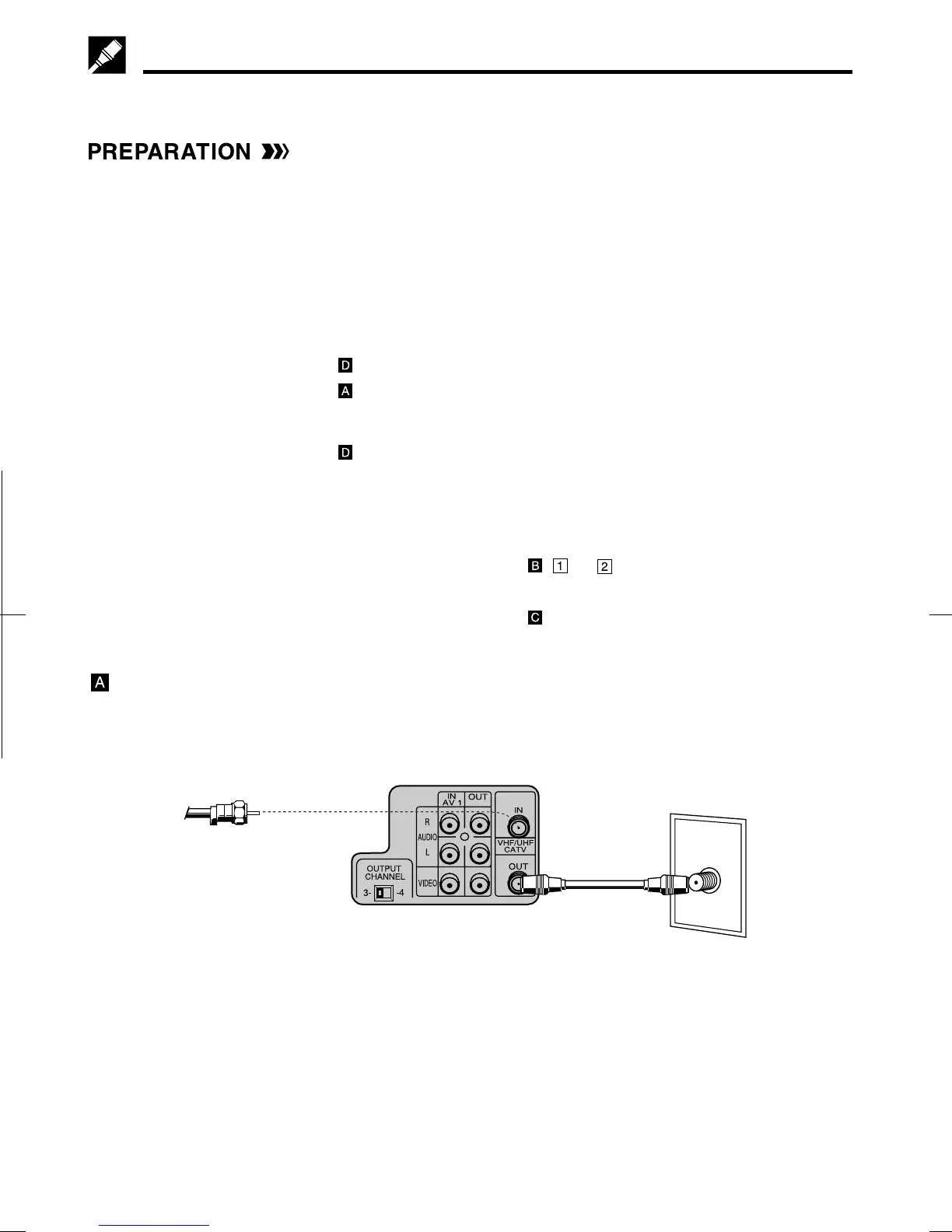
ANT/CABLE
VCR Rear (Hi-Fi model)
TV Rear
From CATV system
Cable TV Connections
Your VCR is capable of receiving the following non-scrambled channels.
• Scrambled channels can be received with the cable box supplied by your cable TV company.
Set the 3 ↔ 4 OUTPUT CHANNEL selector on the rear of the VCR to 3 or 4. (Factory preset: 3)
First check your TV/CATV system
Step Q Is your TV cable compatible with the VCR?
•YES → Go to Step W
•NO → Go to Step E
Step W Does your CATV system have some or all channels scrambled?
•YES → Go to
•NO → Go to
Step E Does your CATV system have some or all channels scrambled?
•YES → Go to
•NO → Go to Step R
Step R Choose the type below.
•Basic connection (only for
descrambled CATV signals.) → Go to - or
•To watch a CATV program while recording a TV program
by using the A/B switch. → Go to
Connection without a cable box
• Connect as shown. Then go to “After the Connection”.
Coaxial
cable
(Supplied)



 To Next Page