Details of operation TV screen
Setting
tM
CLQCK
Press
the9
OSD
button.
-_
.......
__... - - _._.
----
.....
-
.....
_.-
-----
Flashing
.-
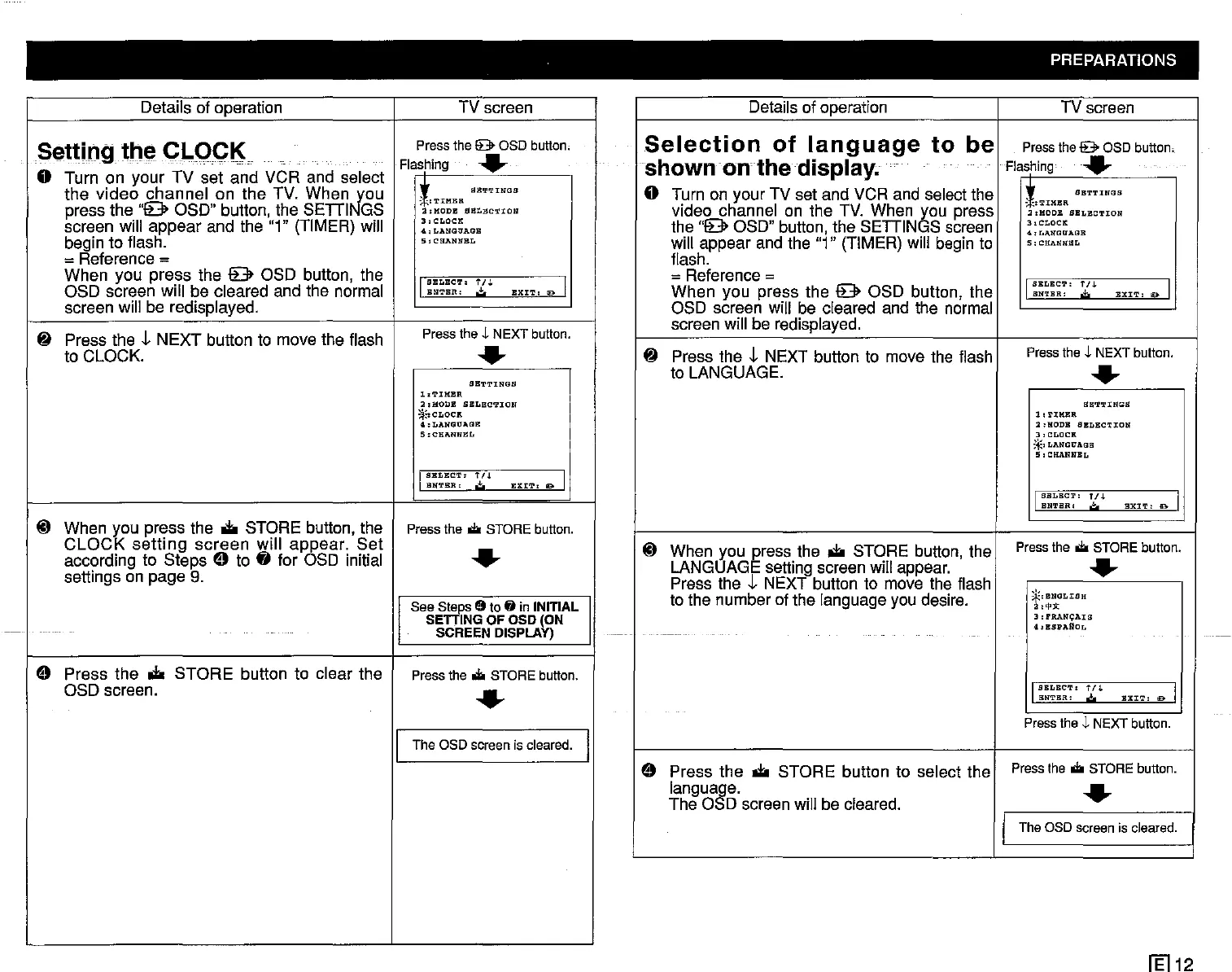
o Turn on your TV set and VCR and select
the
video
channel
on
the
TV.
When
J<0u
I
*~
SBTTINGS
: -,
'l'IM1'a\
press the
"9
OSD" button, the
SEDI
GS
a,HODB
SELECTION
screen will
appear
and the "1" (TIMER) will
3 I
CLOCK
4,LANGUAGB
begin to flash.
5,CHANNBL
= Reference =
When you
press
the 9 OSD button, the
OSD screen will be cleared and the normal
I
SELECT'
1'/.1.
EXIT:
19 I
ENTER:
.:!:.
screen will be redisplayed.
~
Press the t
NEXT
button to move the flash
Press
the
J.
NEXT
button.
to CLOCK.
.-
SETTINGS
1,TIMBR
a,HODB
SBLECTION
;:j~CLOCIt
4.LANGOAllE
5:CHAll"ffEL
I
SBLECT,
fn
EXIT,
11)0 I
BNTBR
I
.:!:.
@ When you press the
.to
STORE button, the
Press
the...
STORE
button.
CLOCK
setting
screen
will
appear.
Set
.-
according to
Steps
e to
fj
for OSD initial
settings on page
9.
See
s~s
19
to
fj
in
INITIAL
SE .
ING
OF
OSD
(ON
SCREEN
DISPLAY)
e
Press the
.to
STORE
button to clear the
Press
the
...
STORE
button.
OSD screen.
.-
I
The OSDscreen is cleared.
I
PREPARATIONS
Details of operation TV screen
Selection
of
language
to
be
Press
the
9
OSD
button.
shown on the display.
Flashing
.-
o Turn on your TV set and VCR and select the
~::
SBTTINGS
:
-:TIMBR
video channel on the TV. When you press
2,HOOB
SELBCTION
the
"9
OSD" button, the
SEDINGS
screen
3,CLOCK
<I.,
LII,IWItAGB
will appear and the "1" (TIMER) will begin to
5:
CHANNBL
flash.
=Reference =
When
you press the 9 OSD button, the
I
SBLBCT:
1'/.1.
EXIT,
a I
ENTER:
.;.
OSD screen will be cleared and the normal
screen will be redisplayed.
~
Press the t NEXT button to move the flash
Press
the
J.
NEXT
button
.
to LANGUAGE.
.-
SB'l'TUIGS
l,T:UUU\
2:HODB SBLBCTION
3,
CLOCK
;~I
LANGUAGE
5,
CHANNEL
I
SELECT:
fI.j.
BXIT:
D I
ENTER:
.:!;o
@ When you press the
.to
STORE button, the
Press
the
...
STORE
button.
LANGUAGE setting screen will appear.
.-
Press the t NEXT button to move the flash
.'.
to the number of the language you desire.
*,BNGLIBH
2,'!'Jl:
3:
rRANO;:AIS
4:BSPARoI,
I
SBI,BCT.
tf.l.
BXIT,
0 I
BNTBR.
,,±,
Press
the
J.
NEXT
button.
e
Press
the
.to
STORE button to select the
Press
the
...
STORE
button.
languaae.
.-
The 0 D screen will be cleared.
I The aso screenis cleared.
1El12



 To Next Page