SETTING THE CHANNELS PREPARATIONS
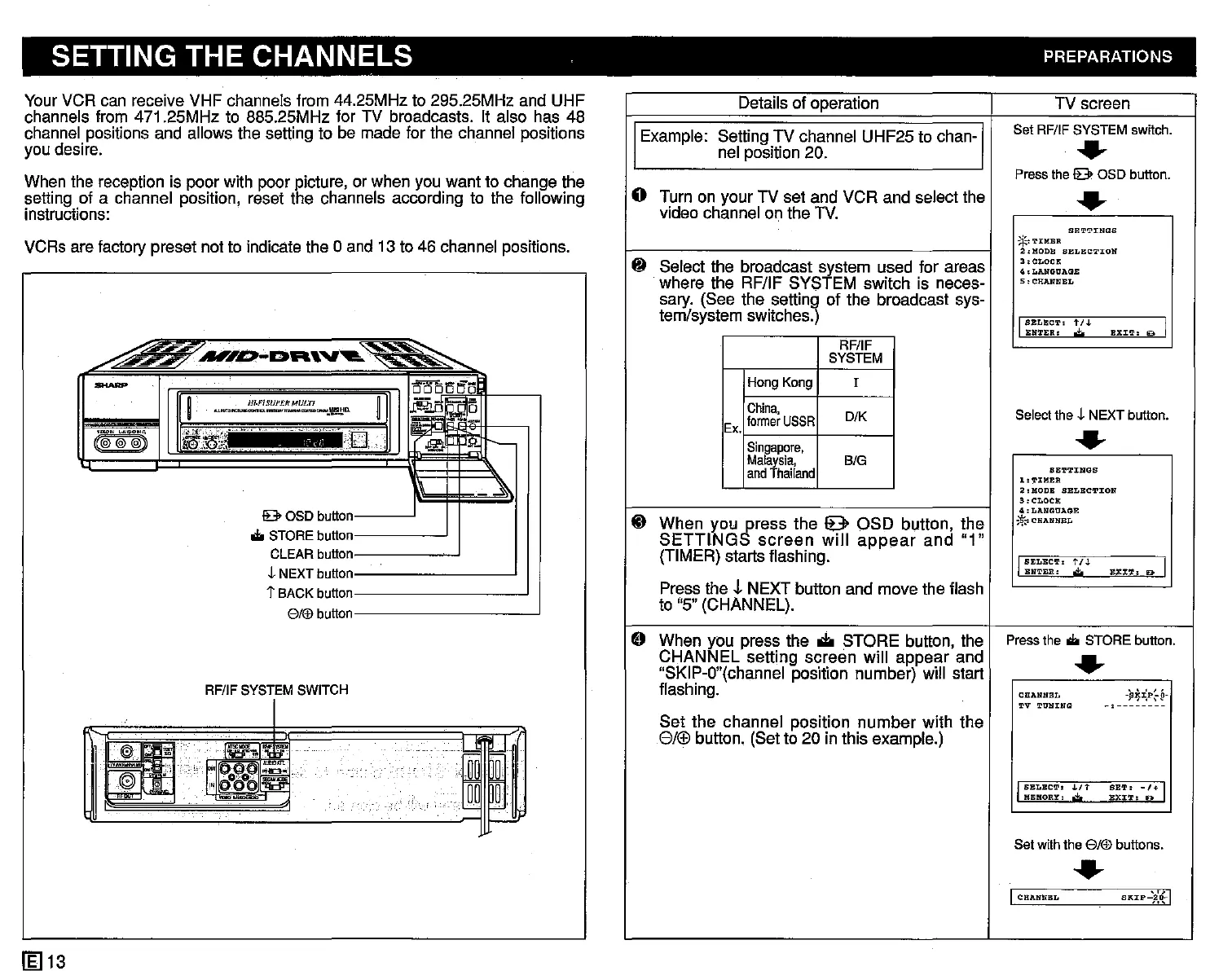
VCRs are factory preset not to indicate the 0 and 13 to 46 channel positions.
Details of operation
TV screen
Example: Setting TV channel UHF25 to chan-
Set RF/IF SYSTEM switch.
nel position 20.
•
Press the
!B>
OSD button.
G Turn on your TV set and VCR and select the
•
video channel on the TV.
SETT:rNGS
*''l'IMER
2,MODB
SELECTION
~
Select the broadcast system used for areas
3:CLOCK
4.LANGtJAGE
where the RF/IF SYSTEM switch is neces-
5
,CHANNEL
sary. (See the setting of the broadcast sys-
tem/system switches.)
I
SELECT'
t/J.
EX:!:'!',
D I
ENTER.
,,;!;,
RF/IF
SYSTEM
Hong Kong
I
China,
DiK
Selectths L NEXT button.
former
USSR
Ex.
•
Singapore,
Malaysia,
BIG
and
Thailand
SETTINGS
1
''l'IMER
2,MODE
SELECTION
3'CLOCll;
4:
LANGUAGE
~ When you press the e OSD button, the
*.:
...
CHANNEL
SETTINGS
screen
will
appear
and
"1"
(TIMER) starts flashing.
I
SELECT,
t/.J.
EX:rT.
Do I
ENTER'
,;,
Press the
,J.
NEXT button and move the flash
to "5" (CHANNEL).
e
When you press the • STORE button, the
Pressthe
...
STORE button.
CHANNEL setting screen will appear and
•
"SKIP-O"(channel position number) will start
flashing.
CHANNEL
-¥JP=.p,P-
TV
TUBING
-,--------
Set the channel position
number
with the
8/r:FJ
button. (Set to 20 in this example.)
I
SELECT
•
.LIt
SET.
-/+
I
RERORY,
.;.
EX:tT:
19>
Set withthe
8/®
buttons.
•
I
CHANNEL
SKrP-):lf-1
P.J1---
~I
;;;:l~:~:lf~",-
....I
~
TI'/ffi
1i!'iij
-
''''''liS
D I
!B>
OSD button I
...
STOREbutton I
CLEAR button I
""NEXTbutton I
1"
BACK button I
8/®
button I
H~FISUP£R
MULTI
....
""'
__
......
,_,
••"
...
_~~(J.
RF/IFSYSTEMSWITCH
~':~!!i~!~
...
;.:,;
..••
;;-",,-
«lO~".lj~,
__
,,_,.
~..,;y.'4:l!'.E:n:nv
....
~
--
(if@'11)
.4
~
[1!:1
I-~
I A
~IWI
Your VCR can receive VHF channels from 44.25MHz to 295.25MHz and UHF
channels from 471.25MHz to 885.25MHz for TV broadcasts. It also has 48
channel positions and allows the setting to be made for the channel positions
you desire.
When the reception is poor with poor picture, or when you want to change the
setting of a channel position, reset the channels according to the following
instructions:
£El
13



 To Next Page