PREPARATIONS
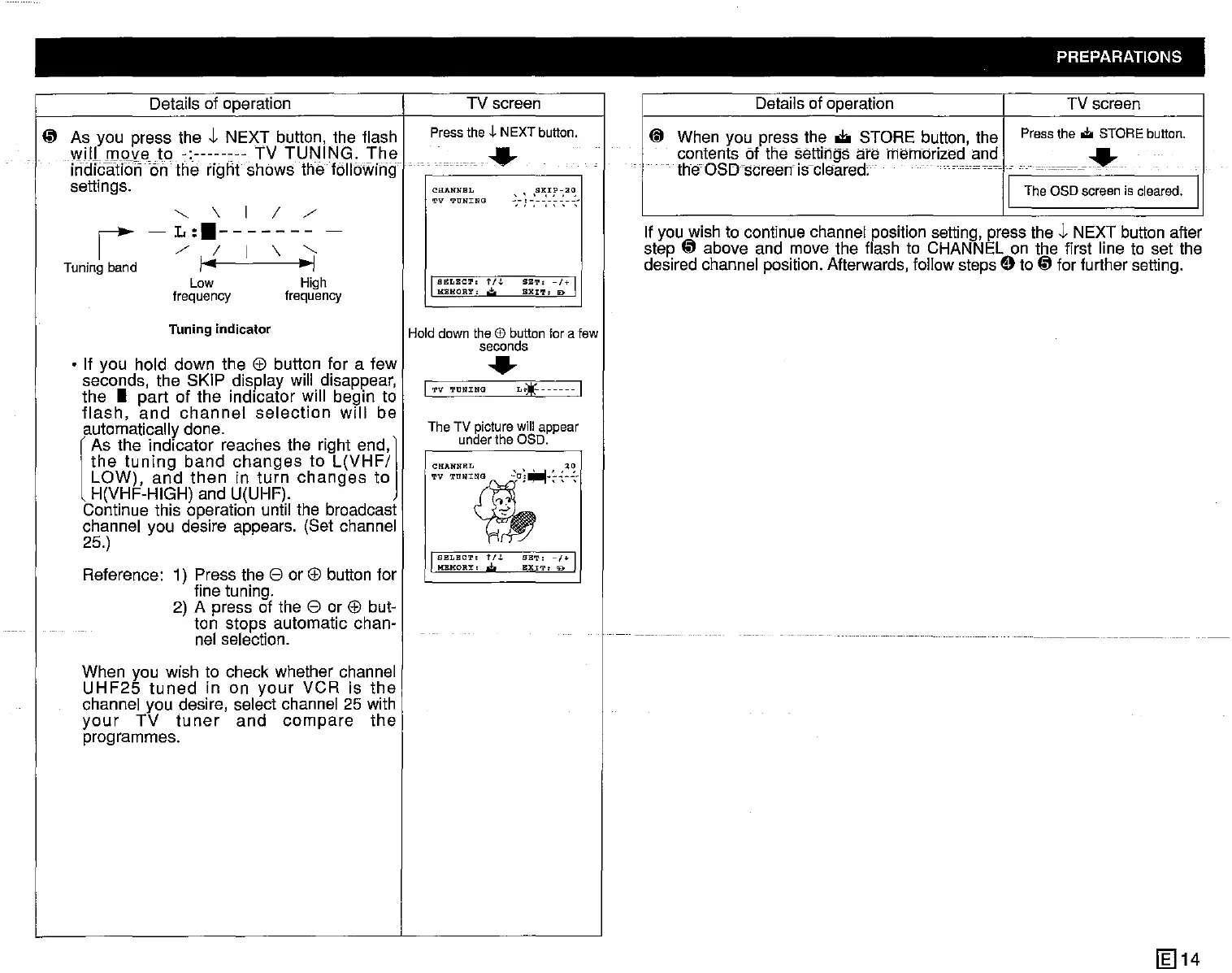
~ As you press the J, NEXT button, the flash
will
move
to
-:--------
TV
TUNING.
The
I
iridlcaHon6n
the rignt shows the following
settings.
TV screen
Pressthe t NEXTbutton.
.....
If you wish to continue channel position setting, press the J, NEXT button after
step
~
above and move the flash to CHANNEL on the first line to set the
desired channel position. Afterwards, follow steps
Et
to
~
for further setting.
Details of operation TV screen
CD
When you press the
oJ:io
STORE button, the
Pressthe
...
STOREbutton.
contents of the settings are memorized and
I.·
...
c
.~.............
.
. the'OSD'sCreerf
iscleared;"
...•••••
I The
aSD
screenis cleared. I
SBT,
-1+
I
EXIT'
D
~,-I-:~~:~~~~~-
SELECT'
1'I.L
MEMORY'
,j.
CHANNEL
TV
TONING
Details of operation
"-
\ I 1 /
-L:.-------
-
/1[\"-
I"
~I
Low High
frequency frequency
r
Tuning band
Tuning indicator
• If you hold down the
El)
button for a
few
seconds, the SKIP display will disappear,
the •
part
of the indicator will begin to
flash,
and
channel
selection
will
be
automatically done.
l
As the indicator reaches the right
end,]
the
tuning
band
changes
to
L(VHF/
LOW),
and
then
in
turn
changes
to
H(VHF-HIGH) and U(UHF).
Continue this operation until the broadcast
channel you desire appears. (Set channel
25.)
Reference: 1) Press the
8 or
El)
button for
fine tuning.
2) A press of the
8 or
El)
but-
ton stops automatic chan-
nel selection.
When you wish to check whether channel
UHF25
tuned
in on
your
VCR
is
the
channel you desire, select channel 25 with
your
TV
tu
ner
and
compare
the
programmes.
Holddown the @ buttonfor a few
seconds
.....
I TV
TONING
L~)jf
1
The TV picturewill appear
underthe OSO.
CHANNEL
TV
TU"~'G
'U'~_'::~'
.,
.
'l'
-2
J
SELBCT,
tlJ.
SBT,
1+ I
HBHOR1::.
BXl'.I':
!Do
[g]14



 To Next Page