USING
YOUR
VCR
WITH
A
VIDEO
CAMERA
EDITING
FROM
OTHER
VIDEO
EQUIPMENT
_I
ml~
~
ii"
1'fMi"it'ii'i1
I~i
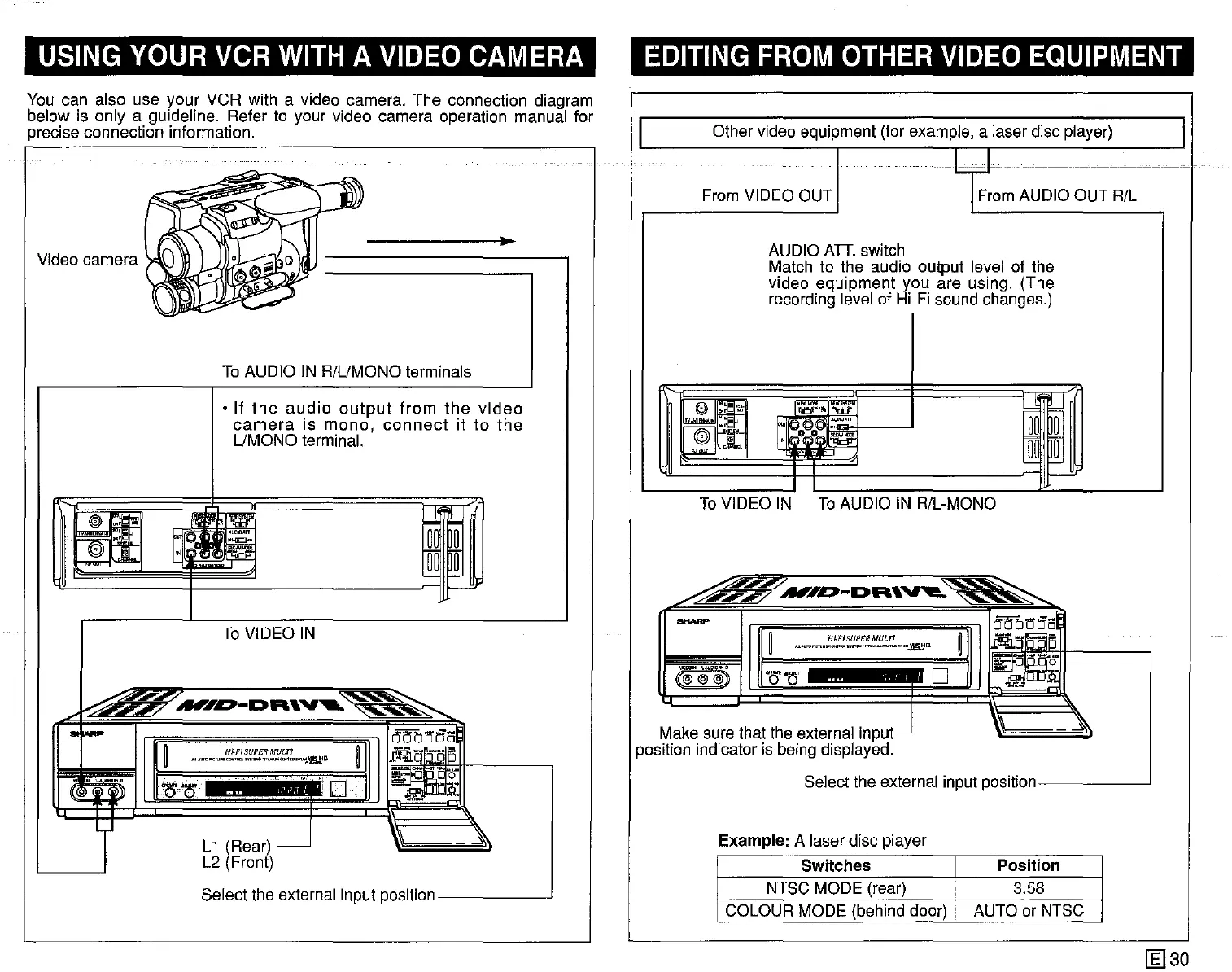
From AUDIO OUT R/L
o
H~FISU~ERMULTI
"""","=",=-"",",'--""',,"~W[l
AUDIO
AD.
switch
Match to the audio output level of the
video equipment you are using. (The
recording level of Hi-Fi sound changes.)
0'0
'Jil""~
'--I~-D""''V'-
~
Example: A laser disc player
Switches Position
NTSC MODE (rear)
3.58
COLOUR MODE (behind door) AUTO or NTSC
Other video equipment (for example, a laser disc player)
From VIDEO OUT
To VIDEO IN To AUDIO IN R/L-MONO
(C@'@,'i;j
Make sure that the external input
position indicator is being displayed.
Select the external input
position--------'
..
Video camera
To AUDIO IN R/UMONO terminals
• If
the
audio
output
from
the
video
camera
is
mono,
connect
it to
the
UMONO terminal.
~
.
.
.
~~
~
0
~~
~
To VIDEO IN
"""'-'
"""~-D""''V'"
~
1'fMi"it'ii'i
~
~
_.
lit"
-
Cl
.
w
--"
Select the external input position
You can also use your VCR with a video camera. The connection diagram
below is only a quidallne, Refer to your video camera operation manual for
precise connection information
[g]30



 To Next Page