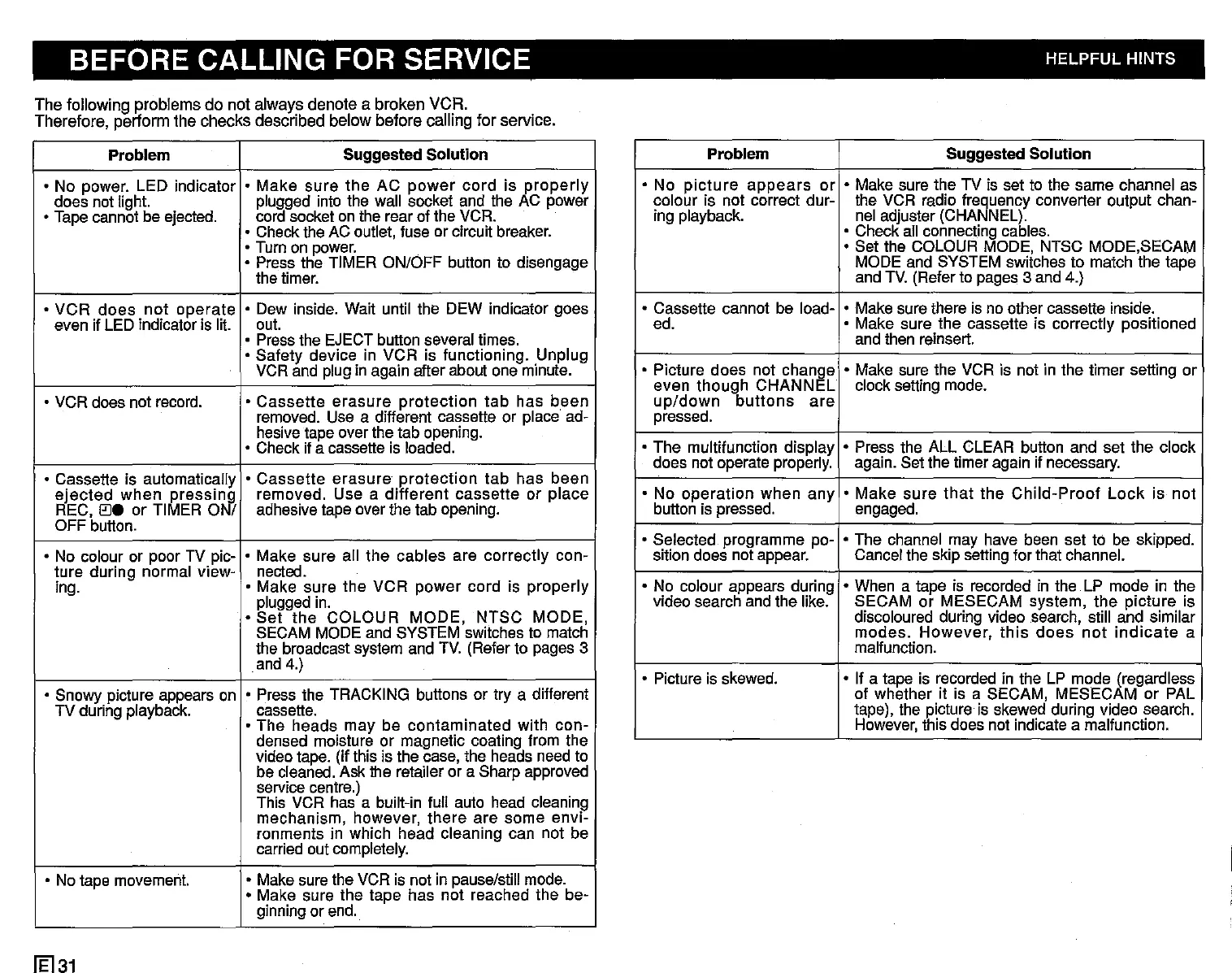
BEFORE CALLING FOR SERVICE HELPFUL HINTS
The following problems do not always denote a broken VCR.
Therefore, perform the checks described below before calling for service.
Problem
Suggested Solution
• No power. LED indicator
• Make
sure
the AC
power
cord is
properly
does not light.
plugged into the wall socket and the AC power
• Tapecannot be ejected.
cord socket on the rear of the VCR.
• Checkthe AC outlet, fuse or circuit breaker.
• Turn on
power.
• Press the TIMER ON/OFF button to disengage
the timer.
• VCR
does
not
operate
• Dew inside. Wait until the DEW indicator goes
even if LED indicator is lit. out.
• Pressthe EJECTbutton several times.
• Safety device in VCR is functioning. Unplug
VCR and plugin again after about one minute.
• VCR does not record.
•
Cassette
erasure
protection
tab
has been
removed. Use a different cassette or place ad-
hesivetape over the tab opening.
• Check if a cassetteis loaded.
• Cassette is automatically
•
Cassette
erasure
protection
tab has been
ejected
when
pressi7Jj
removed. Use a different cassette or place
REC,
0.
or TIMER 0 /
adhesivetape overthe tab opening.
OFF button.
• No colour or poor TV plc-
• Make sure all the cables are correctly con-
ture during normal view- nected.
ing.
• Make sure the VCR power cord is properly
pluggedin.
•
Set
the COLOUR MODE, NTSC MODE,
SECAM MODEand SYSTEM switches to match
the broadcast system and TV. (Refer to pages 3
and 4.)
• Snowy picture appears on
• Press the TRACKING buttons or try a different
TV during playback.
cassette.
• The heads may be contaminated with con-
densed moisture or magnetic coating from the
video tape. (If this is the case, the heads need to
be cleaned. Ask the retailer or a Sharp approved
servicecentre.)
This VCR has a built-in full auto head cleaning
mechanism, however, there are some envi-
ronments in which head cleaning can not be
carried out completely.
• No tape movement.
• Makesure the VCR is not in pause/stillmode.
• Make sure the tape has not reached the be-
ginningor end.
1El31
Problem Suggested Solution
• No
picture
appears
or • Make sure the TV is set to the same channel as
colour is not correct dur- the VCR radio frequency converter output chan-
ing playback. nel adjuster (CHANNEL).
• Check all connectingcables.
• Set the COLOUR MODE, NTSC MODE,SECAM
MODE and SYSTEM switches to match the tape
and TV. (Referto pages 3 and 4.)
• Cassette cannot be load-
• Make sure there is no other cassette inside.
ed. • Make sure the cassette is correctly positioned
and then reinsert.
• Picture does not change
• Make sure the VCR is not in the timer setting or
even though CHANNEL clock setting mode.
up/down
buttons
are
pressed.
• The multifunction display
• Press the ALL CLEAR button and set the clock
does not operate properly. again. Set the timer again if necessary.
• No operation when any
• Make
sure
that
the
Child-Proof
Lock
is not
button is pressed. engaged.
• Selected programme po-
• The channel may have been set to be skipped.
sition does not appear. Cancelthe skip setting for that channel.
• No coiour appears during
• When a tape is recorded in the LP mode in the
video search and the like. SECAM or MESECAM system, the picture is
discoloured during video search, still and similar
modes.
However,
this
does
not
indicate
a
malfunction.
• Picture is skewed.
• If a tape is recorded in the LP mode (regardless
of whether it is a SECAM, MESECAM or PAL
tape), the picture is skewed during video search.
However,
this does not indicatea malfunction.


 To Next Page
 Loading...




