20
Dimension: 140mm x 215mm
Parental Control (V-CHIP Operation) (Continued)
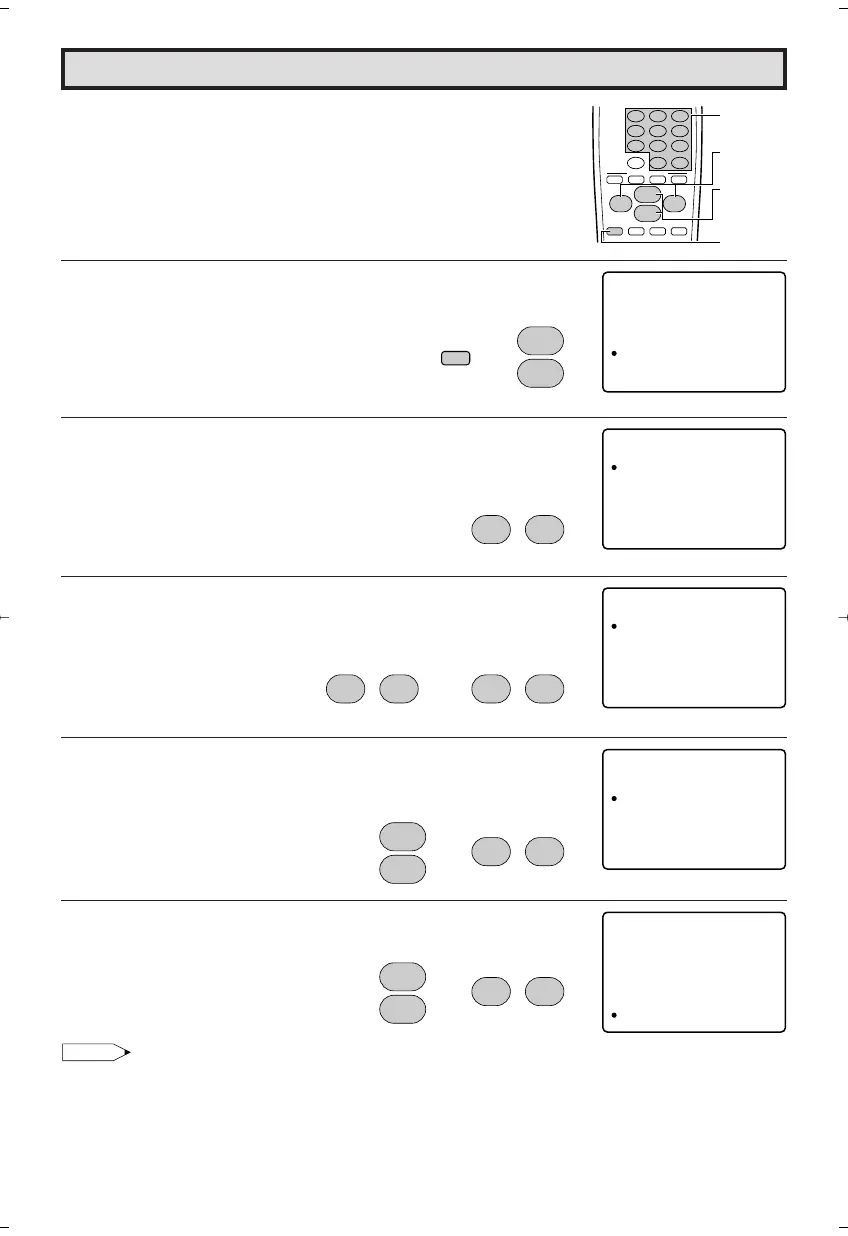
L HOW TO SET V-CHIP
[1] MPAA RATING
1 Press
MENU
to access the MAIN MENU screen.
2 Press
CH UP (
8
)
or
DOWN (
9
)
to move the “a” mark to
“PARENTAL CONTROL”.
3 Press
VOL (+)
or
(–)
to access PARENTAL CONTROL mode.
4 Press
VOL (+)
or
(–)
to access V-CHIP BLOCK select mode, then
press
VOL (+)
or
(–)
to select “MPAA RATING”.
5 Press
CH UP (
8
)
or
DOWN (
9
)
to move the “a” mark to “PG”,
then press
VOL (+)
or
(–)
to select BLOCK. If you set “PG” to
BLOCK, “PG-13”, “R”, “NC-17” and “X” are automatically blocked.
6 Press
CH UP (
8
)
or
DOWN (
9
)
to move the “a” mark to "RETURN",
then press
VOL (+)
or
(–)
to exit V-CHIP BLOCK select mode.
Note:
Ex.
• If you set “G” to BLOCK , all RATING are automatically blocked.
• If you set “X” to BLOCK, “G”, “PG”, “PG-13”, “R” and “NC-17” are not blocked.
(MAIN MENU screen)
→
CH
8
9
CH
(PARENTAL CONTROL mode)
→
;
:
VOL
–
VOL
+
;
:
VOL
–
VOL
+
321
654
987
100
0
FLASHBACK
ENTER
9
VCR-CH
8
POWER (DVD/VCR)
;
:
CH
8
VOL
–
VOL
+
9
CH
MENU MUTE
g
SKIP
f
ABCD
PERSONAL PREFERENCE
CHANNEL
UP (8)/
DOWN (9)
MENU
VOLUME
(+)/(–)
REMOTE
KEYPAD
MENU
SLEEP T IMER
VIDEO ADJUST
AUD I O ADJUST
AUD I O SELECT
CLOSED CAPT
CH TSE UP
ION
PAREN
SETUP
TAL CON ROLT
PARENT CONTOLAL
V – CH I P BLOCK
VIEW TIMER
V – CH I P OCKLB
MPAA
TV UGI
OP OINT
DEL I NES
SEC ERT ––No .
STA UTSO:FF
: ––
(V-CHIP BLOCK select mode)
MPAA
G
PG
PG 31–
R
N
X
–
B
B
B
B
B
:
:
:
:
:
:
–
O
O
O
O
O
–
C
C
C
C
C
–
K
K
K
K
K
–
L
L
L
L
L
C – 71
RET RNU
;
:
VOL
–
VOL
+
;
:
VOL
–
VOL
+
→
CH
8
9
CH
MPAA
G
PG
PG 31–
R
N
X
–
B
B
B
B
B
:
:
:
:
:
:
–
O
O
O
O
O
–
C
C
C
C
C
–
K
K
K
K
K
–
L
L
L
L
L
C – 71
RET RNU
;
:
VOL
–
VOL
+
→
CH
8
9
CH
20F650[19-23].p65 9/12/04, 1:41 PM20






 To Next Page