21
Dimension: 140mm x 215mm
Parental Control (V-CHIP Operation) (Continued)
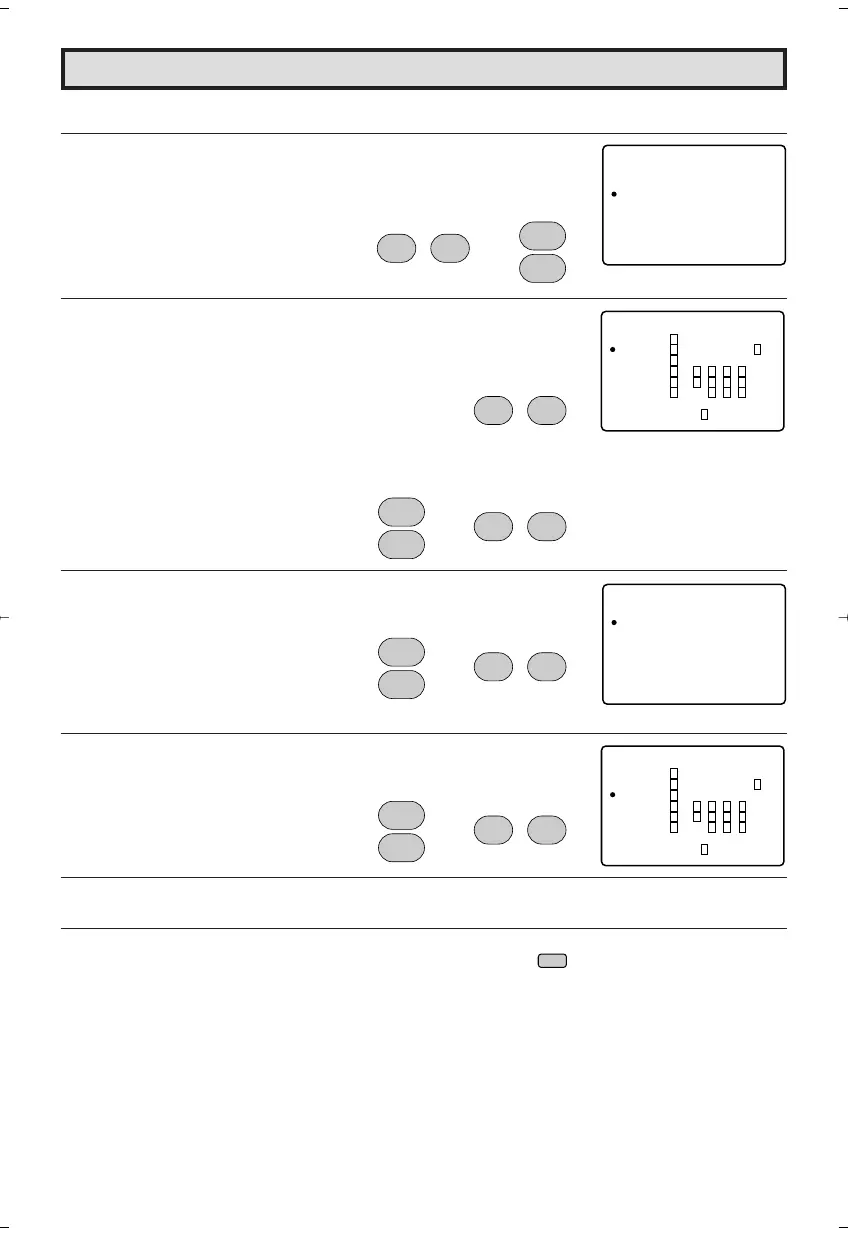
[2] TV GUIDELINES
1 Repeat steps 1 to 3 of [1] MPAA RATING.
2 Press
VOL (+)
or
(–)
to access V-CHIP BLOCK select mode, then
press
CH UP (
8
)
or
DOWN (
9
)
to move the “a” mark to “TV
GUIDELINES”.
3 Press
VOL (+)
or
(–)
to access TV GUIDELINES mode.
4 To change CONTENT SETTING, press
CH UP (
8
)
or
DOWN (
9
)
to move the “a” mark to the desired rating and then press
VOL (+)
or
(–)
to select.
5 Press
CH UP (
8
)
or
DOWN (
9
)
to move the “a” mark to the desired
content and then press
VOL (+)
or
(–)
to select either “BLOCK” or
unblock (“– – – – –”).
6 Press
CH UP (
8
)
or
DOWN (
9
)
to move the “a” mark to "RETURN",
then press
VOL (+)
or
(–)
to return to TV GUIDELINES mode.
7 Repeat steps 4 to 5 until all ratings and their contents are set.
8 When done, press
MENU
to exit.
V – CH I P OCKLB
MPAA
TV UGI
OP OINT
DEL I NES
SEC ERT ––No .
STA UTSO:FF
: ––
(V-CHIP BLOCK select mode)
CH
8
9
CH
;
:
VOL
–
VOL
+
EDLSVFVGA
TV– Y7
V
V––––
V
V V V V V –
V V V V –
–
V V V –
V
V
V:BLOCK
TV– Y –––––
TV– G
TV GP–
–––––
TV– 41
TV– AM
RET RNU
(TV GUIDELINES mode)
;
:
VOL
–
VOL
+
;
:
VOL
–
VOL
+
→
CH
8
9
CH
TV– Y7
AGE
D
L
S
V
FV
B
–
–
–
–
B
:
:
:
:
:
:
O
–
–
–
–
O
C
–
–
–
–
C
K
–
–
–
–
K
L
–
–
–
–
L
RET RNU
(CONTENT RATING mode)
;
:
VOL
–
VOL
+
→
CH
8
9
CH
EDLSVFVGA
TV– Y7
––––
V
V V V V V –
V V V V –
–
V V V –
V
V
V:BLOCK
TV– Y –––––
TV– G
TV GP–
–––––
TV– 41
TV– AM
RET RNU
;
:
VOL
–
VOL
+
→
CH
8
9
CH
MENU
→
20F650[19-23].p65 9/12/04, 1:41 PM21


 To Next Page