22
Dimension: 140mm x 215mm
→
Parental Control (V-CHIP Operation) (Continued)
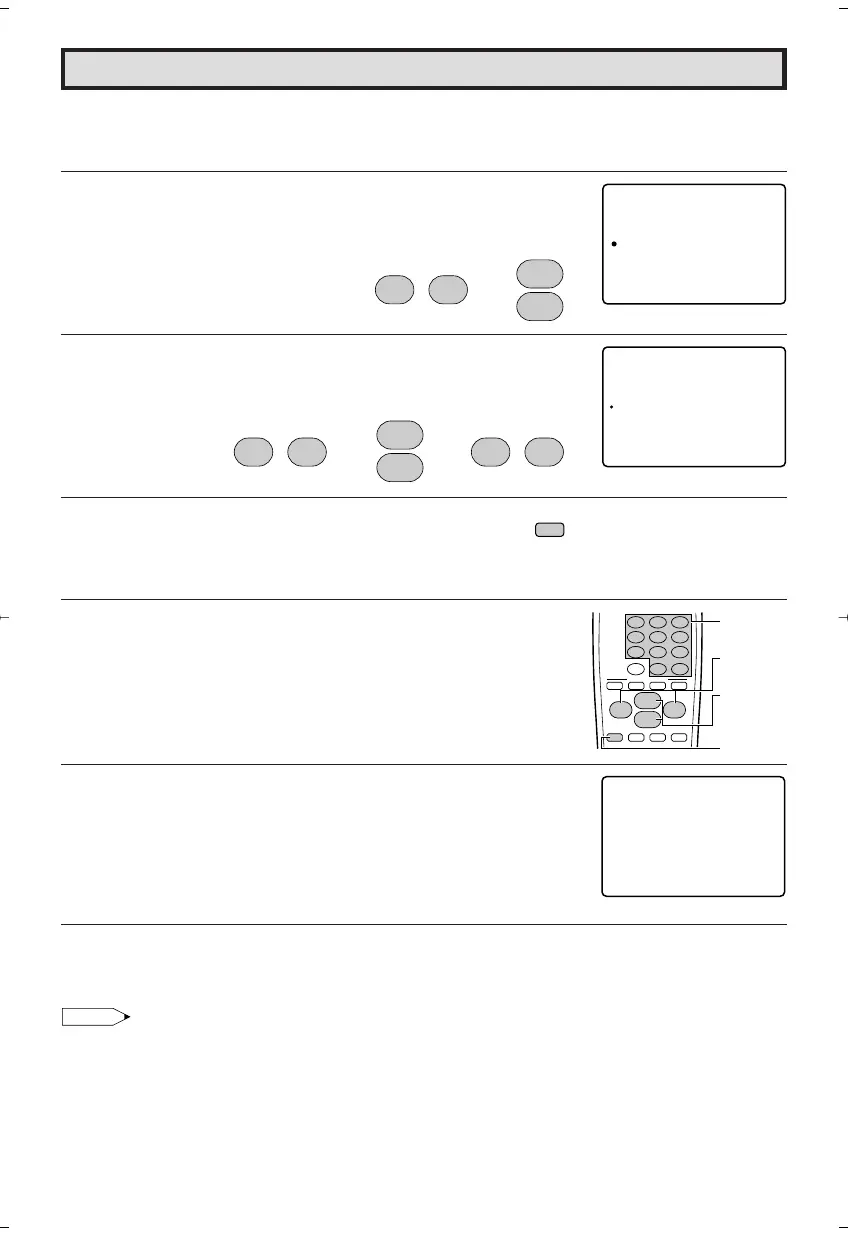
[3] ADDITIONAL MODE (DOWNLOAD)
There will be an additional new rating system. In that case, please set up as follows.
Subsequently the new rating system will set up automatically.
1 Repeat steps 1 to 3 of [1] MPAA RATING.
2 Press
VOL (+)
or
(–)
to access V-CHIP BLOCK select mode, then
press
CH UP (
8
)
or
DOWN (
9
)
to move the “a” mark to “OPTION”.
3 Press
VOL (+)
or
(–)
to access OPTION mode, then press
CH UP
(
8
)
or
DOWN (
9
)
to move the “a” mark to “DOWNLOAD”, then
press
VOL (+)
or
(–)
to “DOWNLOAD : ON”.
4 Press
MENU
to exit.
• DOWNLOAD V-CHIP DATA
1 If you watch the program containing “New Rating System Data”,
the DOWNLOAD screen will be displayed.
2 The DOWNLOAD screen will disappear, once downloading is
finished.
Note:
• DOWNLOAD will not start, if you do not watch a program containing “New Rating System Data”.
V – CH I P OCKLB
MPAA
TV UGI
OP OINT
DEL I NES
SEC ERT ––No .
STA UTSO:FF
: ––
(V-CHIP BLOCK select mode)
CH
8
9
CH
;
:
VOL
–
VOL
+
OPT I ON
DOWNLO
RETURN
AD : ON
(OPTION mode)
;
:
VOL
–
VOL
+
CH
8
9
CH
;
:
VOL
–
VOL
+
→→
MENU
321
654
987
100
0
FLASHBACK
ENTER
9
VCR-CH
8
POWER (DVD/VCR)
;
:
CH
8
VOL
–
VOL
+
9
CH
MENU MUTE
g
SKIP
f
ABCD
PERSONAL PREFERENCE
CHANNEL
UP (8)/
DOWN (9)
MENU
VOLUME
(+)/(–)
REMOTE
KEYPAD
PLEASE WA I T
NOW DOWNL OAD I NG
V – CH I P DATA
(DOWNLOAD screen)
20F650[19-23].p65 9/12/04, 1:41 PM22





 To Next Page