23
Dimension: 140mm x 215mm
Parental Control (V-CHIP Operation) (Continued)
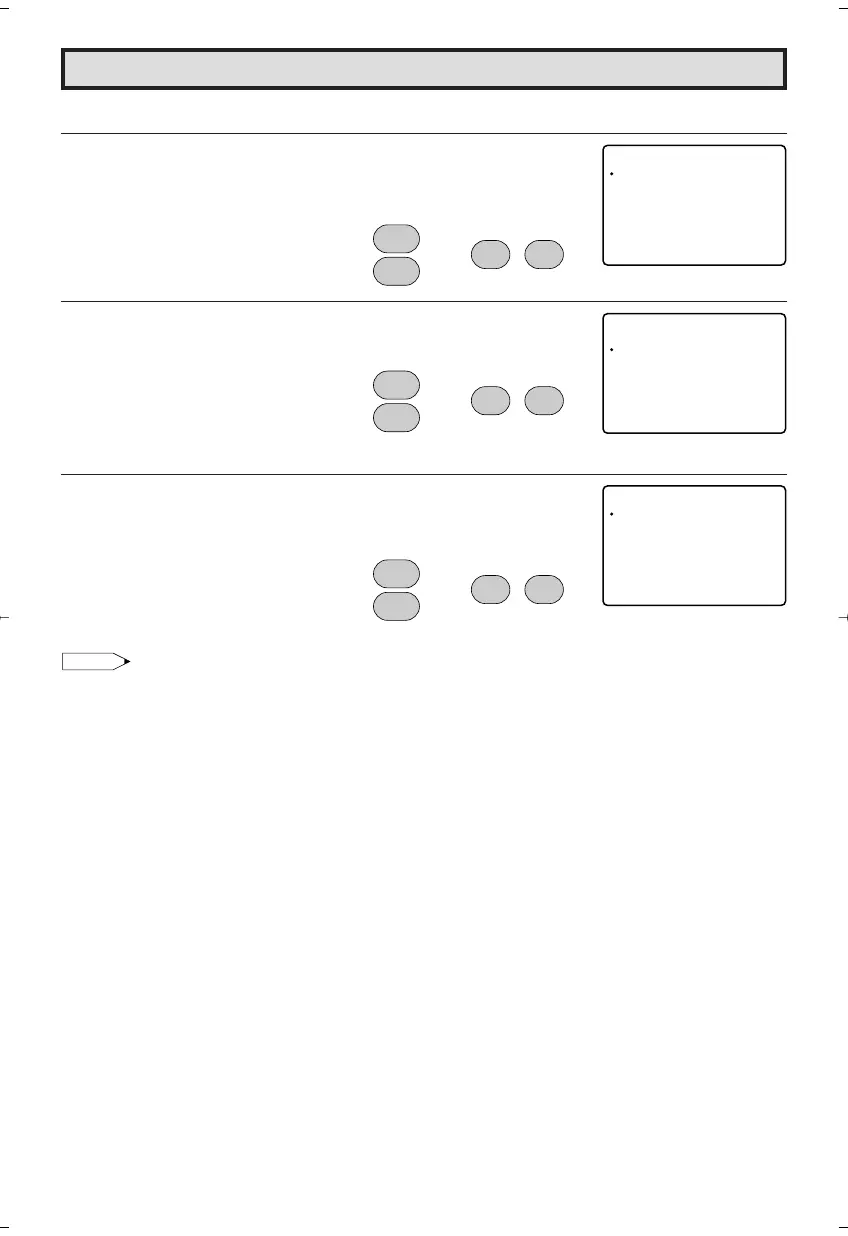
• How to set Additional mode (Example)
1 Repeat steps 1 to 2 of [3] ADDITIONAL MODE.
2 Press
CH UP (
8
)
or
DOWN (
9
)
to move the “a” mark to “Cdn.
English Ratings”, then press
VOL (+)
or
(–)
.
3 You can select “BLOCK” or “– – – – –” (unblock) from each RATING
mode by pressing
CH UP (
8
)
or
DOWN (
9
)
and
VOL (+)
or
(–)
.
4 You can select “BLOCK” or “– – – – –” (unblock) from each RATING
mode by pressing
CH UP (
8
)
or
DOWN (
9
)
and
VOL (+)
or
(–)
if
you select “Cdn. French Ratings” in step 2.
Note:
• In additional mode
Including two types (English mode, French mode), altogether you are able to download 4 different
modes.
OPT I ON
Cdn. Engl ish Rat ings
Cdn . F r ench Ra t i ngs
DOWNLO
RETURN
AD : ON
(After download the rating data)
CH
8
9
CH
;
:
VOL
–
VOL
+
→
C
PG
14+
18+
ANAD I
A
RETUR
N
C
C8+
G
NENGLISH
(
THRES
HO L D B LOCK )
B:LOCK
–: ––––
–: ––––
–: ––––
–: ––––
–: ––––
(ENGLISH THRESHOLD BLOCK
mode)
CH
8
9
CH
;
:
VOL
–
VOL
+
→
C
ANAD I
A
RETUR
N
G
8ans+
31ans+
61ans+
81ans+
N FRENCH
(
THRES
HO L D B LOCK )
B:LOCK
–: ––––
–: ––––
–: ––––
–: ––––
(FRENCH THRESHOLD BLOCK
mode)
CH
8
9
CH
;
:
VOL
–
VOL
+
→
20F650[19-23].p65 9/12/04, 1:41 PM23







 To Next Page