32
Dimension: 140mm x 215mm
Ch Setup (Continued)
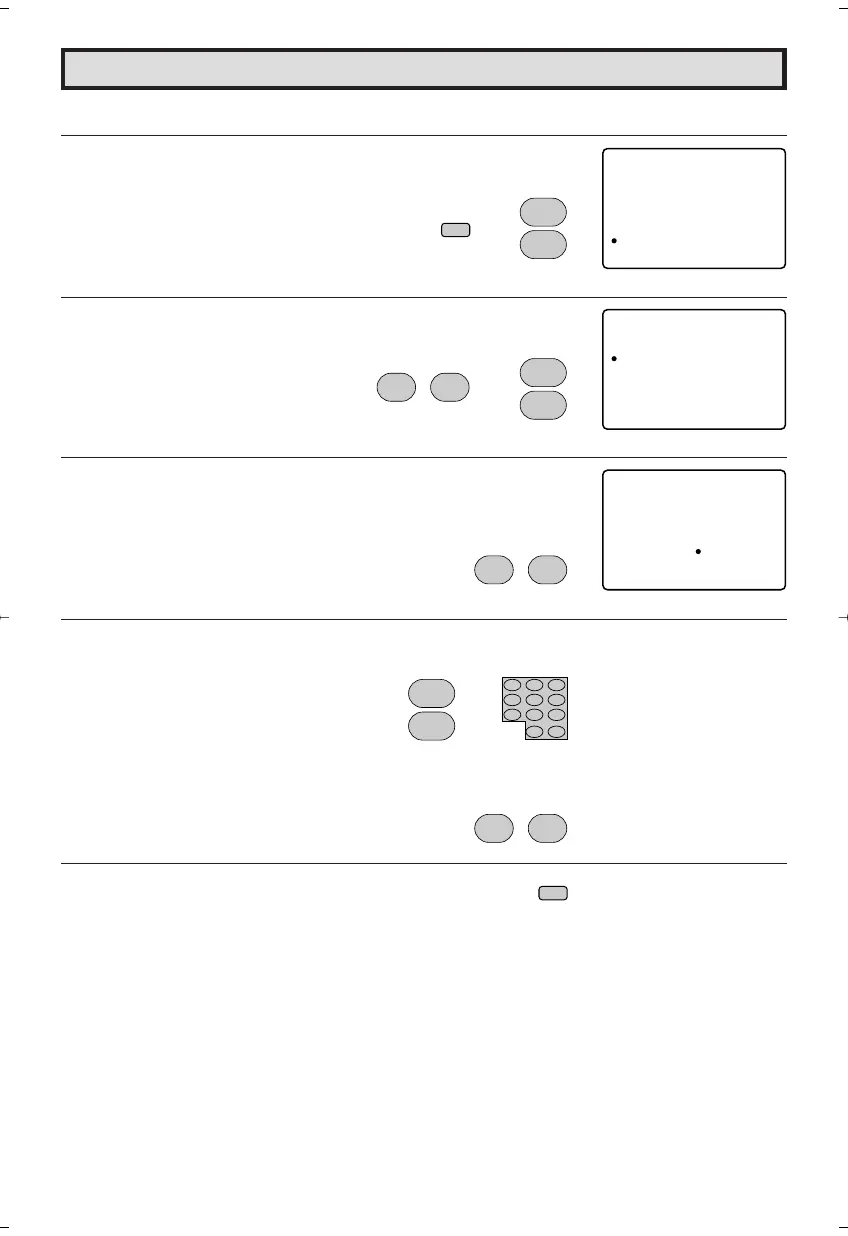
3 How to add or erase weak, additional or unwanted channels from TV memory.
1 Press
MENU
to access the MAIN MENU screen, then press
CH
UP (
8
)
or
DOWN (
9
)
to move the “a” mark to “CH SETUP”.
2 Press
VOL (+)
or
(–)
to access CH SETUP mode, then press
CH
UP (
8
)
or
DOWN (
9
)
to move the “a” mark to “CH MEMORY”.
3 Press
VOL (+)
or
(–)
to access CH MEMORY mode.
4 Use
CH UP (
8
)
or
DOWN (
9
)
or
REMOTE KEYPAD
to select
each desired channel to add or erase.
5 Press
VOL (+)
to add a channel to the TV’s memory or press
VOL
(–)
to erase a channel from the TV’s memory.
6 Press
MENU
to exit.
MENU
SLEEP T IMER
VIDEO ADJUST
AUD I O ADJUST
AUD I O SELECT
CLOSED CAPT
CH TSE UP
ION
PAREN
SETUP
TAL CON ROLT
(MAIN MENU screen)
CH ESUPT
AIR AC/BLE
CH MME ORY
CH ASE RCH
PERSONAL PR
EZ TSE UP
EF .
UN I VERSAL P L SU
(CH SETUP mode)
CH EMORYM
ARI12
EERAS A DD
(CH memory mode)
CH
8
9
CH
→
CH
8
9
CH
→
;
:
VOL
–
VOL
+
;
:
VOL
–
VOL
+
CH
8
9
CH
or
;
:
VOL
–
VOL
+
MENU
20F650[29-33].p65 9/12/04, 1:42 PM32








 To Next Page