XL-UH240W_8-16.fm
XL-UH240W
E-16
ENGLISH
CD or MP3/WMA disc Playback
Various disc functions
Notes for CD or MP3/WMA disc:
Advanced CD or MP3/WMA disc
playback
Direct track search
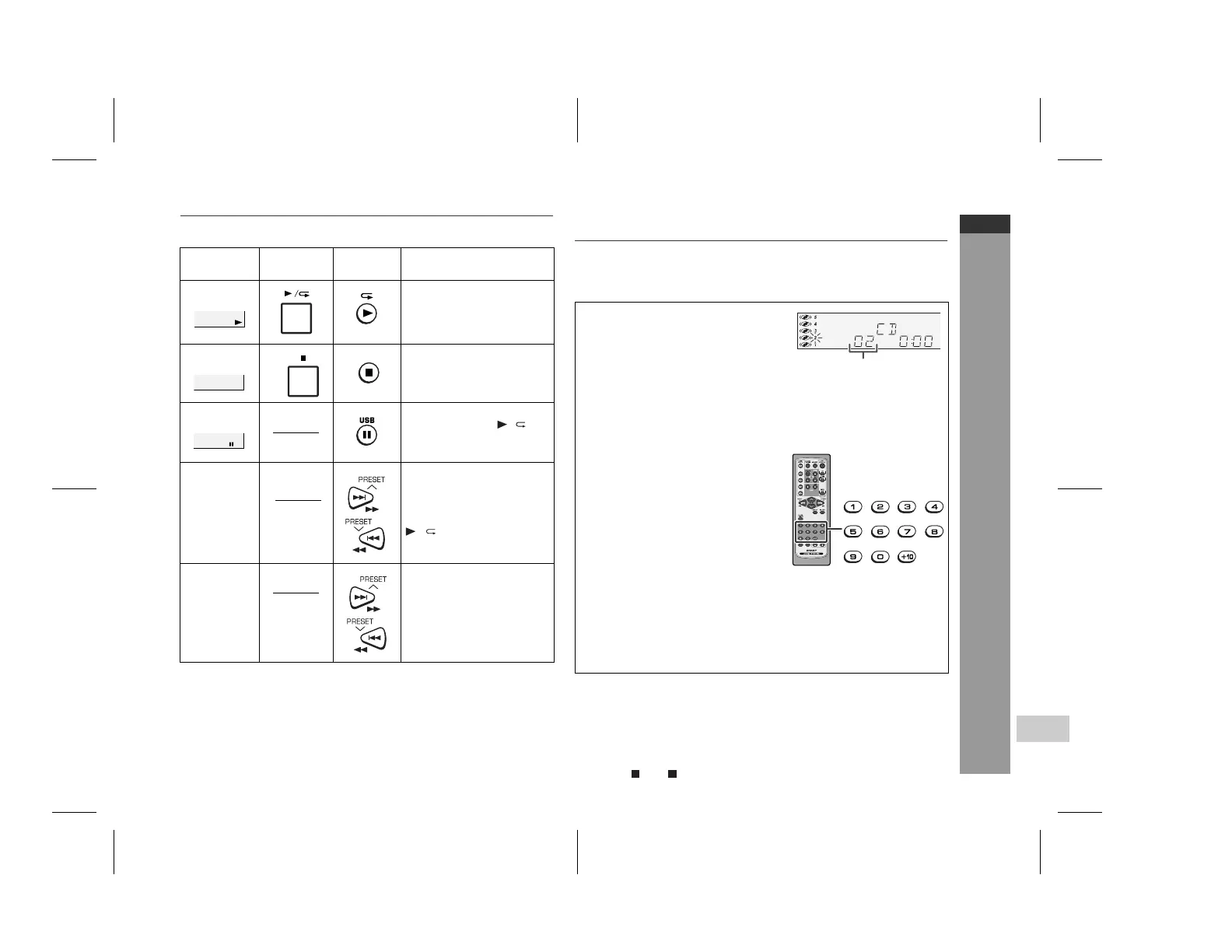
By using the direct search buttons, the desired tracks on the current
disc can be played.
Notes:
A track number higher than the number of tracks on the disc can-
not be selected.
During random play, direct search is not possible.
To stop playback:
Press the (CD ) button.
Function Main unit Remote
control
Operation
Play Press in the stop mode.
Stop Press in the playback
mode.
Pause Press in the playback
mode. Press the / but-
ton to resume playback
from the paused point.
Track up/
Track down
Press in the playback or
stop mode.
If you press the button in
the stop mode, press the
/ button to start the
desired track.
Fast for-
ward/Fast
reverse
Press and hold down in
the playback mode.
Release the button to re-
sume playback.
Track up/track down is possible only within individual discs.
Fast forward/fast reverse is possible only within individual discs.
When the end of the last track is reached during fast forward,
"END" will appear on the display and CD operation will be paused.
When the beginning of the first track is reached during fast
reverse, the unit will enter the playback mode.
Rewritable multi session discs which writing is not finished, can
still be played.
Use the direct search buttons on
the remote control to select the de-
sired track whilst playing the se-
lected disc.
Selected track number
The direct search buttons allow you to select up to number 9.
When selecting number 10 or higher, use the "+10" button.
A. For example, to choose 13
1 Press the "+10" button once.
2 Press the "1" button.
3 Press the "3" button.
B. For example, to choose 130
1 Press the "+10" button twice.
2 Press the "1" button.
3 Press the "3" button.
4 Press the "0" button.
Downloaded from: http://www.usersmanualguide.com/


 To Next Page