03/12/17 XL-UH240W 26-34.fm
XL-UH240W
E-27
ENGLISH
Advanced Features
Timer and sleep operation (Remote Control only) (continued)
Continued to the next page
4
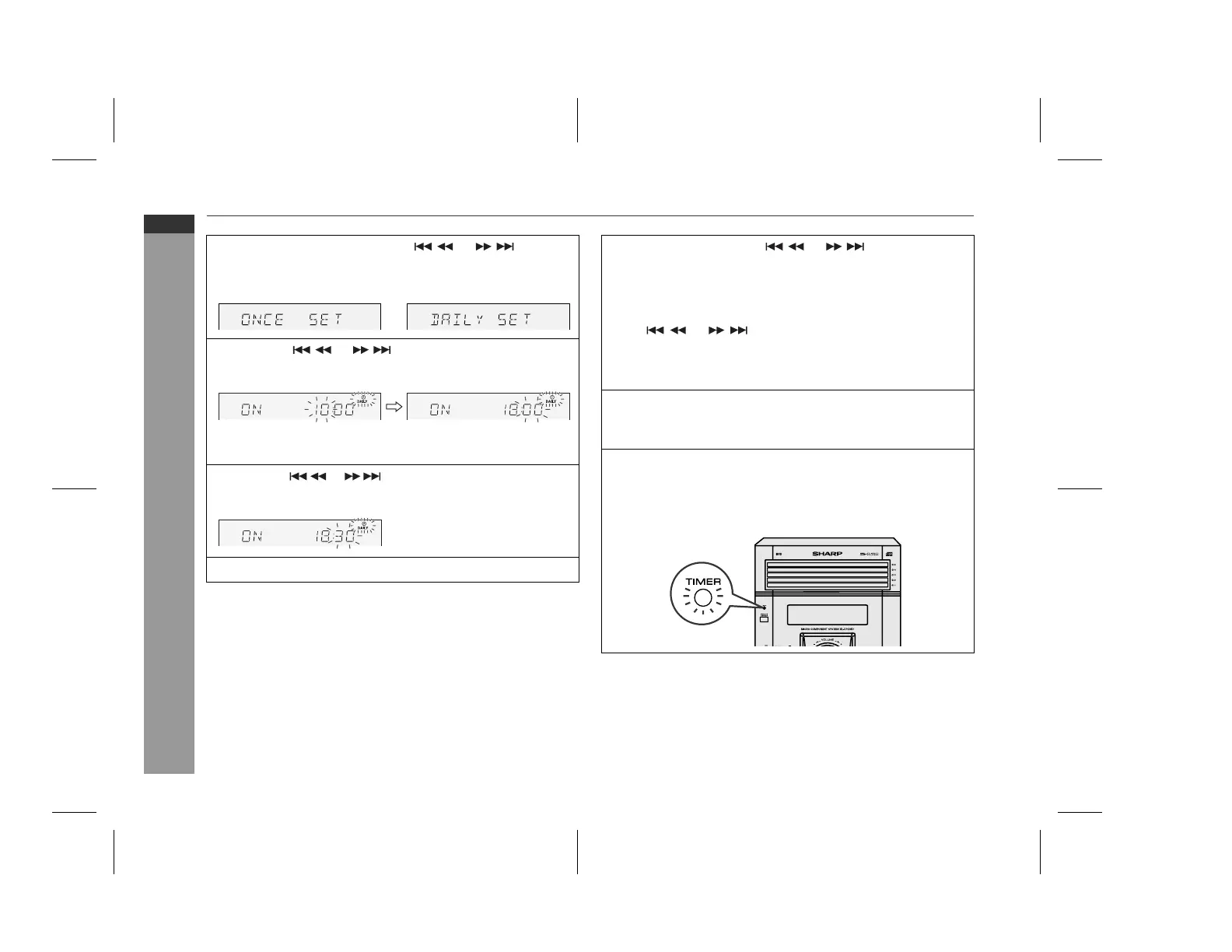
Within 10 seconds, press the or button to
select "ONCE SET" or "DAILY SET", and press the
MEMORY button.
5
Press the or button to adjust the hour and
then press the MEMORY button.
The illustrations show the timer playback setting in the daily
timer mode.
6
Press the or button to adjust the minutes and
then press the MEMORY button.
7
Set the time to finish as in steps 5 and 6 above.
8
Switch input with the or button, and then
press the MEMORY button.
To select the timer playback source: CD, TUNER, USB or
AUX.
When you select the tuner, select a station by pressing the
or button, and then press the MEMORY
button.
If a station has not been programmed, "NO PRESET" will
be displayed and timer setting will be cancelled.
9
Adjust the volume using the VOLUME control, and then
press the MEMORY button.
Do not turn the volume up too high.
10
Press the ON/STAND-BY button to enter the power stand-
by mode.
The "TIMER" indicator lights up and the unit is ready for timer
playback.
Downloaded from: http://www.usersmanualguide.com/


 To Next Page