Shenchen Pump LabV Series
4.4 The Basic Configuration Interface
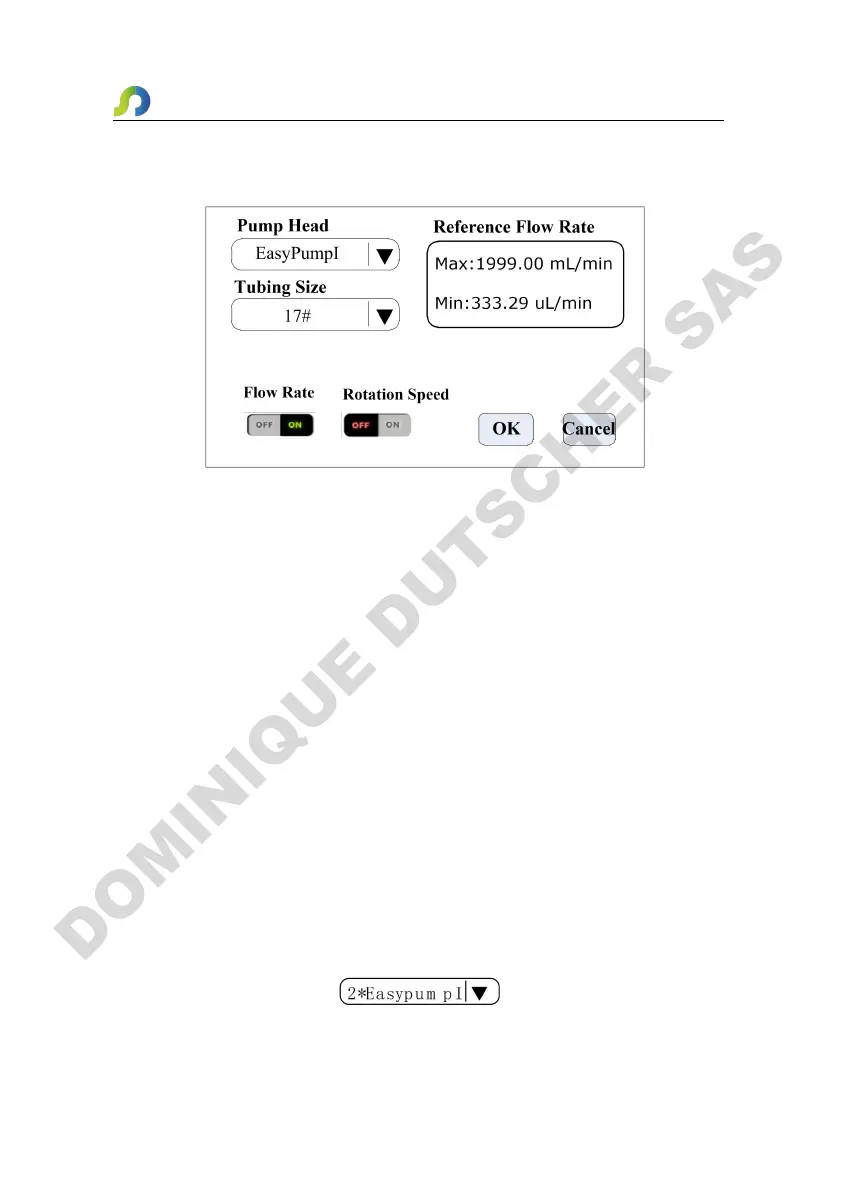
The basic configuration interface:
Click the Pump Head and Tubing Size to choose the pump head and tubing.
Reference flow rate displays the maximum and minimum flow rate with the current
pump head and tubing.
Click the Flow rate mode or Speed mode button to choose the working mode. When
you choose the flow rate mode, the flow rate is adjustable, the speed will change
with the flow rate. When you choose the speed mode, the speed is adjustable, the
flow rate will change with the rotating speed.
Click the confirm button when you had finished choosing parameter then back to the
main interface.
Note that: When the pump come with two pump heads, the output of two pump
heads are connected to one channel with Y type connector, then you will need to
choose 2* pump head model; if the two pump heads use as two channels, then you
need to choose single pump head model number.
For example, the pump come with two EasyPumpI, and output connect with Y type
connector to one channel, then when choose pump head need to select 2*EasypumpI,
as in below picture:
In other cases, such as: the pump come with one pump head EasypumpI, or with two


 To Next Page