EasyManua.ls Logo

Shimadzu Hyper Vision HPV-X2 - Playing Back Images; Setting Playback Parameters - Viewer Operations

Shimadzu Hyper Vision HPV-X2
97 pages
Print Icon
To Next Page IconTo Next Page
To Previous Page IconTo Previous Page
Loading...
55
Operating
Camer
a
High-Speed Video Camera
HPV-X2
5.5
Playing Back Images
The HPV-X software immediately displays recorded images as moving images. Images
can also be played back one frame at a time by manual operation.
Before playing back moving images, click [DETAIL] in Viewer and set the playback
parameters.
5.5.1
Setting Playback Parameters – Viewer Operations
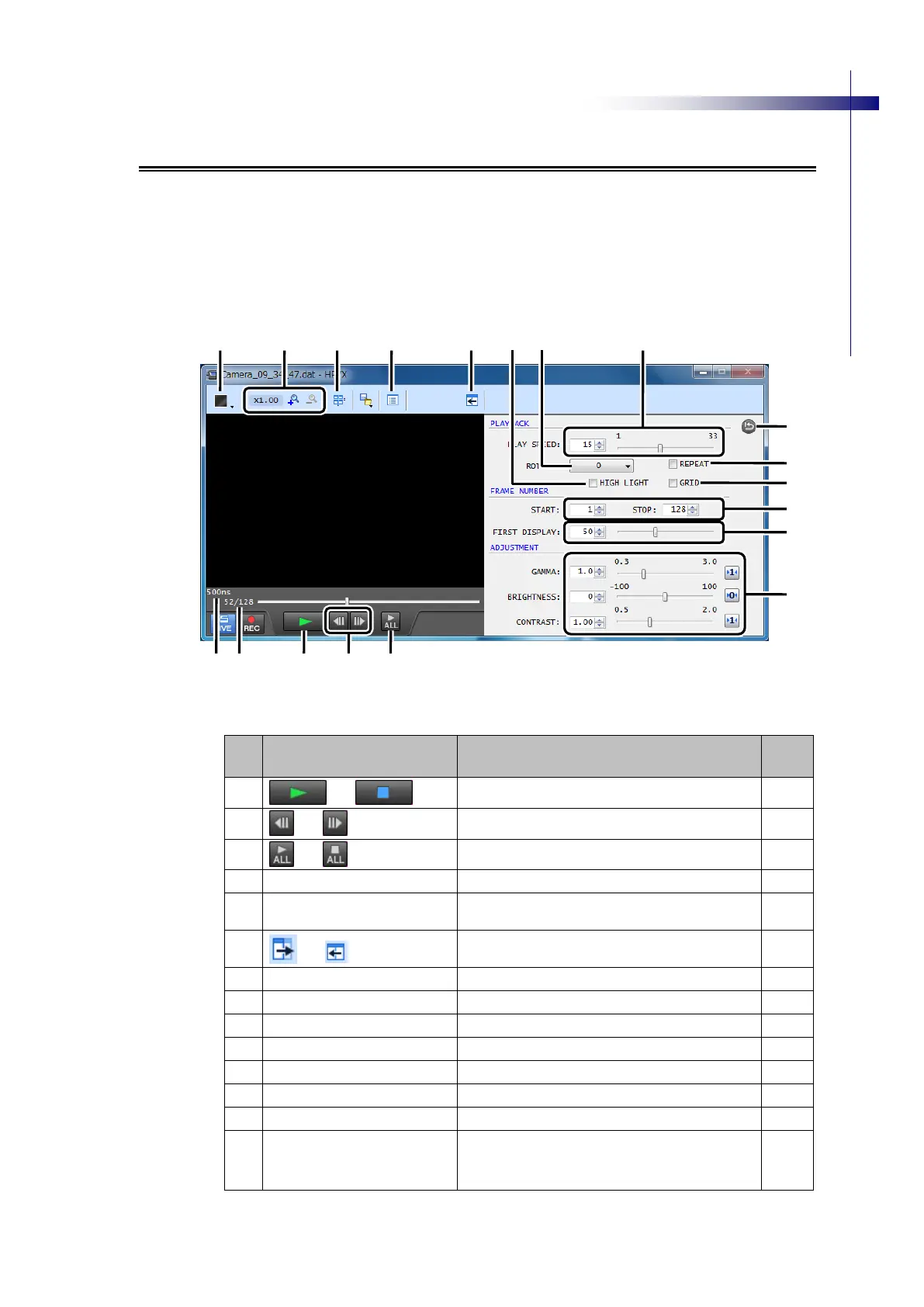
Fig. 5-19 Setting Playback Parameters in the Viewer Window
No.
Name
Description
See
Page
①
/
Playback/stop
P.56
②
/
Moves one frame back/forward.
P.56
③
/
Plays all or stops all.
P.56
④
Frame No.
Displays the current frame number.
P.56
⑤
Relative Time Since Trigger
Input
Relative time since trigger input
P.56
⑥
/
[DETAIL]
Switches display mode for playback parameter
settings window.
P.56
⑦
[PLAY SPEED]
Set playback speed.
P.56
⑧
[ROTATE]
Set display angle.
P.56
⑨
[REPEAT]
Specifies repeated playback.
P.57
⑩
[HIGH LIGHT]
Displays overexposure area.
P.57
⑪
[GRID]
Displays grid.
P.57
⑫
[START][STOP]
Set frame range.c
P.57
⑬
[FIRST DISPLAY]
Select the first frame to display.
P.57
⑭
[GAMMA]
[BRIGHTNESS]
[CONTRAST]
Set playback window display settings.
P.57
⑯
⑰
⑱
⑲
⑥
⑩
⑮
⑨
⑧
⑪
⑦
⑫
⑬
⑭
①
②
③
⑤
④

Table of Contents