https://shimano-steps.com/
32 33
https://shimano-steps.com/
E6000 MANUALE8000 CONCEPT E8000 MANUAL E6000 CONCEPT
INSTALLING / REMOVING THE BATTERY
Installation of the Battery
BT-E8010/BT-E6010
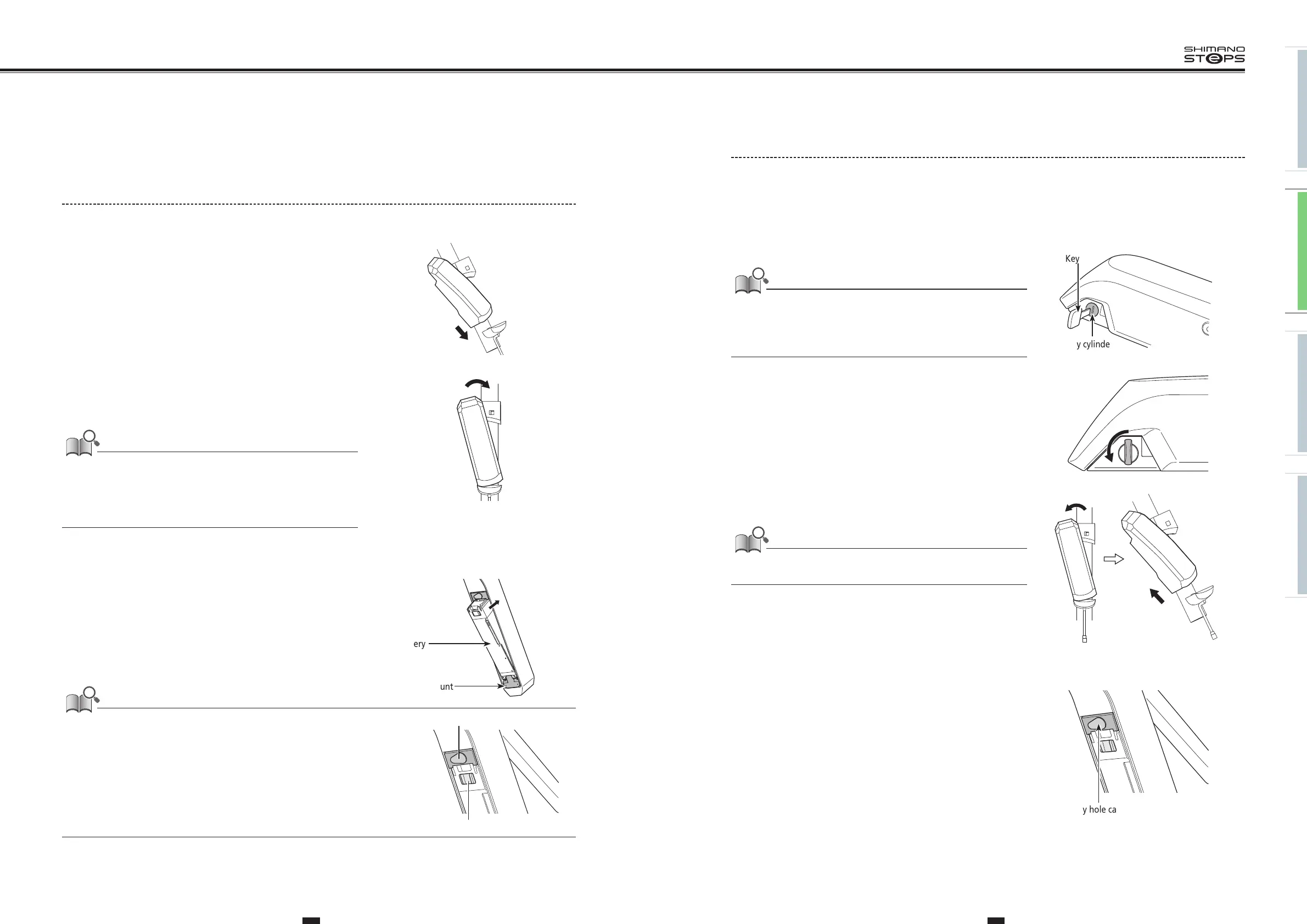
1. Align the indentation in the bottom of the battery with the
protrusion on the mount and insert the battery.
2. Slide the battery to the right starting from the point where it
is inserted. Push in the battery until you hear it click.
3.
Return the key to the locking position, remove it, and store it
in a safe place.
• To prevent the battery from falling out, check to see that the battery is
locked after installation.
•
Before riding, make sure that the charging port cap is closed.
•
To prevent the battery from falling out, do not ride the bicycle with the key
inserted.
14
Installing / removing the battery
Installation of the battery
BT-E8010/BT-E6010
1.
Align the indentation in the bottom of the battery
with the protrusion on the holder and insert the
battery.
2.
Slide the battery to the right starting from the point
where it is inserted. Push in the battery until you hear
it click.
3.
Return the key to the locking position, remove it, and
store it in a safe place.
NOTE
•
Check to see that the battery is locked before riding the
bicycle. The battery may fall out while riding if not properly
locked in place.
•
Before riding, make sure that the charging port cap is
closed.
•
To prevent the battery from falling out, do not ride the
bicycle with the key inserted.
BT-E8020
For the purposes of demonstration, these instructions
take as an example a frame design where the battery is
removed/installed from below.
Insert the battery into the battery mount until there is a
click.
•
When inserted until a click is heard, the battery is
locked automatically.
NOTE
•
Check that the battery is locked before riding the bicycle.
The battery may come loose and fall out if not properly
locked in place before riding.
•
Before riding, make sure that the keyhole cap and charging
port cap are closed.
•
To prevent the battery from falling out, do not ride the
bicycle with the key inserted.
BT-E8020
Insert the battery into the battery mount until there is a click.
•
When inserted until a click is heard, the battery is locked automatically.
• To prevent the battery from falling out,
check to see that the battery is locked after installation.
•
Before riding, make sure that the keyhole cap and charging port cap are closed.
• To prevent the battery from falling out, do not ride the bicycle with the key inserted.
Battery
Battery mount
Charging port cap
Keyhole cap
Removing the Battery
The following description may not be applicable as different types of keys are available.
BT-E8010/BT-E6010
1. Turn off the power, then insert the key into the key cylinder
in the battery holder.
• Hold the battery firmly and be careful that it does not drop when removing or
carrying it.
• The position of the key does not affect the insertion of the battery. You can
insert it regardless of the key position.
• You cannot remove the key when it is not in the inserting position.
Key cylinder
Key
2. To unlock the battery turn the key to the left until you feel
some resistance.
3. Hold the upper part of the battery and slide it to the left to
remove it.
Hold the battery firmly and be careful that it does not drop when removing or
carrying it.
BT-E8020
• If using a battery cover manufactured by another company, remove the battery cover before removing the battery.
1. Remove the keyhole cap.
Key hole cap


 To Next Page
 Loading...



