https://shimano-steps.com/
38 39
https://shimano-steps.com/
E6000 MANUALE8000 CONCEPT E8000 MANUAL E6000 CONCEPT
CYCLE COMPUTER DISPLAY AND SETTING
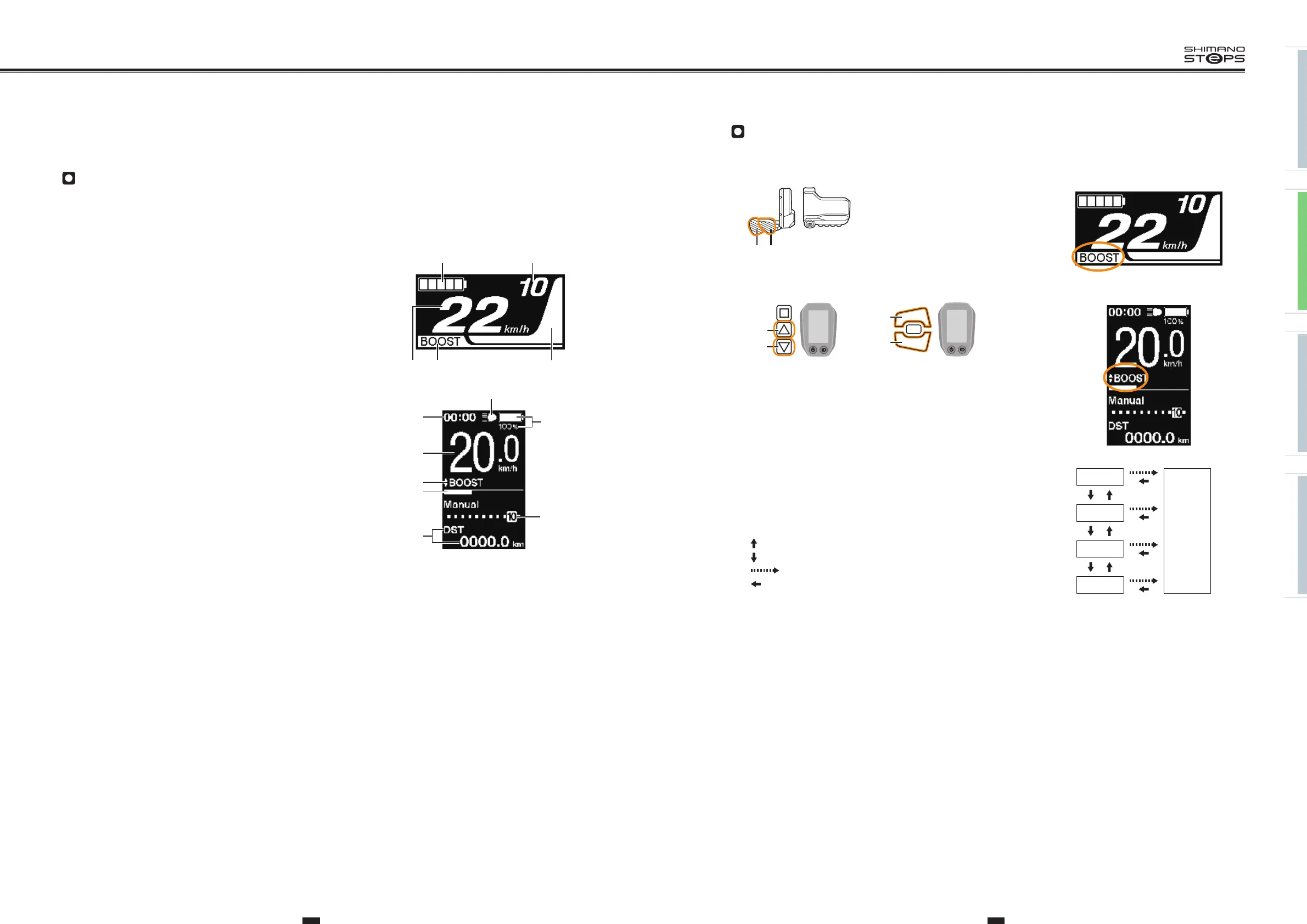
Basic Screen Display
Displays the status of the power assisted bicycle, traveling data.
•
These explanations for the cycle computers SC-E8000 and SC-E6010, referred to in this instruction manual, are illustrated using the screen
displays of SC-E8000 only, except where the displays of the cycle computers differ significantly.
(A)
Battery level indicator
Displays the current battery level.
(B)
Gear position (Only displays when electronic gear shifting is in use)
Displays the currently set gear position.
(C)
Assist
gauge
Displays the assistance.
(D)
Assist mode display
Displays the current assist mode. (Assist mode automatically switches to [ECO] as
remaining battery capacity declines. The switch to [ECO] occurs earlier if a battery–
powered light is connected.)
(E)
Current
speed
Displays the current speed.
The display can be switched between km/h and mph.
(F)
Current
time
Shows the current time.
(G)
Icon to indicate when the light is on
Notifies you when the battery-powered light is on.
(H)
Traveling data display
Displays the current traveling data.
<SC-E8000>
(A) (B)
(C)(D)(E)
<SC-E6010>
(A)
(B)
(G)
(H)
(C)
(D)
(E)
(F)
Changing Assist Mode
Press X or Y to switch assist modes.
XY
SW-E8000-L/SC-E8000
<SC-E8000>
X
Y
SW-E6000/SC-E6010
X
Y
SW-E6010/SC-E6010
<SC-E6010>
BOOST: Assist boost
TRAIL: Assist trail
ECO: Assist eco
OFF: Assist off
WALK: Walk assist
23
Changing assist mode
Press X1 or Y1 to switch assist modes.
X1Y1
SW-E8000-L/SC-E8000
X1
Y1
SW-E6000/SC-E6010
SC-E8000
SC-E6010
Assist high
Assist normal
Assist eco
Assist off
Walk assist
: Short press Y1
: Short press X1
: Long press Y1
: Short press X1 (This operation is for canceling
[WALK] mode)
BOOST
WALK
TRAIL
ECO
OFF
: Short press X
23
Changing assist mode
Press X1 or Y1 to switch assist modes.
X1Y1
SW-E8000-L/SC-E8000
X1
Y1
SW-E6000/SC-E6010
SC-E8000
SC-E6010
Assist high
Assist normal
Assist eco
Assist off
Walk assist
: Short press Y1
: Short press X1
: Long press Y1
: Short press X1 (This operation is for canceling
[WALK] mode)
BOOST
WALK
TRAIL
ECO
OFF
: Short press Y
23
Changing assist mode
Press X1 or Y1 to switch assist modes.
X1Y1
SW-E8000-L/SC-E8000
X1
Y1
SW-E6000/SC-E6010
SC-E8000
SC-E6010
Assist high
Assist normal
Assist eco
Assist off
Walk assist
: Short press Y1
: Short press X1
: Long press Y1
: Short press X1 (This operation is for canceling
[WALK] mode)
BOOST
WALK
TRAIL
ECO
OFF
: Long press Y
23
Changing assist mode
Press X1 or Y1 to switch assist modes.
X1Y1
SW-E8000-L/SC-E8000
X1
Y1
SW-E6000/SC-E6010
SC-E8000
SC-E6010
Assist high
Assist normal
Assist eco
Assist off
Walk assist
: Short press Y1
: Short press X1
: Long press Y1
: Short press X1 (This operation is for canceling
[WALK] mode)
BOOST
WALK
TRAIL
ECO
OFF
: Short press X (This operation is for canceling
[WALK] mode)
BOOST
WALK
TRAIL
ECO
OFF






 To Next Page