https://shimano-steps.com/
40 41
https://shimano-steps.com/
E6000 MANUALE8000 CONCEPT E8000 MANUAL E6000 CONCEPT
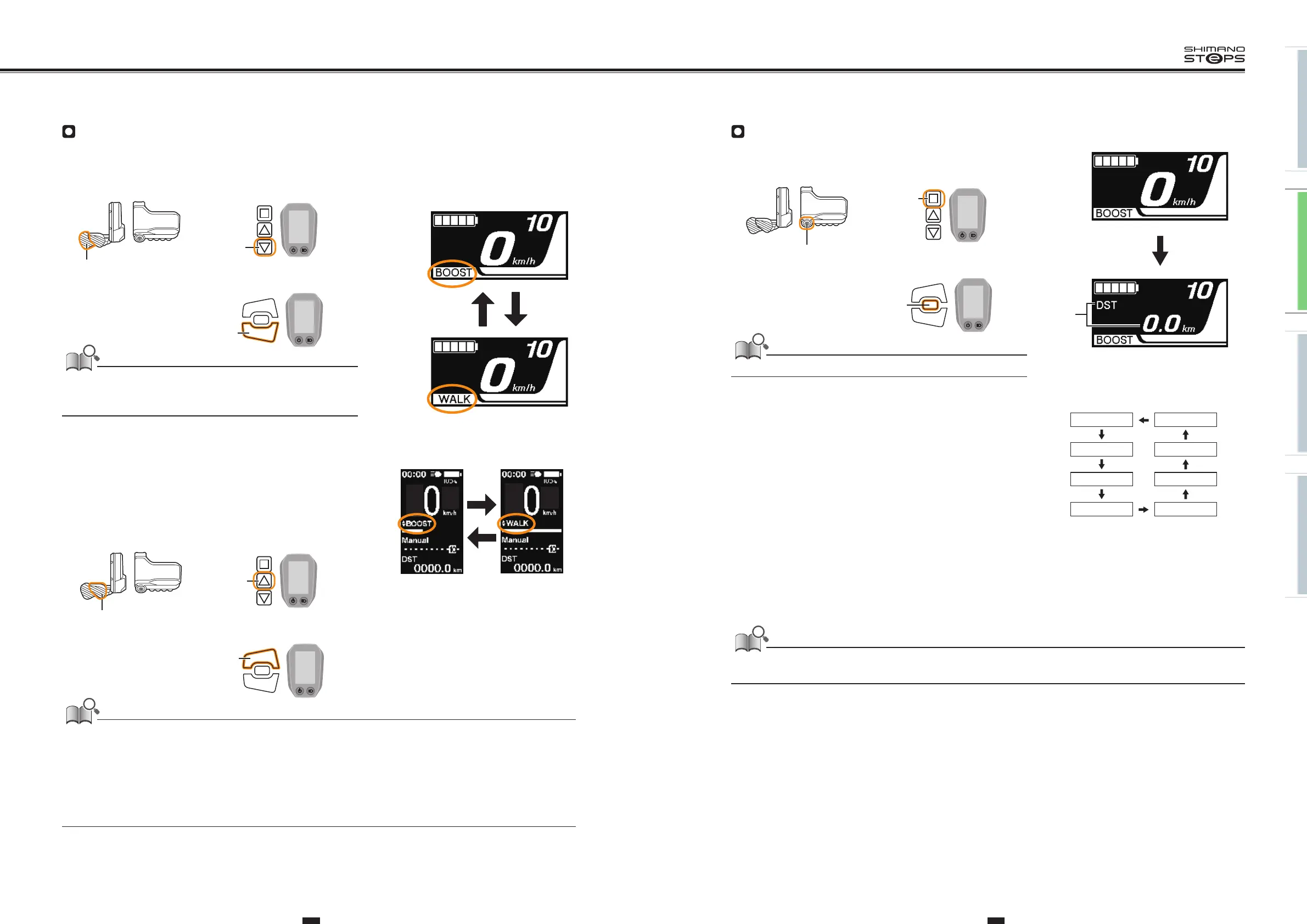
Switching to [WALK] mode (walk assist mode)
1. With your feet off the pedals and current speed at [0 km/h], hold
down Y until [WALK] displays.
A warning tone will sound while switching is in progress if it is not possible to
switch to [WALK] mode because the current speed is not [0 km/h] or there is
pressure on the pedals etc.
2. Release Y when [WALK] displays.
3. Hold down Y again to activate walk assist.
•Walk assist remains active provided Y is being held down.
4. To cancel [WALK] mode, release Y and press X.
• When [WALK] mode is canceled, the mode active before [WALK] mode was set, is
re-activated.
YX
<SC-E8000>
Y
X
<SC-E6010>
• If Y is not pressed for one minute or more, the mode active before [WALK] mode was set, is re-activated.
• If the bicycle is not moved after [WALK] mode is activated, walk assist is automatically inactivated. T
o re-activate [WALK] mode, momentarily
release Y and then hold down Y.
• The walk assist function can operate at a maximum of 6 km/h.
• The assistance level and speed vary with the gear position.
• The intelligent walk assist function activates when an electric shifting system such as XTR, DEORE XT SEIS is connected.
System individually supplies assist power to detect gear position.
“Intelligent walk assist” support rider more torque output in steep climb condition in lower side gears.
“Quick walk assist” function works quickly by holding down SW from any mode.
Y
SW-E6010/SC-E6010
Y
SW-E6000/SC-E6010
Y
SW-E8000-L/SC-E8000
X
SW-E6010/SC-E6010
X
SW-E6000/SC-E6010
X
SW-E8000-L/SC-E8000
Switching between displayed traveling data
The type of traveling data displayed changes each time you press A.
Holding down A when DST is displayed clears all traveling data.
(A)
(A)
Traveling distance
(B)
Cumulative distance
(C)
Maximum traveling distance *1, 3
(D)
Traveling time (optional) *2
(E)
Average speed (optional) *2
(F)
Maximum speed (optional) *2
(G)
Number of crank rotations *2
(H)
Current time *4
(A) DST CLOCK (H)
(B) ODO CADENCE (G)
(C) RANGE MAX (F)
(D) TIME AVG (E)
*1 When [RANGE] is displayed, the battery level is not displayed. The traveling range should be used as a reference only.
*2
Optional item: You can configure the display settings in E-TUBE PROJECT. For details, refer to ”CONNECTION AND COMMUNICATION WITH
DEVICES” (page 51).
*3
When walk assistance is functioning, the on screen display [RANGE] changes to [RANGE ---].
*4
Displayed constantly on SC-E6010.
When traveling data is displayed, the screen returns to speed display after 60 seconds.
When speed data is displayed, pressing A changes the traveling data displayed starting with DST.
A
SW-E6010/SC-E6010
A
SW-E6000/SC-E6010
A
SW-E8000-L/SC-E8000






 To Next Page