https://shimano-steps.com/
120 121
https://shimano-steps.com/
E6000 MANUALE8000 CONCEPT E8000 MANUAL E6000 CONCEPT
HOW TO USE
CHARGING THE BATTERY
You cannot use the battery immediately after shipment. The battery can be used after charging it with
the designated charger. The battery can be used when the LED on it lights up.
Charging time depends on the battery charger model.
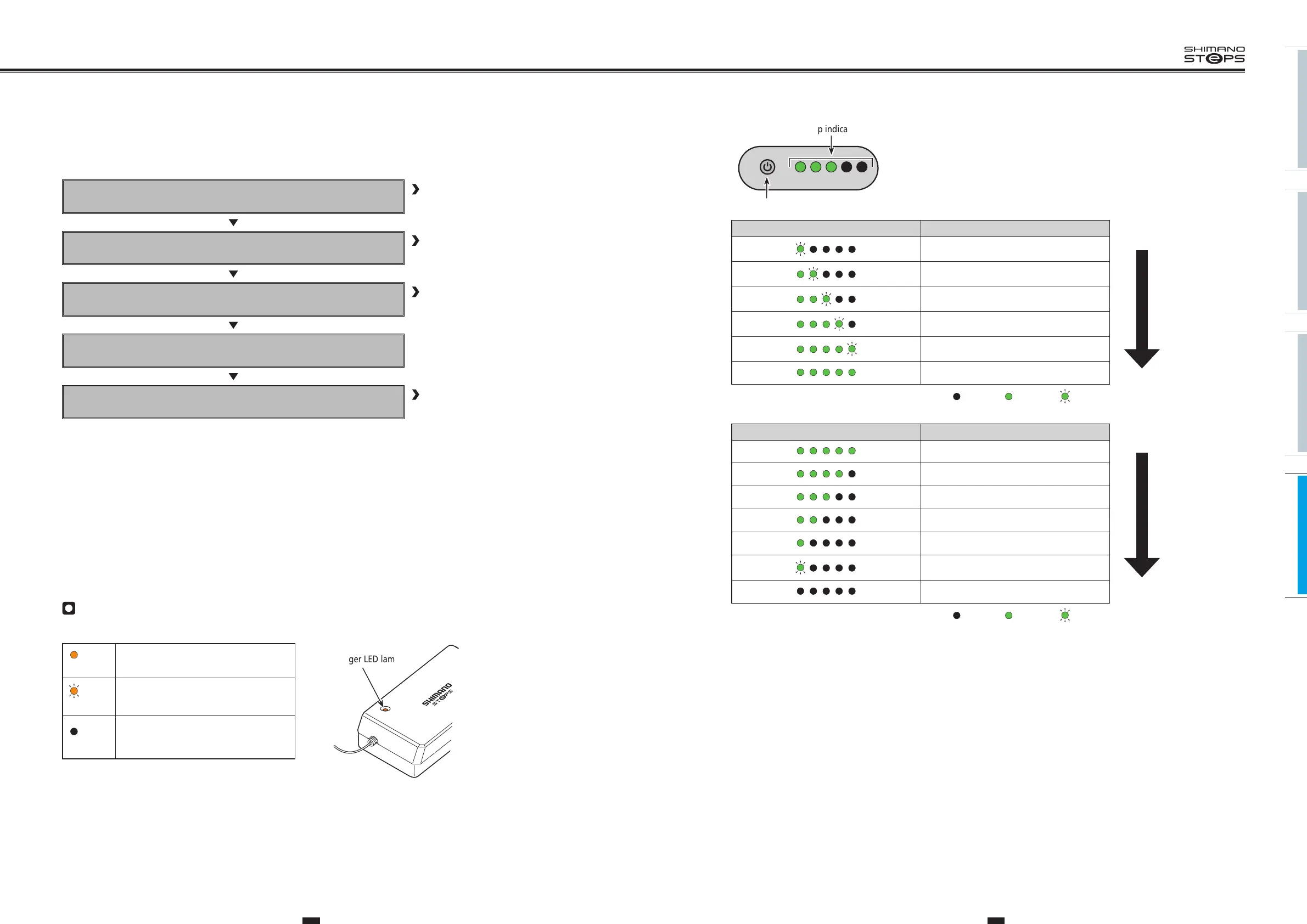
About battery and charger displays
You can check the current charging status.
Lights up
Charging (Within 1 hour after the
completion of charging)
Flashing
Charging error
Turned off
Battery disconnected
(1 hour or more after the completion of
charging)
Charger LED lamp
You can check the current charging status on the battery level lamp located on the battery.
Charging the battery
Be sure to charge it before use.
Refer to following section
Turn on the power.
Power cannot be turned on while charging.
Refer to ”TURNING THE
POWER ON/OFF” (page 128)
Select your preferred assist mode.
Assistance will start when the pedals start turning.
Refer to ”CHANGING THE
ASSIST MODE” (page 130)
Change the assist mode in accordance with the riding
conditions.
Turn off the power when parking the bicycle.
Refer to ”TURNING THE
POWER ON/OFF” (page 128)
Charging-in-progress indication*1 Battery level
0% - 20%
Empty
Charged
21% - 40%
41% - 60%
61% - 80%
81% - 99%
100%
*1
: No light : Lights up : Flashing
The current battery level can be checked by pressing the battery's power button.
Current remaining battery level indication*1 Battery level
100% - 81%
Charged
Empty
80% - 61%
60% - 41%
40% - 21%
20% - 1%
0%
Power off / Shutdown
*1
: No light : Lights up : Flashing
Battery level lamp indication
Power button






 To Next Page