https://shimano-steps.com/
132 133
https://shimano-steps.com/
E6000 MANUALE8000 CONCEPT E8000 MANUAL E6000 CONCEPT
TURNING THE BATTERY-
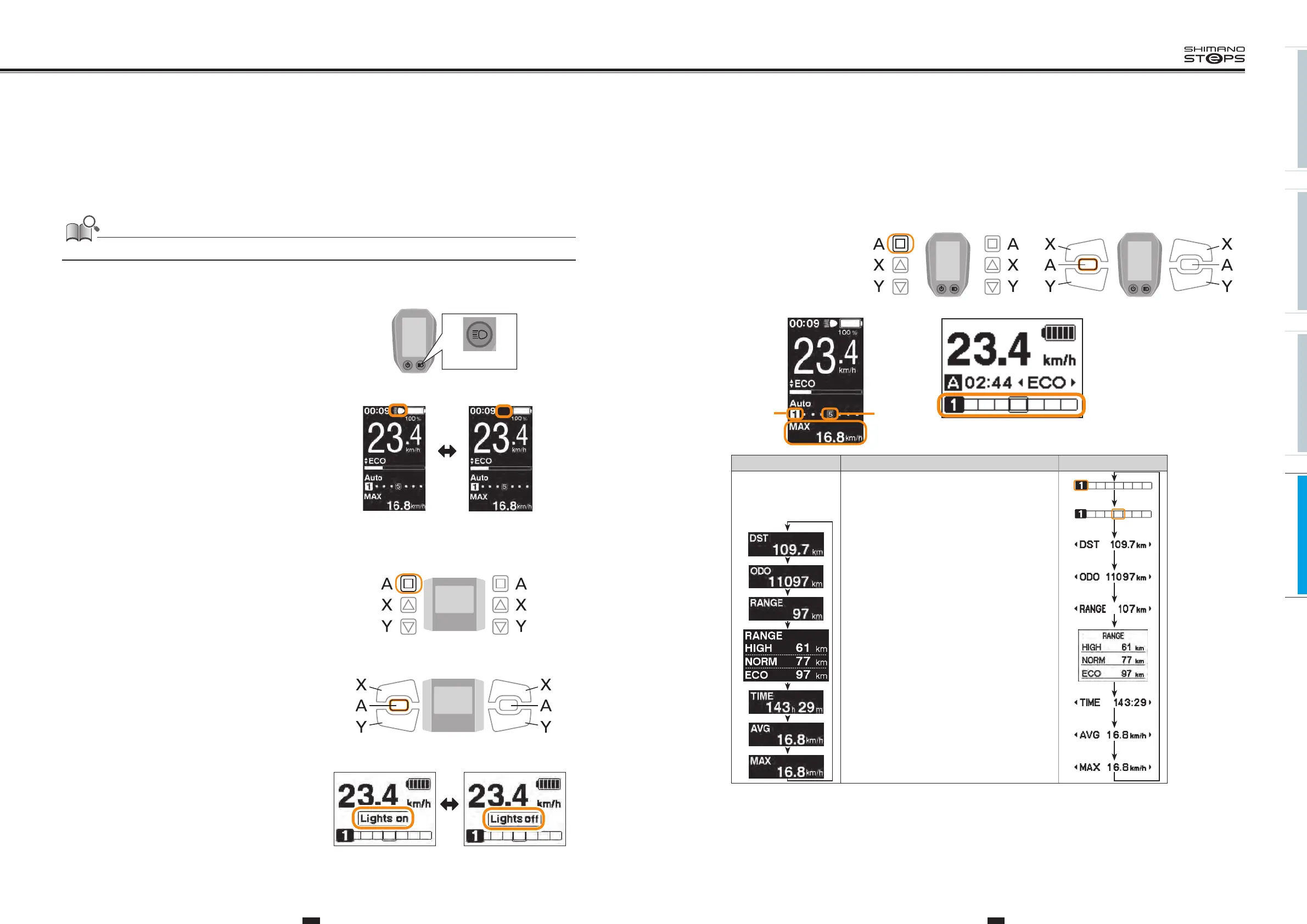
POWERED LIGHT ON OR OFF
The light turns off in conjunction with the battery power. When the battery power is off, the light is off.
<SC-E6010>
1. Push the light button on the cycle computer to turn
the light on
Turning the light on, and an icon indicating that the light is on
appears on the screen.
2. Push the button again to turn the light off
Once the light is turned off, the icon on the screen disappears
Note: When the battery powered light is not connected and
"Backlight" is set to "MANUAL", pressing the light button turns
the cycle computer’s backlight on and off.
When the light is
turned on
When the light is
turned off
Light button
<SC-E6000>
1. To turns light on, press the Assist-A button for 2
seconds.
Displays this information instead of the clock and assist mode. It is
displayed for about 2 seconds.
2. To turns light off, press the Assist-A button for 2
seconds again.
Displays this information instead of the clock and assist mode. It is
displayed for about 2 seconds.
When the light is
turned on
When the light is
turned off
Assist Shift
2 Sec.
<SW-E6000>
Assist Shift
<SW-E6010>
2 Sec.
SWITCH THE GEAR POSITION
AND TRAVELING DATA DISPLAY
Display (
<SC-E6010
>)
Details
Display (
<SC-E6000>)
*
1
Gear position*7
(displayed only when the motor unit is connected)
*
2
Gear position*6
(when setting start mode)
Traveling distance
Cumulative distance
Traveling range*3 *5
Traveling range
(optional)*4
Traveling time
(optional)*4
Average speed
(optional)*4
Maximum speed
(optional)*4
*3 When "RANGE" is displayed, the battery level and the walk assist indicator do not appear on the screen.
*4 Optional item: You can configure the display settings in E-TUBE PROJECT.
*5 When the walk assist function is working, "-" is displayed in the "RANGE" screen.
*6 The starting gear position is displayed when using start mode.
*7 The gear position is only displayed when using electronic gear shifting.
ShiftAssist Shift Assist
<SW-E6000> <SW-E6010>
Displays the current gear ratio or
traveling data.
The type of traveling data displayed
changes each time you push Assist-A
button.
<SC-E6010>
*
2
*
1
<SC-E6000>






 To Next Page