https://shimano-steps.com/
176 177
https://shimano-steps.com/
E6000 MANUALE8000 CONCEPT E8000 MANUAL E6000 CONCEPT
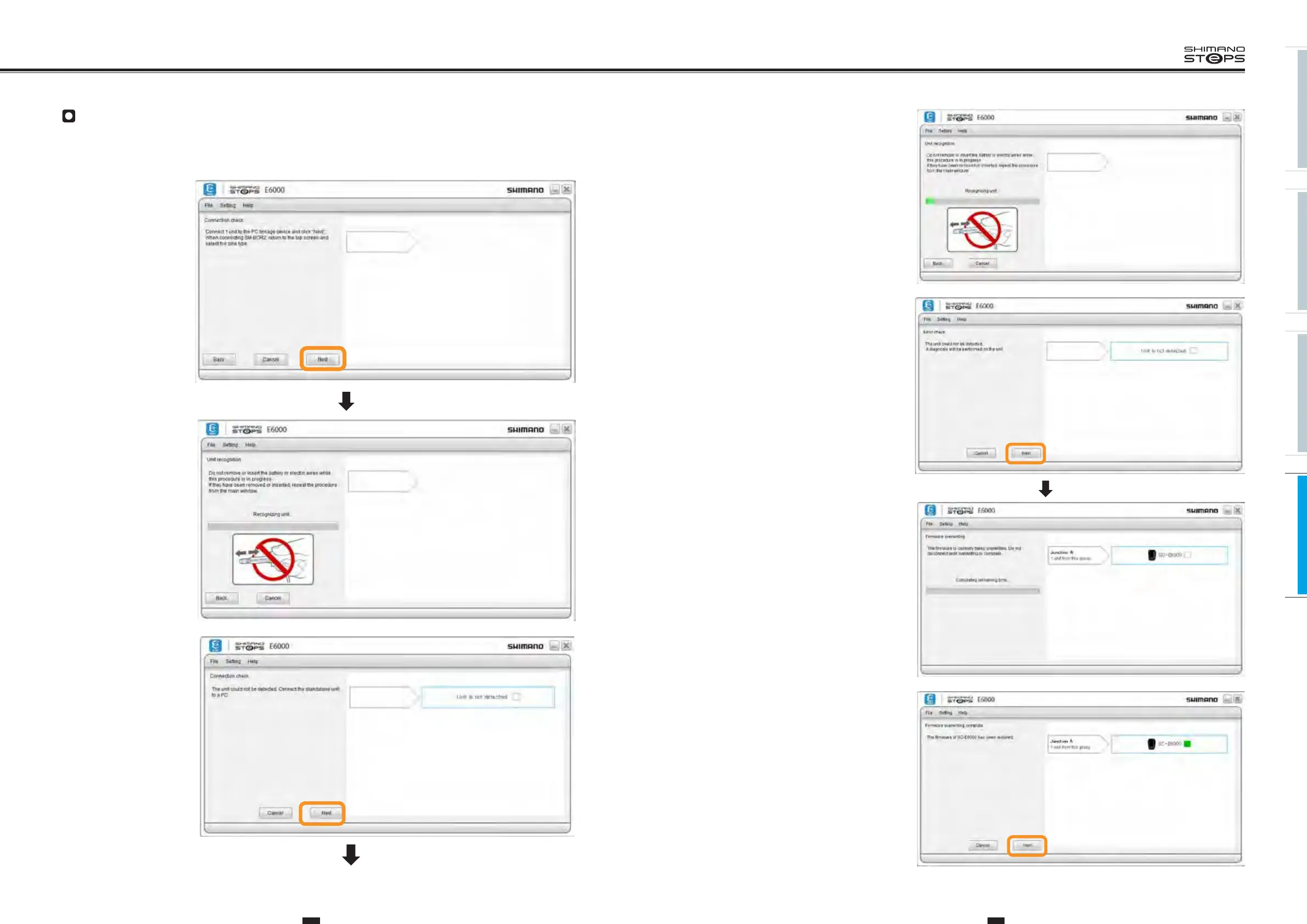
Do not remove or re-insert the battery or
electric wires while this procedure is in
progress. If they are removed or re-inserted,
procedures must be repeated from the main
window.
4. Invokes the unit with the corrupted
firmware, and overwrites its
firmware with new firmware.
Click "Next".
The firmware is being overwritten. Do not
disconnect until the process is complete.
5. The firmware overwriting process
is complete. Click "Next".
Restoring firmware
When firmware is corrupted, the name of the currently connected unit does not display during connection check. In such cases, the firmware
should be restored in accordance with instructions displayed on screen.
•
The following steps demonstrate the procedure involved in restoring firmware, taking as an example a case where the firmware for the cycle
computer has become corrupted.
1. Click "Next".
2.
Connect 1 unit only to
the PC linkage device,
and then click "Next".
Do not remove or re-insert
the battery or electric wires
while this procedure is in
progress. If they are removed
or re-inserted, procedures
must be repeated from the
main window.
3. Reconfirms that
the unit cannot be
detected.
Click "Next".






 To Next Page