15
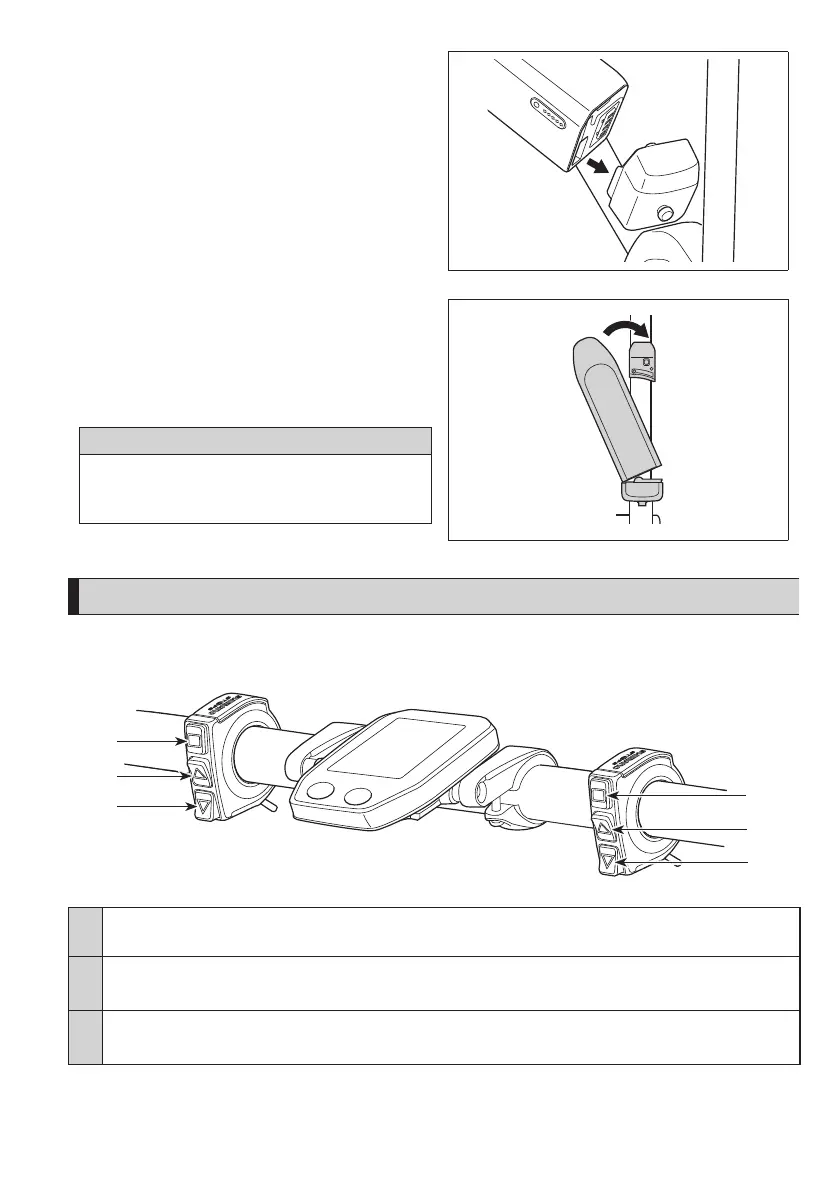
<BT-E6010>
1.
Align the indentation in the bottom of the battery
with the protrusion on the holder and insert the
battery.
2.
Slide the battery to the right starting from the point
where it is inserted. Push in the battery until you
hear it click.
3.
Return the key to the locking position, remove it,
and store it in a safe place.
CAUTION
Check to see that the battery is locked before riding the bicycle.
The battery may fall out while riding if not properly locked in
place.
Switching between cycle computer operations and modes
For cycle computer screen operations and switching modes, use the buttons on the assist switch and shifting switch on the
left and right.
X
Y
Z
X
Y
Z
X
•
Changing the cycle computer display
•
Switching between automatic and manual gear shifting
Y
When switching assist modes: the level of assistance becomes stronger
When shifting gears: pedaling becomes heavier
Z
When switching assist modes: the level of assistance becomes weaker
When shifting gears: pedaling becomes lighter
The operation procedure provided here refers to cases where the cycle computer is set to the default values.





 To Next Page