27
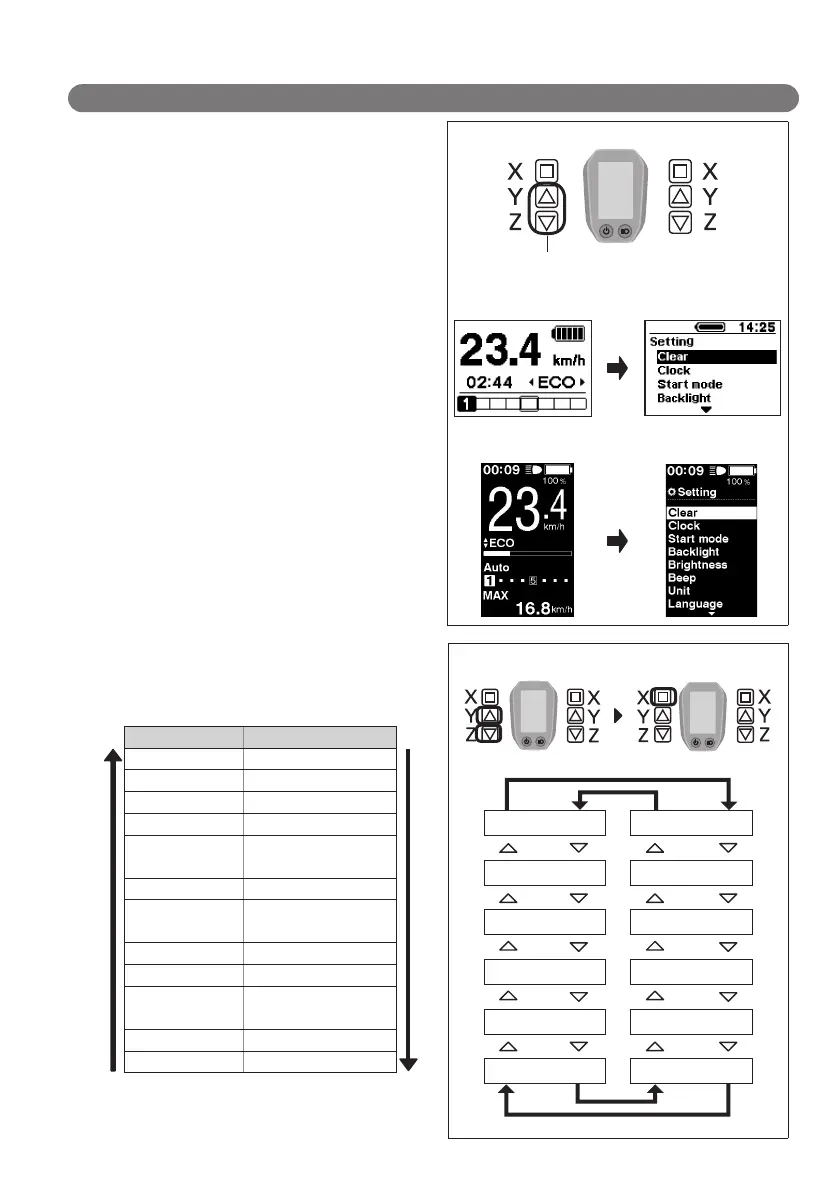
About the settings menu
Launching
1.
With the bicycle stopped, pressing both the Assist-Y
and Assist-Z at the same time for 2 seconds displays
the setting screen.
Assist Shift
2 Sec.
< SC-E6000 >
< SC-E6010 >
2.
Press the Assist-Y or Assist-Z to move the cursor to the
item you want to configure.
Pressing the Assist-X displays the setting screen for
the item selected.
Configurable items
Details
Clear Clear settings
Clock Clock setting
Start mode
*2
Start mode setting
Backlight Backlight setting
Brightness
*1
Backlight brightness
settings
Beep Beep setting
Unit
Switching between km
and miles
Language Language setting
Font color
*1
Font color settings
Adjust
*2
Adjusting the power
gear shifting unit
Auto
*2
Shift timing adjustment
Exit
Return to the main screen
*
1: This menu is only for the SC-E6010.
*
2: This operation is only available when using electronic
gear shifting.
Assist Shift Assist Shift
Clear
Exit
Auto
*2
Adjust
*2
Font color
*1
Language
Clock
Start mode
*2
Backlight
Brightness
*1
Beep
Unit




 To Next Page