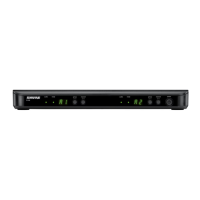
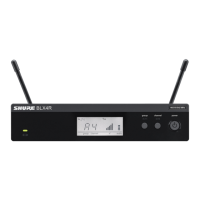
The Shure BLX Wireless System is a professional audio solution designed for clear and reliable wireless performance. It comprises various components, including single and dual-channel receivers, bodypack transmitters, and handheld microphone transmitters, all engineered for ease of use and consistent audio quality.
Function Description
The BLX Wireless System operates by converting audio signals into radio frequency (RF) signals, transmitting them wirelessly to a receiver, and then converting them back into audio for output to a sound system or amplifier. The system features automatic frequency scanning to identify the clearest available channel, simplifying setup and minimizing interference.
Receivers (BLX4 and BLX88)
The BLX4 is a single-channel receiver, while the BLX88 is a dual-channel receiver, allowing two transmitters to be used simultaneously. Both receivers feature a front panel with an audio LED (indicating incoming audio signal strength, green for normal, red for overload), a ready LED (green when the system is ready and receiving a transmitter signal), and an LED display showing the group and channel settings.
- Group and Channel Buttons: These buttons are used to scan for an open group and channel. A quick press and release initiates a scan. For manual selection, pressing and holding the group button allows selection of a group, and pressing and holding the channel button allows selection of a channel within the current group.
- Power Button: A push-and-hold action turns the receiver on or off.
- Back Panel Connections:
- DC Power Jack: For connecting the power adapter.
- Adapter Cord Tie-Off: Secures the power adapter cord.
- XLR Microphone Output Jack (MIC out): Provides a balanced microphone-level output.
- 6.35 mm (1/4") Instrument Level Output Jack (instrument out): Provides an unbalanced instrument-level output.
Transmitters (BLX1 Bodypack and BLX2 Handheld)
Both transmitter types are designed for robust performance and ease of use, featuring LED indicators for power, battery status, and controls for group and channel selection.
BLX1 Bodypack Transmitter:
- LED Indicator: Displays power and battery status (green for ready, rapidly flashing red for controls locked, solid red for low battery, flashing red and off for dead batteries).
- Power Switch: Toggles power on or off.
- 4-Pin Microphone Input Jack (TA4 connector): For connecting lavalier microphones, headworn microphones, or instrument cables.
- Antennas: For RF transmission.
- Group Button: Changes the group setting.
- LED Display: Displays group and channel setting.
- Channel Button: Changes the channel setting.
- Battery Compartment: Houses AA batteries.
- Audio Gain Adjustment: Adjusts transmitter gain to increase or decrease the signal level.
BLX2 Handheld Transmitter:
- LED Indicator: Displays power and battery status (similar to BLX1).
- Power Button: Push to turn power on or off.
- Group Button: Changes the group setting.
- Channel Button: Changes the channel and gain setting.
- LED Display: Displays group and channel setting.
- Identification Cap: Allows for customization.
- Battery Compartment: Houses AA batteries.
Important Technical Specifications
BLX Wireless System (General):
- Working Range: 91 m (300 ft) Line of Sight. Actual range depends on RF signal absorption, reflection, and interference.
- Audio Frequency Response: 50 to 15,000 Hz (dependent on microphone type).
- Total Harmonic Distortion: Ref. ±33 kHz deviation with 1 kHz tone, 0.5% typical.
- Dynamic Range: 100 dB, A-weighted, typical.
- Operating Temperature: -18°C (0°F) to 57°C (135°F).
- Polarity: Positive pressure on microphone diaphragm (or positive voltage on pin 2 of WA302 connector) produces positive voltage on pin 2 (with respect to pin 3 of low-impedance output) and the tip of the 1/4-inch output.
BLX4 Receiver:
- Audio Output Level: XLR connector: -27 dBV (into 100 kΩ load); 6.35 mm (1/4") connector: -13 dBV (into 100 kΩ load).
- RF Sensitivity: -105 dBm for 12 dB SINAD, typical.
- Image Rejection: >50 dB, typical.
- Dimensions: 40 mm X 188 mm X 103 mm (H X W X D).
- Weight: 241 g (8.5 oz).
- Housing: Molded ABS.
BLX88 Receiver:
- Audio Output Level: XLR connector: -27 dBV (into 100 kΩ load); 6.35 mm (1/4") connector: -13 dBV (into 100 kΩ load).
- RF Sensitivity: -105 dBm for 12 dB SINAD, typical.
- Image Rejection: >50 dB, typical.
- Dimensions: 40 mm X 388 mm X 116 mm (H X W X D).
- Weight: 429 g (15.1 oz).
- Housing: Molded ABS.
BLX1 Transmitter:
- RF Transmitter Output: 10 mW, typical (varies by region).
- Dimensions: 110 mm X 64 mm X 21 mm (H X W X D).
- Weight: 75 g (2.6 oz), without batteries.
- Housing: Molded ABS.
- Power Requirements: 2 LR6 AA batteries, 1.5 V, alkaline.
- Battery Life: Up to 14 hours (alkaline).
BLX2 Transmitter:
- RF Transmitter Output: 10 mW, typical (varies by region).
- Dimensions: 224 mm X 53 mm diam. (8 7/8 X 2 1/8 in.).
- Weight: 218 g (7.7 oz), without batteries.
- Housing: Molded ABS.
- Power Requirements: 2 LR6 AA batteries, 1.5 V, alkaline.
- Battery Life: Up to 14 hours (alkaline).
Usage Features
-
Single System Setup:
- Connect Receiver to Power Source: Plug the receiver into an electrical outlet.
- Connect Receiver to Mixer or Amplifier: Use an XLR or 1/4" cable to connect the receiver's output to your audio system.
- Perform a Group Scan: Press and release the
group button on the receiver. The receiver will scan for the clearest group and channel. To stop the scan, press group again.
- Turn on Transmitter and Match Group/Channel: Power on the transmitter. Adjust its group and channel settings to match those displayed on the receiver. The receiver's
ready LED will illuminate when a match is achieved.
- Audio Check and Gain Adjustment: Perform an audio test and adjust the gain on the transmitter as needed.
-
Multiple System Setup:
- For systems with up to 12 compatible channels, ensure all transmitters are off before starting.
- Perform a group scan for the first receiver.
- Turn on the first transmitter and match its group and channel to the receiver.
- For each additional receiver, manually set the receiver to the next available group and channel (using the BLX Channel guide) and then match the corresponding transmitter.
- Always perform an audio check and adjust gain for all microphones.
-
Manually Setting Receiver Group and Channel:
- Hold the
group button on the receiver until the display begins to flash.
- Press
group again to advance to the next group.
- Once the desired group is displayed, release
group. The receiver will automatically perform a channel scan.
- To manually select a channel, use the
channel button after selecting a group.
-
Locking and Unlocking Controls:
- To lock the transmitter, hold the
group button for approximately 2 seconds. The LED indicator will flash rapidly red when locked.
- To unlock, repeat the process.
- For the BLX88 receiver, both sides can be locked or unlocked simultaneously by holding
group and channel on either side.
-
Adjusting Gain:
- Monitor the
audio LED on the receiver front panel. Green indicates normal levels, red indicates overload.
- BLX1: Rotate the audio gain adjustment screw to increase (+) or decrease (-) the gain until the desired level is reached.
- BLX2: The BLX2 has two gain level settings: default and attenuated (-10 dB). To switch between these, hold the
channel button for 5 seconds. The LED display will show "-10 dB" when attenuated.
-
Wearing the Bodypack Transmitter:
- Clip the transmitter to a belt or slide a guitar strap through the transmitter clip. For best results, the belt should be pressed against the base of the clip.
-
Correct Microphone Placement:
- Handheld: Hold the microphone within 12 inches from the sound source. For a warmer sound with increased bass presence, move the microphone closer. Avoid covering the grille with your hand.
- Headworn: Position the headworn microphone 13 mm (1/2 in.) from the corner of your mouth. Position lavalier and headworn microphones so that clothing, jewelry, or other items do not bump or rub against the microphone.
Maintenance Features

 Need help?
 General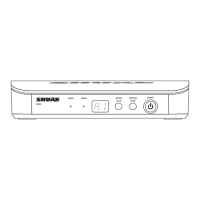

 To Next Page