EasyManua.ls Logo

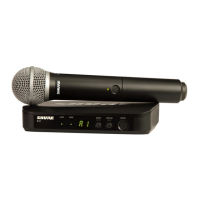
Shure BLX4R - User Manual

Shure BLX4R
23 pages
Print Icon
To Next Page IconTo Next Page
Loading...
BLX4R
Wireless System
The Shure digital wireless system, BLX4R, user guide.
Version: 7.1 (2024-C)

Other manuals for Shure BLX4R

Questions and Answers

  • P
    Paige RodriguezAug 13, 2025
    How to fix Shure Receiver with no sound?
    • G
      gparksAug 13, 2025
      If your Shure Receiver isn't producing sound, check the following: * If the receiver RF bars and battery LED are illuminated, verify all sound system connections or adjust the gain. * If the receiver RF bars and battery LED are off, turn on the transmitter, ensure the batteries are installed correctly, perform transmitter setup, or insert fresh batteries. * If the receiver screen is off, make sure the AC adapter is securely plugged into the electrical outlet and that the receiver is powered on. * If the transmitter indicator LED is flashing red, replace the transmitter batteries.
  • R
    Rebecca GatesAug 16, 2025
    What to do if Shure Receiver has audio dropouts?
    • K
      Kristopher FarrellAug 16, 2025
      If you're experiencing audio artifacts or dropouts with your Shure Receiver, consider these solutions: * If the receiver RF bars and battery LED are flickering, try changing the receiver and transmitter to a different group and/or channel. * Identify and eliminate any nearby sources of RF interference. * Replace the transmitter batteries. * Ensure the receiver and transmitter are positioned within the recommended system parameters and away from metallic surfaces. The transmitter should be used in line of sight from the receiver for optimal sound.
  • T
    Tyler GatesAug 20, 2025
    How to fix no sound or faint sound on Shure Receiver when RF bars and battery LED are illuminated?
    • K
      Karen DayAug 21, 2025
      If you're experiencing no sound or faint sound from your Shure Receiver and the receiver RF bars and battery LED are illuminated, here's what to do: * Check all your sound system connections and adjust the gain as necessary. * Ensure that the receiver is properly connected to the mixer or amplifier.
  • H
    hannah61Aug 25, 2025
    What to do if the Shure Receiver screen is off?
    • S
      stevenssamuelAug 25, 2025
      If your Shure Receiver screen is off, try the following: * Ensure the AC adapter is securely plugged into the electrical outlet. * Make sure the receiver is powered on.
  • K
    Katherine SmithAug 28, 2025
    How to troubleshoot no sound on Shure Receiver when RF bars and battery LED are off?
    • T
      Thomas AtkinsonAug 28, 2025
      If you have no sound or faint sound from your Shure Receiver and the receiver RF bars and battery LED are off, here's how to troubleshoot: 1. Turn on the transmitter. 2. Ensure the batteries are correctly installed. 3. Perform the transmitter setup. 4. Insert fresh batteries.
  • T
    theresalangAug 31, 2025
    What to do if my Shure Microphone system has no sound?
    • J
      Jamie VazquezSep 1, 2025
      If your Shure Microphone system produces no sound, check the following: * If the receiver RF bars and battery LED are illuminated, verify all sound system connections or adjust gain as needed and ensure the receiver is connected to the mixer/amplifier. * If the receiver RF bars and battery LED are off, turn on the transmitter, ensure the batteries are correctly installed, perform transmitter setup, and insert fresh batteries. * If the receiver screen is off, ensure the AC adapter is securely plugged into the electrical outlet and the receiver is powered on. * If the transmitter indicator LED is flashing red, replace the transmitter batteries.
  • S
    Susan VaughnSep 4, 2025
    Why does my Shure Microphone system have audio dropouts?
    • P
      Pam VegaSep 4, 2025
      Audio dropouts in your Shure Microphone system can occur if the receiver RF bars and battery LED are flickering. To resolve this: * Change the receiver and transmitter to a different group or channel. * Identify and remove any nearby sources of RF interference. * Replace the transmitter batteries. * Ensure the receiver and transmitter are within system parameters, set up within the recommended range, and keep the receiver away from metallic surfaces. * Maintain a line of sight between the transmitter and receiver for optimal sound.
  • A
    Antonio HillSep 8, 2025
    What to do if Shure BLX4R Microphone system sound level varies with different sources?
    • C
      Caitlyn AlvarezSep 8, 2025
      If the sound level varies when switching to different sources on your Shure Microphone system, adjust the transmitter gain as necessary.

Summary

IMPORTANT SAFETY INSTRUCTIONS

Quick Start Guide

BLX4 R Receiver

Front and Rear Panel Overview

Overview of controls, indicators, connections, and ports on the BLX4R receiver.

Receiver Component Descriptions

Detailed explanation of each component and feature of the BLX4R receiver.

Receiver LCD Screen

Explanation of the indicators and information displayed on the receiver's LCD screen.

Transmitters

BLX1 and BLX2 Overview

Introduction to BLX1 bodypack and BLX2 handheld transmitters, including controls.

Transmitter LED Indicators

Explanation of the LED status lights on the transmitter for power and battery.

System Setup Procedures

Setting Transmitter and Receiver Group;Channel

Manually configuring transmitter and receiver group and channel settings for optimal performance.

Performance and Operation

Getting Good Sound & Adjusting Gain

Tips for optimal audio quality, microphone placement, and gain adjustment.

Controls, Power, and Wearing

Procedures for locking/unlocking controls, powering off, and wearing the bodypack transmitter.

Batteries and Troubleshooting

Batteries

Information on battery usage, life, and replacement for the wireless system.

Troubleshooting Common Issues

Resolving no sound, faint sound, artifacts, distortion, and range issues with the system.

Accessories and Specifications

Accessories

Details on furnished and optional accessories for the wireless system.

System Specifications

Technical specifications for the system, BLX1, BLX2, and BLX4R components.

Certifications and Regulatory Information

Shure BLX4R Specifications

General IconGeneral
Quick start guideYes
Impedance200 Ω
Antenna typeRemovable
Ethernet LANNo
Mounting typeDesktop
Product colorBlack
LED indicatorsPower
Housing materialABS
Channels quantity12 channels
Operating frequency typeUltra High Frequency (UHF)
Radio Frequency (RF) range542 - 572 MHz
Input voltage12 - 15 V
Power supply typeAC
Current consumption235 mA
XLR out1
Weight and Dimensions IconWeight and Dimensions
Depth103 mm
Width188 mm
Height40 mm
Weight241 g

Related product manuals