Shure Incorporated
15/26
1.
2.
3.
4.
5.
1.
2.
◦
◦
◦
3.
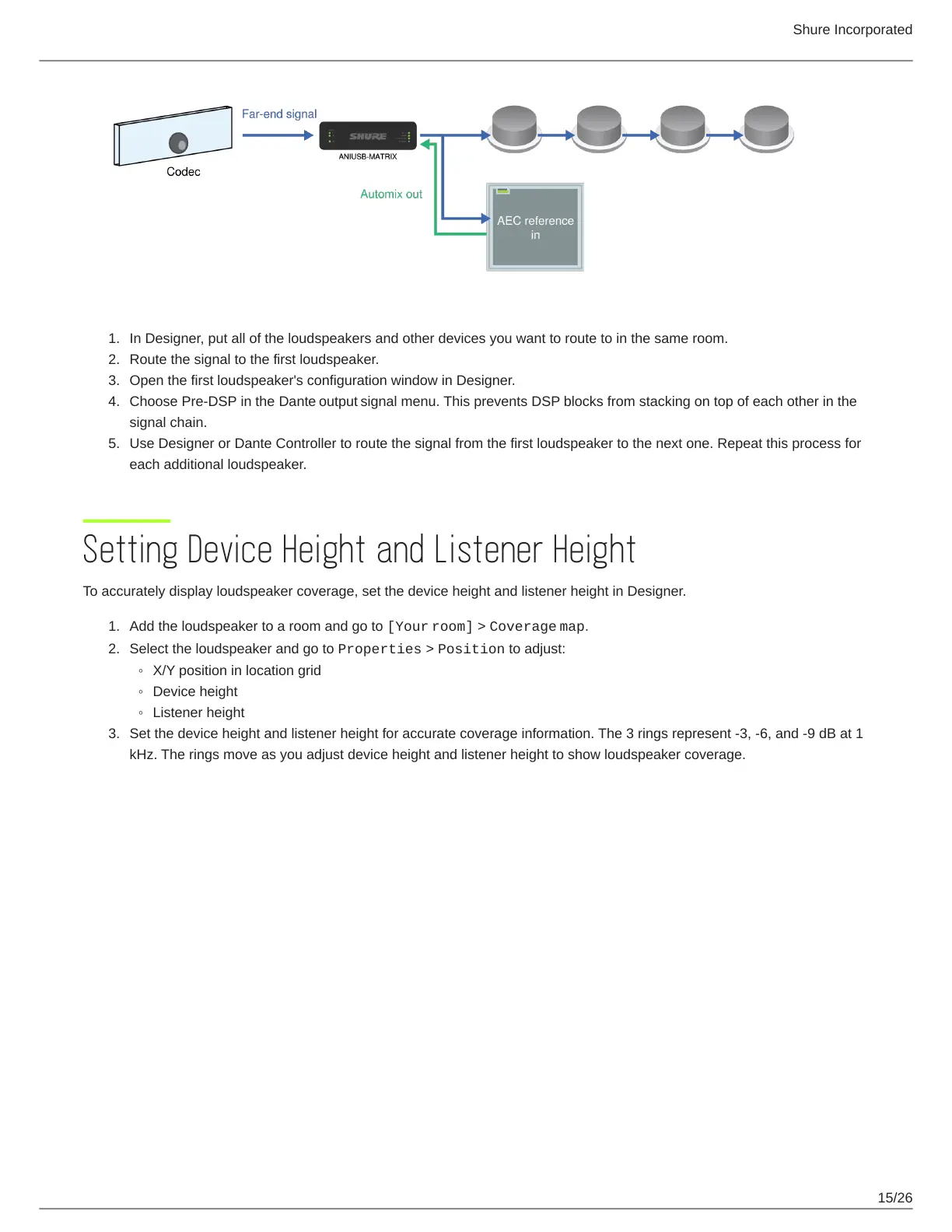
In Designer, put all of the loudspeakers and other devices you want to route to in the same room.
Route the signal to the first loudspeaker.
Open the first loudspeaker's configuration window in Designer.
Choose Pre-DSP in the Dante output signal menu. This prevents DSP blocks from stacking on top of each other in the
signal chain.
Use Designer or Dante Controller to route the signal from the first loudspeaker to the next one. Repeat this process for
each additional loudspeaker.
Setting Device Height and Listener Height
To accurately display loudspeaker coverage, set the device height and listener height in Designer.
Add the loudspeaker to a room and go to [Your room] > Coverage map.
Select the loudspeaker and go to Properties > Position to adjust:
X/Y position in location grid
Device height
Listener height
Set the device height and listener height for accurate coverage information. The 3 rings represent -3, -6, and -9 dB at 1
kHz. The rings move as you adjust device height and listener height to show loudspeaker coverage.


 To Next Page