- 90 -
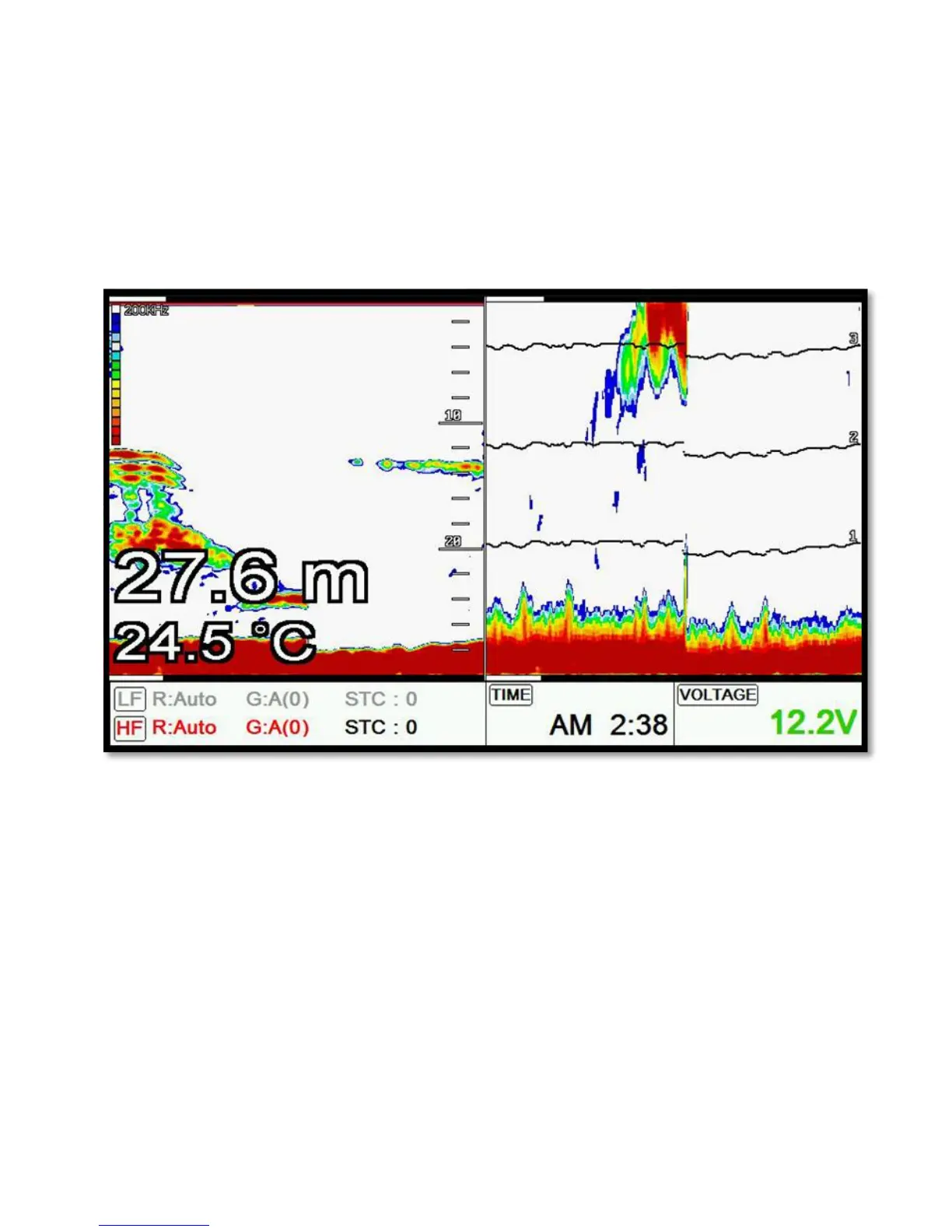
Bottom Zoom magnifies the sounder display from the sea bottom toward the surface for a short
distance. The sea bottom contour is displayed and additional contour lines are added at intervals
above the sea bottom to aid in determining distances of echoes near the bottom. Use the Sounder
Menu to set the magnified Bottom Range from 2.5 to 20m (10 to 60ft.). Default setting is 10m (40ft.). If
the depth Range is set manually, the setting must place the sea bottom echo in the lower portion of the
screen for Bottom Zoom to be effective.
6.3. Bottom Lock
Bottom Lock divides the Fishfinder main screen image for the selected Fishfinder into two sections.
The left hand section displays a Normal Mode image. The right hand section of the screen displays the
Fishfinder image relative to the sea bottom. The sea bottom appears as a straight line with the
Fishfinder image magnified for a short distance toward the surface. A scale
appears on the right for estimating distances of echoes near the bottom. Use the Fishfinder Manu to
set the magnified Bottom range from 2.5 to 20m (10 to 60ft.). Default setting is 10m (40ft.). If the depth
Range is set manually, the setting must place the sea bottom echo in the
lower portion of the screen for Bottom Lock to be effective.



 To Next Page