Choosing the Right Cookware
• Only use cookware with a base suitable for induction cooking. Look for the induction symbol on the packaging or on
the bottom of the pan.
• You can check whether your cookware is suitable by carrying out a magnet test. Move a magnet towards the base
of the pan. If it is attracted, the pan is suitable for induction.
• If you do not have a magnet:
1. Put some water in the pan you want to check.
2. If “ ” does not flash in the display and the water is heating, the pan is suitable.
• Cookware made from the following materials is not suitable: pure stainless steel, aluminium or copper without a
magnetic base, glass, wood, porcelain, ceramic and earthenware.
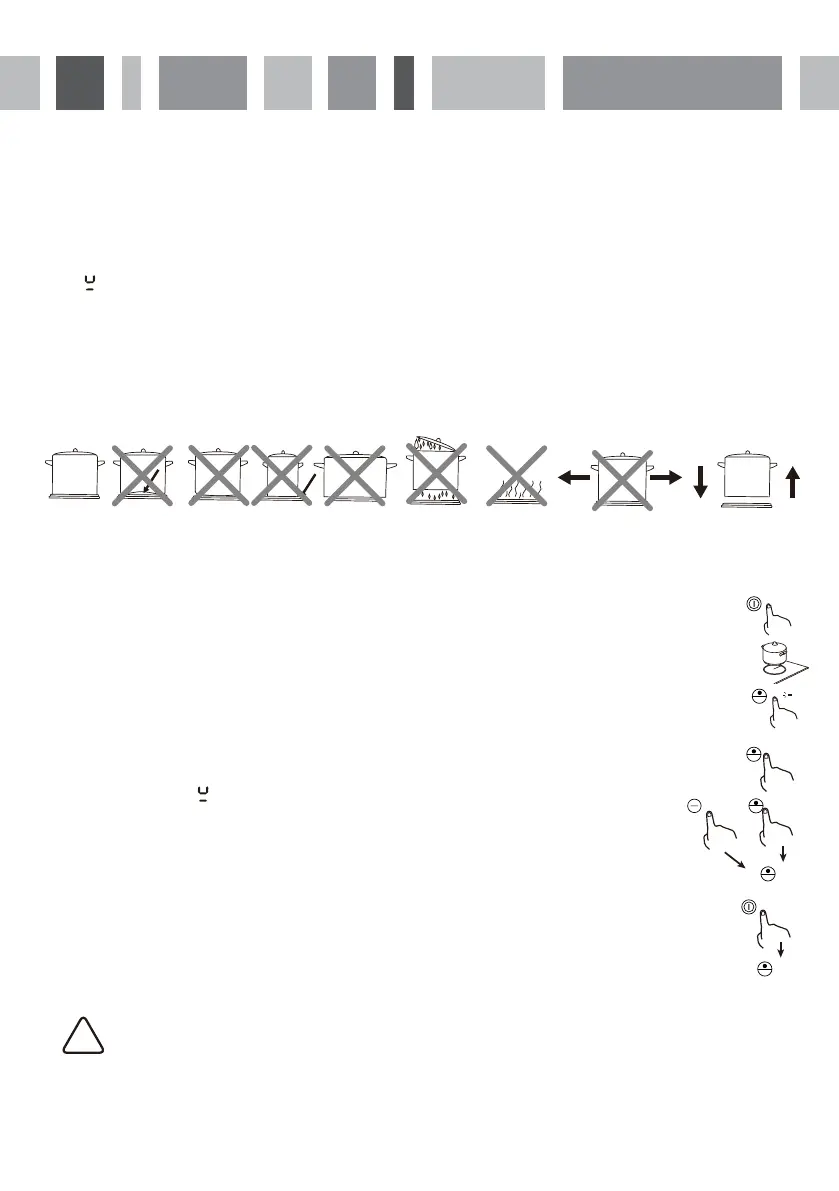
Do not use cookware with jagged edges or a curved base.
Make sure that the base of your pan is smooth, sits flat on the glass and is the same size as the cooking zone. Using a
pot that is slightly wider means energy will be used at its maximum efficiency. If you use a smaller pot, efficiency could
be less than expected. Pots with a diameter of less than 140 mm could be undetected by the hob if placed on the
larger cooking zone. Always centre your pan on the cooking zone.
Always lift pans off the induction hob – do not slide as they may scratch the glass.
7
Good Bad Bad Bad Bad Bad Bad
(recessed base) (convex base) (undersize) (oversize) (moisture on hotplate) (no utensil)
To Start Cooking
1. Touch the ON/OFF control.
With the power switched on, the buzzer will beep once, all displays will show “ – “ or “ – – “, indicating that
the induction hob has entered standby mode.
2. Place a suitable pan on the cooking zone that you wish to use.
• Make sure the bottom of the pan and the surface of the cooking zone are clean and dry.
3. Touch the heating zone selection control and the indicator next to the key will flash.
4. Select a heat setting by touching the “-“ or “+” control.
If you don’t choose a heat setting within 1 minute, the induction hob will automatically switch off. You will
need to start again at step 1.
• You can touch the heating zone selection again and modify the heat setting at any time during cooking.
!
If the Display Flashes “ ” Alternately with the Heat Setting
This means that:
• you have not placed a pan on the correct cooking zone or,
• the pan you’re using is not suitable for induction cooking or,
• the pan is too small or not properly centred on the cooking zone.
No heating takes place unless there is a suitable pan on the cooking zone.
The display will automatically turn off after 1 minute if no suitable pan is placed on it.
When You Have Finished Cooking
1. Touch the heating zone selection control that you wish to switch off.
2. Turn the cooking zone off by scrolling down to”0” . Make sure the display shows“0” and then “H”.
Turn the hob off by touching the ON/OFF control.
4. Beware of hot surfaces indicator “H” will show which cooking zone is hot to touch. It will disappear when the
surface has cooled down to a safe temperature. It can also be used as an energy saving function - if you want
to heat further pans, use the hotplate that is still hot.
6
H
0
or



 To Next Page