7
EN
FR
E
T
N
o not
os
t
on t
e
um
a
ove t
e water
eve
because it is not self-priming and the risk of the pump to run dry.
he risk o
invisible air bubbles creating a vacuum area is very high. Damages which are caused by the pump running dry
re excluded
rom warranty
o maximize the pump’s e
ciency, choose a strai
ht inlet tube without elbows
e su
est an Inlet and outlet tubes with diameter equal or bi
er than the diameter o
the threaded pipe included
o not use the pump leaving the outlet totally closed. A minimum water
ow is necessary to keep the inner motor cool
ithout runnin
dry
NTR
LLER U
E AND PUMP
RE
ULATI
y connectin
the power supply to the controller, all the LEDs li
ht up once. A
ter about 20 seconds the WIFI symbol will
start to flash slowly to indicate that it is ready and awaitin
the set-up. If the controller has already been set-up, once
powered, the WI FI automatically reconnects to the network and reloads the programs set in the
NTRALL APP
ecause the controller keys are capacitive, simply place your fin
er on the surface and apply a li
ht pressure to use it.
YN
RA
D
.
- P
K 2
-4
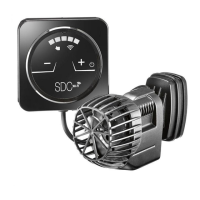
o activate the pump, keep the right key (+) pressed for 3 ". As a test, all the LEDs light up for a few seconds. The pump
starts at 30% of the operatin
ran
e. Pressin
the keys
+
and
-
it is possible to increase or decrease the pump
flow. Consequently, the luminous intensity of the 5 LEDs will vary. The pump symbol will li
ht up in the color set via
the
NTRALL app. The Wi-Fi symbol will flash blue slowly while waitin
to be connected to the Wi-Fi network via the
CONTRALL App. If the pump is mana
ed via CONTRALL, it will not be possible to modify its operation usin
the controller.
It will only be possible to switch it o
by keeping the right key (+) pressed
or 3 ".
he
ontroller supplied can only re
ulate the flow. It can only be powered with the included transformer and mana
es only
the supplied pump. Any other use could irreparably dama
e the device and void the warranty
WI-FI
ET
NTRALL A
Free download
l
t MY DEVI
E
n
t
n +
hoose
ncra
D
or P
K and then Model 3.0 or 2600- 4000
ead the text and then
onfirm PR
EED
ext: select the Wi
network
ou wish to link the
um
and the Wi-Fi
sw
ive a name to your pump and confirm with D
NE.
YN
RA
D
.
-7.
-
.
ll the LEDs
ash simultaneously at the
rst power-up or a
ter a black out. This means that the controller has not
rst
power-up
or has lost
black out
the E
and PAU
E already made settin
, which need to be set up a
ain. Holdin
down
the ON/OFF button for 4 seconds the LEDs will stop flashin
. The flashin
ends autonomously when, after a black out, the
I FI controller reconnects to the network and reloads the pump’s settin
s done with APP CONTRALL.
- Pump ON / OFF: LONG TOUCH of the central key
Pump ON = 1st LED Blu colour is on
- When the pump is OFF and then ON a
ain, the pump starts from where it was set up when you stopped it.
- SHORT TOUCH: : LOCK / UNLOCK of the ke
board. When
ou lock it , the s
mbol LOCK is red.
- To set the pump’s water
ow turn clockwise
the
ow
oes up
and counterclockwise
the
ow
oes down
with
your fin
er the “SPEED” area of the controller . The led li
hts will be on and will follow your fin
er to indicate where you
re with the pump’s re
ulation.
- The WI FI connection is always active as indicated by the
ashin
symbol
hen the
um
and controller are
owered, it ma
take a
ew seconds
or the WI FI connection to become active.
hen the PRESET pro
rams are activated, the LEDs on the bar follow the variations in flow rate preset by the pro
ram.
he Controller su
lied with S
ncra 6.0 - 7.0 - 9.0 SDC models re
licates all the features of CONTRALL with the onl
exception of the CUSTOM function. It can be powered only with the included transformer and mana
es only the pump
supplied. Any other use could irreparably dama
e the device and void the warranty.
Wi-Fi &
NTR
LLER Rese
: by the LONG TOUCH of both ECO and PAUSE keys the Wi-Fi will be reset. The Wi-FI symbol
ill remain on without flashin
. The restore operation will last 11
ET
P
YN
RA
.
-7.
-
.
he SHORT touch of key MODE drives you into the PRE-SET MODE section: small decreases of speed, which are
“variations” of the set s
eed. The
will be random for the first three MODE, sinusoidal for the last two, until
ou return to
M
DE mode
all LEDs off
c.
ith
SHORT TOUCH “ECO” the pump will remain in ECO for 7 hours. Durin
this time the white LED in the left side
under the key E
will be
N. This settin
will start a
ain automatically a
ter 24hours .
ith a LONG TOUCH “ECO”, in the SPEED area you set up the reduced speed for ECO; durin
this settin
the LED of the
round side which indicates the speed level will be flashin
to
ether with the blu one in the ri
ht side under the key E
.
y a new L
N
T
U
H you will record the selected speed level.
t
H
RT T
U
H “PAU
E” the pump will work for 10 minutes at reduced speed. The white led under the key PAU
E
ill
n. This
unction will start a
ain automatically a
ter 24 hours.
ith a L
N
T
U
H “PAU
E”, in the
PEED area you set up the reduced speed for PAU
E. The LED of the central area,
hich indicate the pump’s speed, will be flashin
to
ether with the blu led on the left side under the key PAUSE. By a new
ONG TOUCH
ou will record the selected s
eed level.
I-FI icon with LIGHT BLU on
it means that the WIFI connection is active.
It may take few seconds before the connection is active.



 To Next Page