2 Integration
2.1 Preparing for the integration
Approach
1.
Update Safety Designer and TIA Portal to the latest release (version and, if applica‐
ble, hotfix).
2. Configure the safety laser scanner using Safety Designer. Some parameters can
only be specified via Safety Designer.
2.2 Installing microScan3 - PROFINET GSDML
Overview
T
he GSDML file contains the device description of the safety laser scanner for the
controller. It only needs to be installed once.
Important information
NOTE
Al
ways install the latest GSDML file in the controller.
Approach
1.
The current GSDML file for integrating the safety laser scanner into the controller
can be downloaded at www.sick.com.
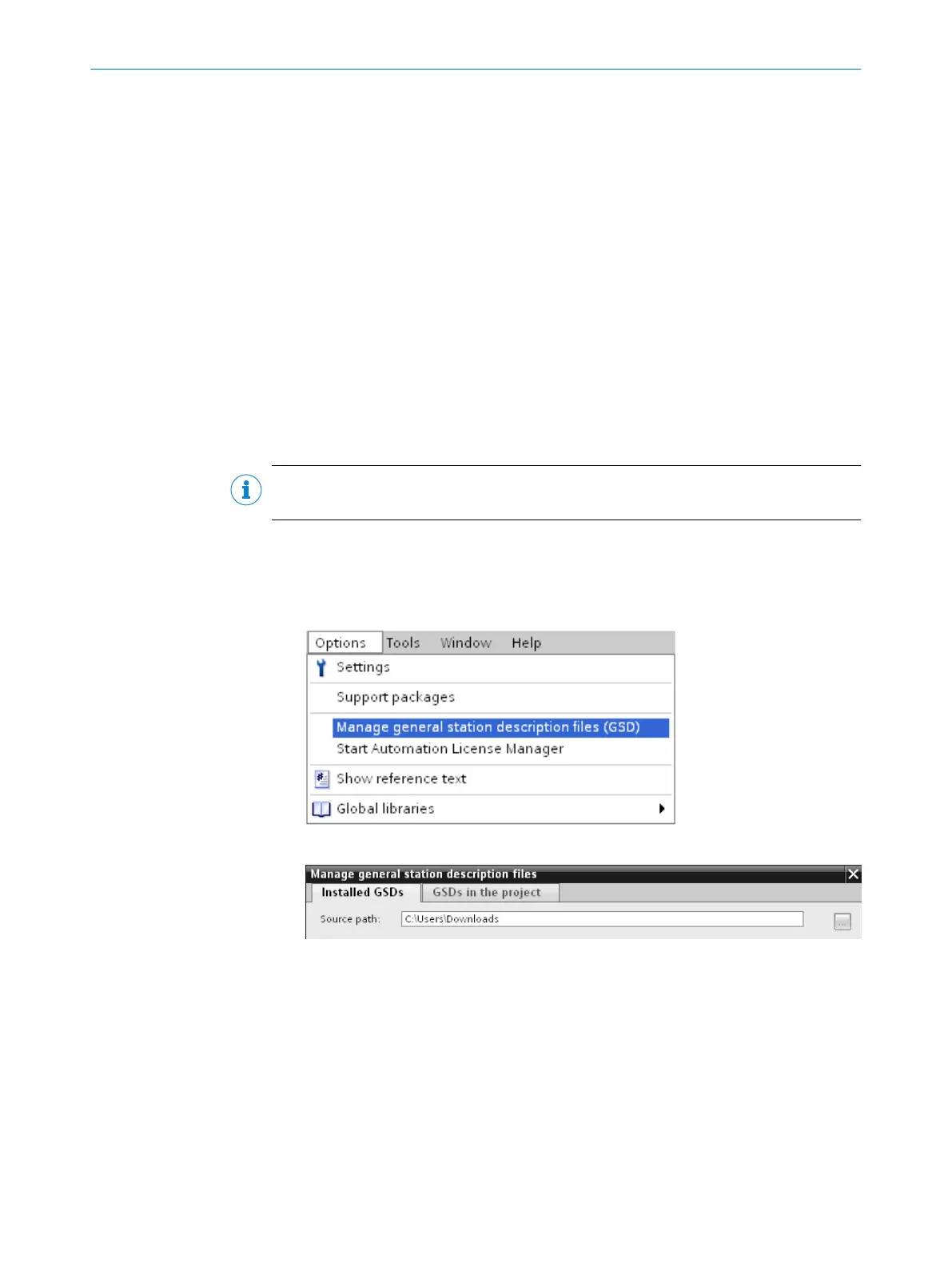
2. In TIA Portal: Options > Manage general station description files
3. Select the folder containing the GSDML file.
4. Select the GSDML file checkbox and click on Ins
tall.
2 IN
TEGRATION
6
T E C H N I C A L I N F O R M A T I O N | microScan3 - PROFINET 8026545/2021-03-15 | SICK
Subject to change without notice














 To Next Page