6 Troubleshooting
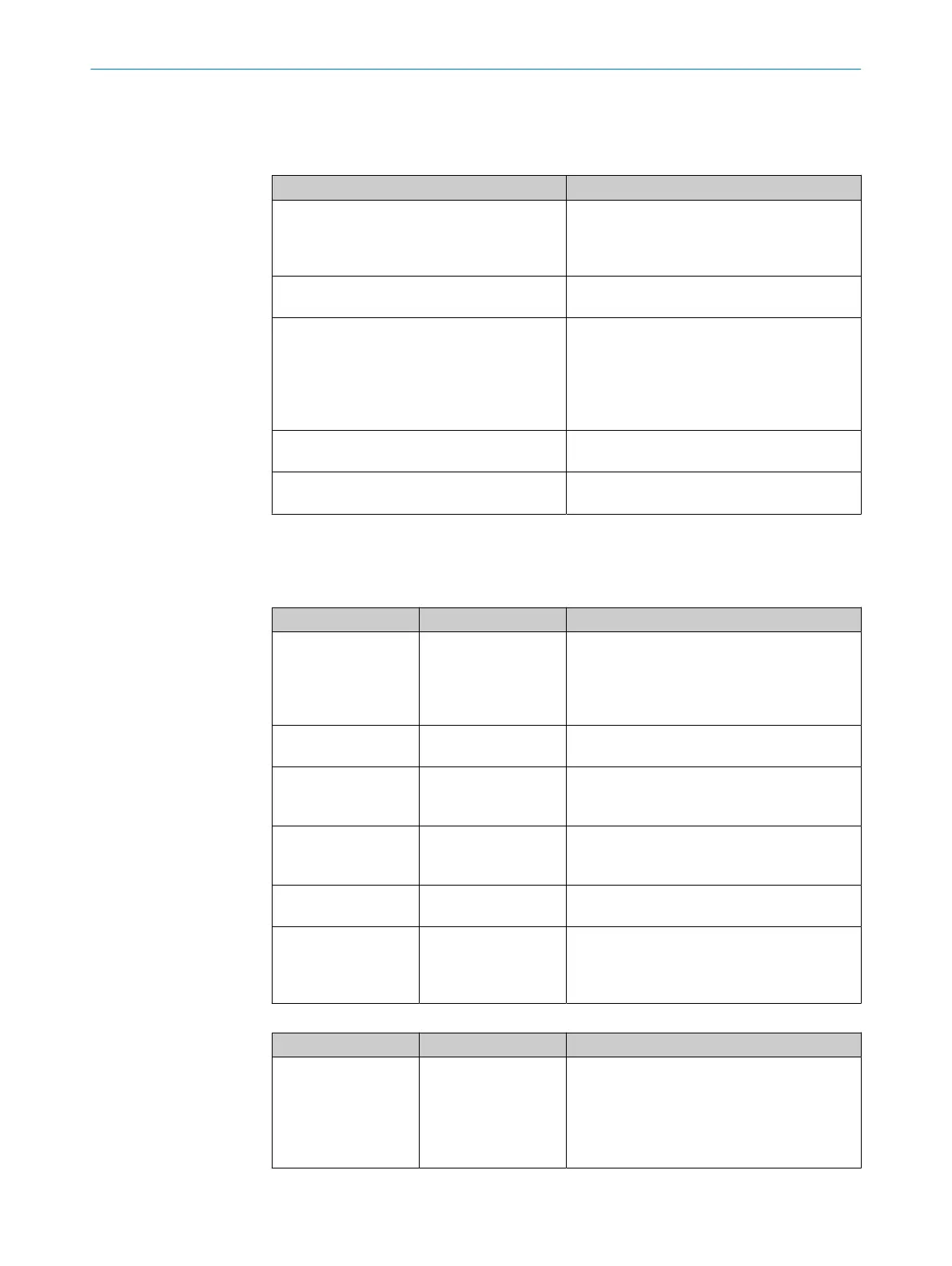
Error indicators in TIA Portal
CPU error Possible causes
Hardware component not available due to type
misma
tch
•
Inc
orrect microScan3 PROFIsafe module
configured in TIA Portal.
•
Incorrect process image selected in Safety
Designer.
Safety Program: Error in PROFIsafe communi‐
c
ation with F-IO
F_WD_Time set too short.
IO device failure - IO device not found
•
Incor
rect PROFINET device name
•
Faulty connection between the safety laser
scanner and the controller (e.g., defective
cable)
•
Voltage supply to the safety laser scanner
is interrupted
Mismatch of failsafe destination address
(F_D
est_Add)
F_Dest_Add does not match the configuration
in Safety Designer.
Inconsistent iParameters (iParCRC error) F_iPar_CRC does not match the configuration
in Safety Designer.
Error indicators on the microScan3 – network LEDs
The safety laser scanner has two PROFINET LEDs in addition to the Ethernet LEDs.
Table 8: Bus error LED, inscription: BF
LED status Meaning Troubleshooting
o
No supply voltage
or P
ROFINET commu‐
nication not active or
device is not config‐
ured
b
Chec
k power supply, wiring and connected
communication partners.
b
Restart device.
b
Check the configuration of the device.
O Green
PROFINET communi‐
c
ation is active
–
Ö Gr
een
No connection to con‐
t
rol unit
b
Chec
k PROFINET names.
b
Check the control unit.
b
Start the controller.
O Red
Serious error, device
no
t ready
b
Chec
k device.
b
Restart device.
b
Replace device.
Ö R
ed
Incorrect PROFINET
conf
iguration
b
Chec
k the PROFINET configuration, in par‐
ticular F_Dest_Add.
Ö Red/green
PROFINET alarm is
ac
tive
b
Chec
k the cause of the error in the con‐
figuration program of the controller and
observe the help text.
b
Check the alarm in the Safety Designer.
Table 9: System error LED, inscription: BF
LED status Meaning Troubleshooting
o
No supply voltage
or P
ROFIsafe commu‐
nication not initialized
or not active or incor‐
rect process image
selected
b
T
rigger or launch PROFIsafe communica‐
tion.
b
Check whether the same process image is
selected in the controller and in the device
(6 bytes or 12 bytes)
6 TROUBLESHOOTING
18
T E C H N I C A L I N F O R M A T I O N | microScan3 - PROFINET 8026545/2021-03-15 | SICK
Subject to change without notice














 To Next Page