1
2
1
2
1
2
454
mm
164 mm
454
mm
164 mm
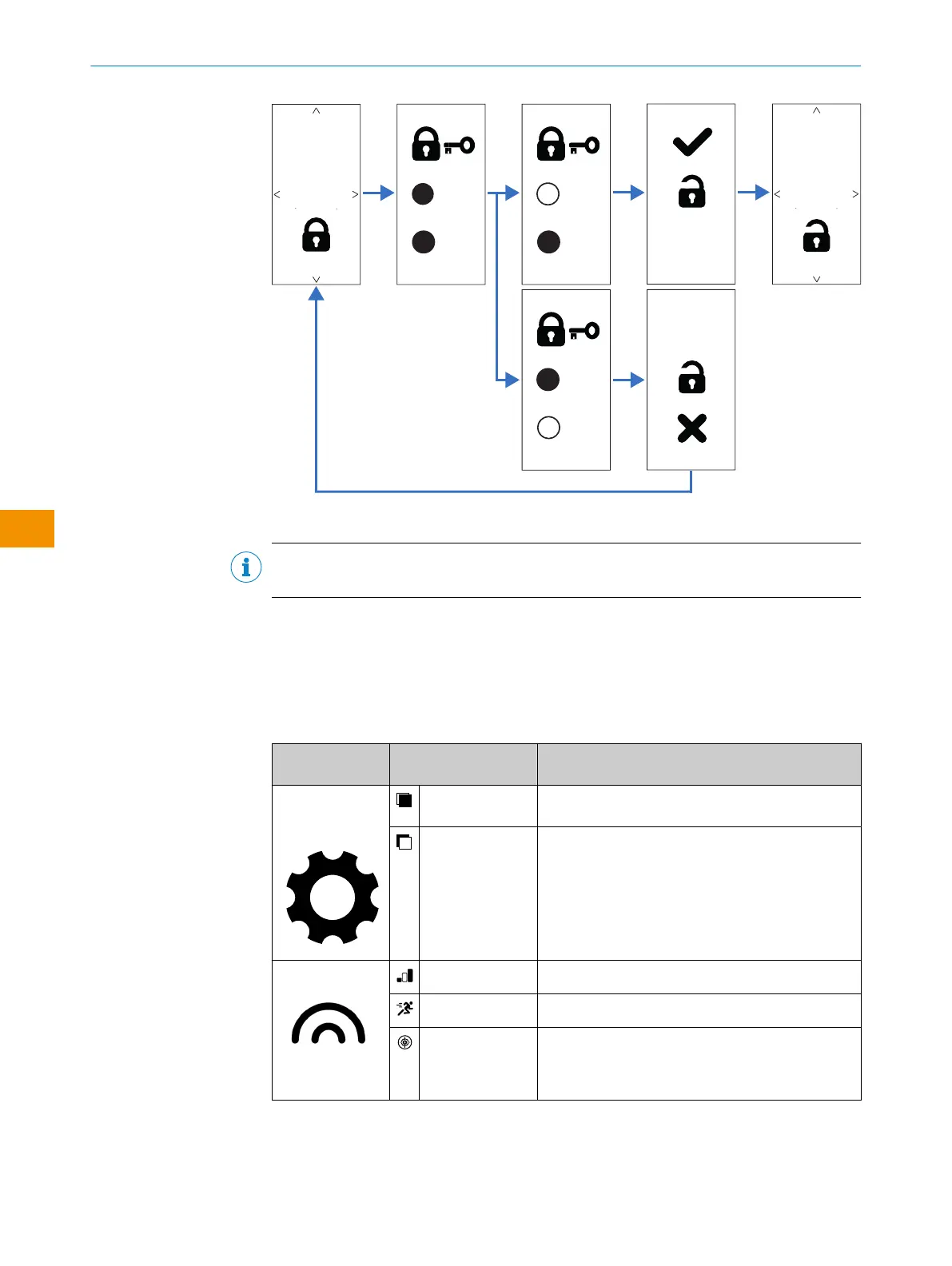
Figure 5: Display unlocking procedure
NOTE
The factory default password is “1”.
3.4 Available modes and functions
The sensor has various detection modes, operating modes and other adjustments,
which are application-specific used and selected. The different modes can be set via
the touch display and IO-Link. Here you find an overview:
Table 1: Modes and functions
Modes / func‐
tions
Mode Description
Configuration -
Functional princi‐
ple
Background sup‐
pression (BGS)
The sensor reliably detects objects no matter
whether there is a background or not.
Foreground sup‐
pression (FGS)
The sensor detects objects in front of the back‐
ground with a small distance between object and
background. It requires a stable background as a
reference.
The sensor is typically used to detect flat objects on
conveyor belts.
Operating modes
Standard mode Factory default; suitable for most applications
Speed mode Obtain data quickly with a reduced sensing range
Precision mode Obtain data at a reduced frequency with a larger
sensing range
OPERATING INSTRUCTIONS
44
O P E R A T I N G I N S T R U C T I O N S | WTM10L 9382969/2024-02-23 | SICK
Subject to change without notice
en











 To Next Page