Installation & User Manual, Radio Remote rev 1_0_4 Page 16
WARNING:
Before working on the transmitter, deactivate the transmitter and the receiver (push “OFF” on the
transmitter(s)) and turn o the power to the receiver as well as the thruster mainswitch.
1. Open the transmitter case by removing the 3 torque screws.
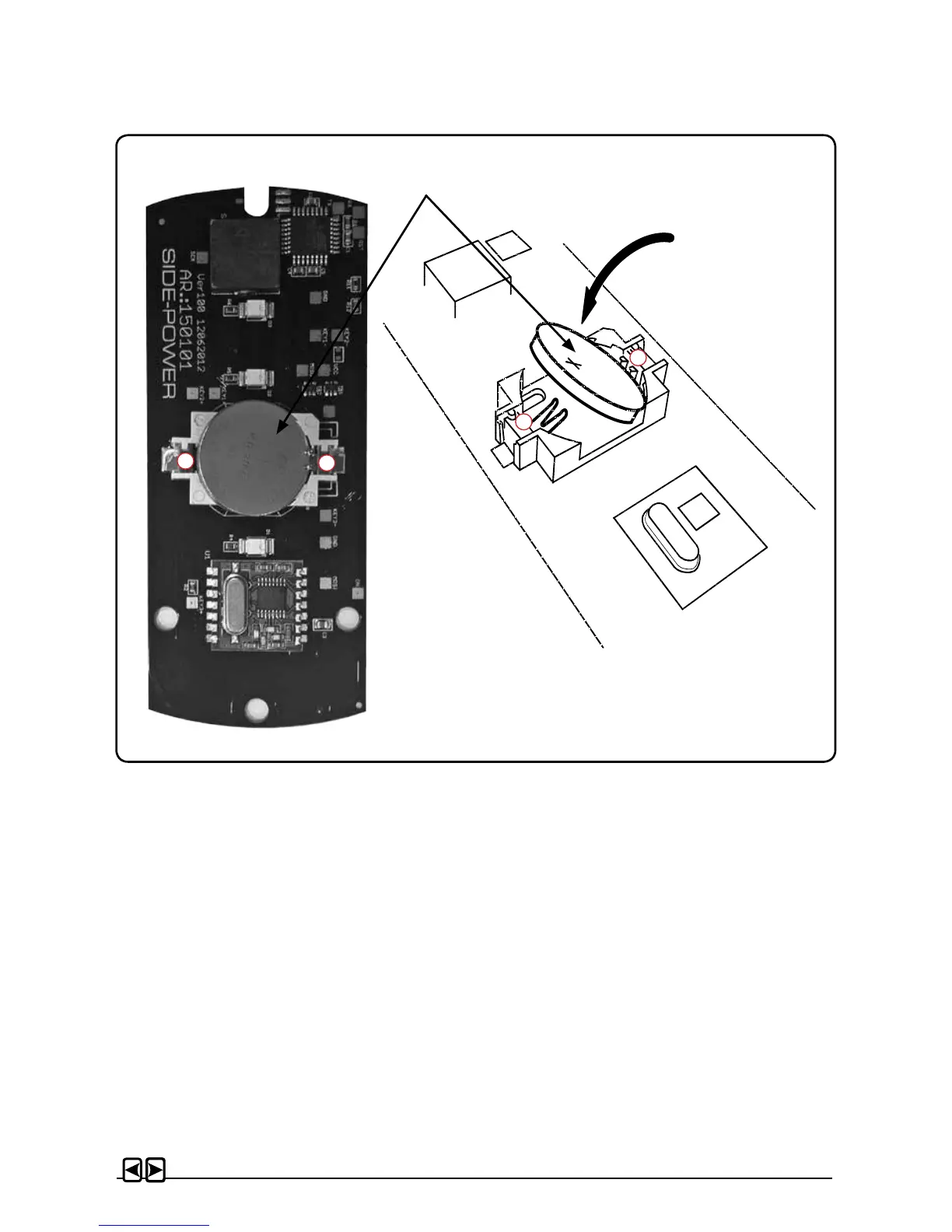
2. Remove the battery by inserting a screwdriver or similar between battery and holder at point A,
and gently ip the battery out, taking care not damaging the battery grips at point B.
3. Insert the new battery (Type CR2032, 3V - Brand name recommended). Be sure to insert the
battery with the positive pole up diagonally into the battery holder, ensuring that the edge of the
battery is under the battery grips (B). Press the battery down until secured at point A.
4. Close the transmitter. Put the cover back in place, ensure that the rubber seal between remote
upper and lower part is located correctly. Place the 3 screws (remember sealing washer) in
their recessed holes and tighten.
Replacing transmitter battery
Battery
A
B
A
B


 To Next Page