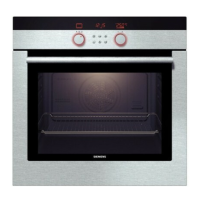
This document describes the Siemens HB.13.B.W built-in oven, providing comprehensive information on its functions, technical specifications, usage, and maintenance.
Function Description
The Siemens HB.13.B.W built-in oven is designed for domestic use, primarily for the preparation of food and drink. It offers various heating functions and cooking compartment settings to accommodate a wide range of dishes. The appliance is equipped with a control panel featuring touch sensors and a function selector to set the heating function and temperature. It also includes a time-setting option for cooking time, end time, and a timer.
Heating Functions:
- 3D hot air: For baking and roasting on one or more levels. The fan distributes heat from the ring heating element in the back panel evenly around the cooking compartment.
- Hot air gentle: For gently cooking selected types of food on one level without preheating. The fan distributes heat from the ring-shaped heating element in the back panel around the cooking compartment. This heating function is used to measure both the energy consumption in air recirculation mode and the energy efficiency class.
- Bottom heating: For cooking in a bain marie and for baking food for extra time. Heat is emitted from below.
- Grill, large area: For grilling flat items, such as steaks or sausages, for making toast, and for browning food. The whole area below the grill element becomes hot.
- Top/bottom heating: For traditional baking and roasting on one level. Especially suitable for cakes with moist toppings. Heat is emitted evenly from above and below. This heating function is used to measure the energy consumption in the conventional mode.
- Interior lighting: Switches on the interior lighting; all other functions remain off. This makes it easier to clean the cooking compartment, for example.
Other Functions:
- Time-setting options: Includes cooking time, end time, and a timer.
- Childproof lock: Prevents children from accidentally switching on or changing settings on the appliance.
Important Technical Specifications
- Temperature range: The temperature in the cooking compartment can be set between 50 °C and 275 °C. For grill settings, the temperature range is 1, 2, 3 (small, medium, large grill area).
- Maximum height for installation: This appliance is intended for use up to a maximum height of 4000 metres above sea level.
- Electrical specifications: The cooking compartment light bulb is a heat-resistant 25 Watt, 230 V halogen bulb.
- Energy efficiency: The "Hot air gentle" and "Top/bottom heating" functions are used to measure energy consumption and efficiency class.
Usage Features
Before Using for the First Time:
- Setting the time: The time must be set before the appliance can be used. The time starts at "12:00". Use the – or + button to set the time, then touch the ◔ button to confirm.
- Cleaning the cooking compartment and accessories: Before preparing food for the first time, the cooking compartment and accessories must be cleaned. Remove any packaging, adhesive tape, or film. Clean the smooth surfaces with a soft, damp cloth. Heat the kitchen ventilated while the appliance is heating.
Operating the Appliance:
- Switching on and off: Turn the function selector to any position other than the "Off" position to switch on. To switch off, always turn the function selector to the "Off" position.
- Setting heating function and temperature: Use the function selector to set the heating function and the temperature selector to set the temperature.
- Time-setting options:
- Cooking time: The appliance will automatically stop heating once the set cooking time has elapsed.
- End time: The appliance will start up automatically so that it finishes cooking at the required time.
- Timer: The timer functions like an egg timer and runs independently of the appliance.
- Childproof lock: To activate, press and hold the ◔ button for approx. 4 seconds. "SAFE" appears on the display. To deactivate, press and hold the ◔ button for approx. 4 seconds until "SAFE" goes out.
Accessories:
The oven comes with various accessories:
- Wire rack: For ovenware, cake tins, ovenproof dishes, roasts, grilled items, and frozen meals.
- Universal pan: For moist cakes, baked items, frozen food, large roasts, and catching dripping fat.
- Baking tray: For baking trays and small baked products.
- Inserting accessories: The cooking compartment has five shelf positions. The shelf positions are counted from the bottom up. Always insert accessories between the two guide rails for a shelf position. Accessories can be pulled out approximately halfway without tipping.
- Locking function: The accessories can be pulled out approximately halfway until they lock in place.
Tested for You in Our Cooking Studio:
The manual provides recommended settings for various dishes, including cakes, pastries, poultry, meat, fish, vegetables, desserts, and more. It also offers tips on preheating, baking, grilling, drying, proving dough, defrosting, and keeping warm.
Maintenance Features
Cleaning:
- General cleaning: Use a soft cloth, warm water, and a little washing-up liquid. Do not use high-pressure cleaners or steam cleaners.
- Door panels: Clean with hot soapy water and a soft cloth. Do not use a glass scraper or a stainless steel scouring pad.
- Door handle: Clean with hot soapy water and a soft cloth. If descaler comes into contact with the door handle, wipe it immediately.
- Appliance interior (enamelled surfaces): Clean with hot soapy water or a vinegar solution and a damp cloth. Soften baked-on food remnants with a damp cloth and soapy water. Use stainless steel wire wool or oven cleaner to remove stubborn dirt.
- Glass cover for the interior light: Clean with a dish cloth and then dry with a soft cloth. If the cooking compartment is heavily soiled, use oven cleaner.
- Door seal: Clean with a dish cloth. Do not scour.
- Door cover (made from stainless steel): Use stainless steel cleaner. Follow the manufacturer's instructions. Do not use stainless steel care products.
- Plastic parts: Clean with hot soapy water and a damp cloth. Do not use glass cleaner or a glass scraper.
- Painted surfaces: Clean with hot soapy water and a damp cloth. Do not use glass cleaner or a glass scraper.
- Control panel: Clean with a dish cloth and then dry with a soft cloth. Do not use glass cleaner or a glass scraper.
- Rails: Clean with hot soapy water and a dish cloth or brush.
- Pull-out system: Clean with hot soapy water and a dish cloth or brush. Do not remove the lubricant while the pull-out rails are pulled out.
- Accessories: Soak and clean using a dishcloth or brush. If there are heavy deposits of dirt, use a stainless steel scouring pad. Enamelled accessories are dishwasher-safe.
Detaching and Refitting the Rails:
- Detaching: Lift the rail slightly at the front (a) and detach it (b). Pull the whole rail towards you and take it out.
- Refitting: First, insert the rail in the middle of the rear socket (a), until the rail rests against the cooking compartment wall, and push it back (b). Then insert the rail into the front socket (c), until the rail also rests against the cooking compartment wall, and press it downwards (d).
Removing and Installing the Door Panels:
- Locking the appliance door: Open the appliance door fully. Open the two locking levers on the left and right. Close the appliance door as far as it goes.
- Removing panels: Open the appliance door slightly. Press the left- and right-hand sides of the cover. Remove the cover. Lift out the outer panel and set it down carefully on a flat surface. Lift out the inner panel and set it down carefully on a flat surface. Push the inner panel in at the top. Slide the outer panel back in and make sure that it is sitting correctly in the bottom in the retainer. Push the outer panel in at the top.
- Fitting panels: Open the appliance door fully and refit the condensate trough. Slide each inner panel back in and make sure that it is sitting correctly in the bottom in the retainer. Put the cover back in place and press on it until you hear it click into place. Open the appliance door again fully. Close the two locking levers on the left and right. Close the appliance door.
Replacing the Bulb in the Top of the Cooking Compartment:
- Unplug the appliance from the mains or switch off the circuit breaker in the fuse box.
- Place a tea towel in the cold cooking compartment to prevent damage.
- Turn the glass cover anti-clockwise to remove it.
- Pull out the bulb, do not turn it. Insert the new bulb, making sure that the pins are in the correct position. Push the bulb in firmly.
- Screw the glass cover back on.
- Remove the tea towel and switch on the circuit breaker.
Customer Service:
In case of a fault, refer to the troubleshooting section in the manual. If the problem persists, contact after-sales service. Provide the E number and FD number of your appliance.

 Need help?


 To Next Page
 General