Page 4 Milltronics ILE-61 – INSTRUCTION MANUAL 7ML19985CX01
Installation
Sensing Head
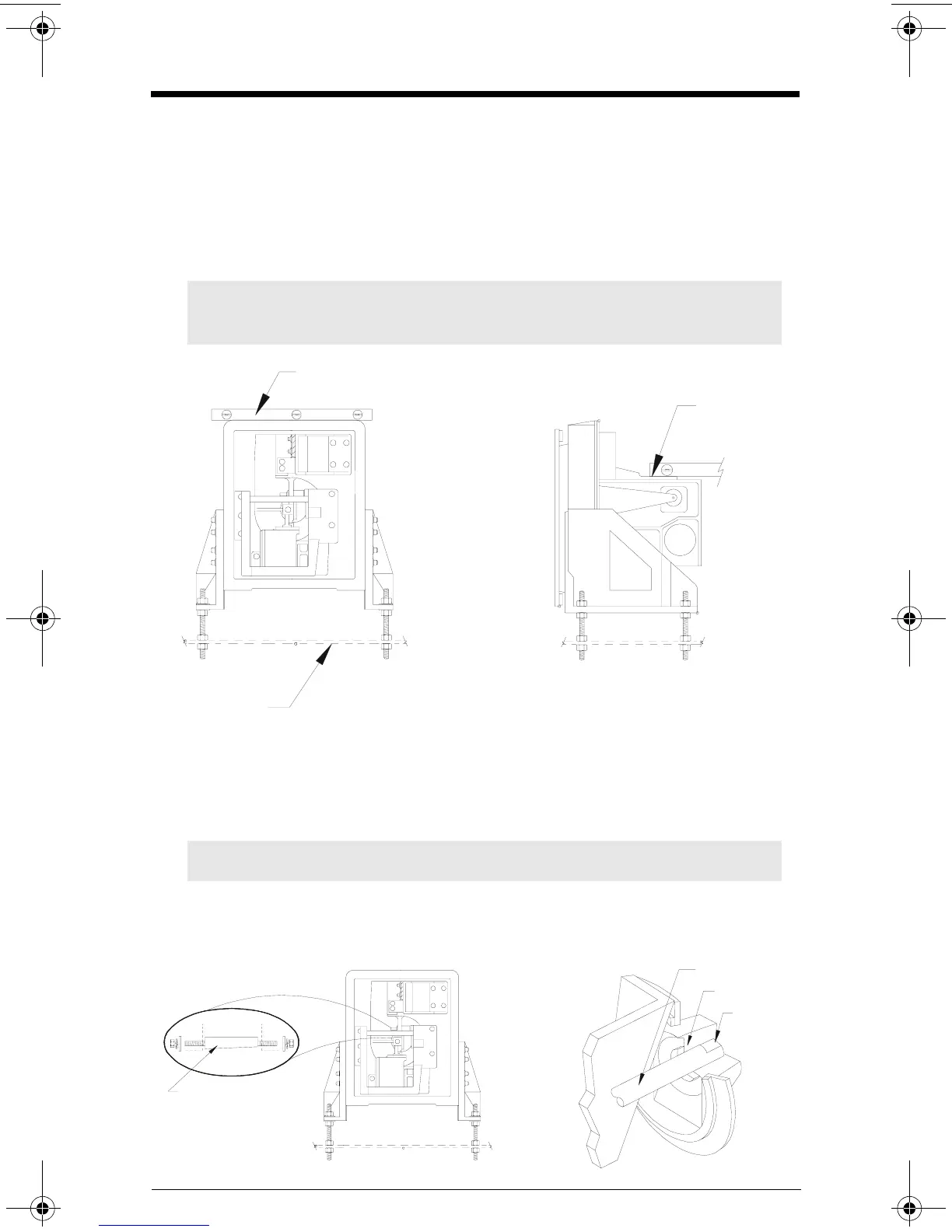
1. With the flowmeter housing installed, mount the ILE-61 to a rigid support structure.
2. Remove the ILE-61 fibreglass cover. With the outer gasket in place, bolt the ILE-61 to
the housing.
3. Adjust the sensing head leveling hardware (provided) to establish level in both
horizontal planes.
Sensing Plate
1. Open the flowmeter housing access door.
2. With the sensing head cover removed, remove the taper pin.
3. Insert the sensing plate shaft fully into the sensing head socket.
4. Insert the taper pin (flat side down), from the left side.
5. Tighten the right taper pin nut to lock the sensing plate shaft in place.
6. Tighten the left taper pin nut.
Note: Ensure the sensing head mounting structure is capable of supporting the
dynamic material impact forces as well as the weight of the sensing head.
Note: Ensure the sensing plate shaft is installed with the flat side up.
spirit level
rigid support
moving beam
(machined
surface)
taper pin
(flat side down)
shaft
socket
flat side up
7ML19985CX01.book Page 4 Thursday, September 18, 2003 12:15 PM



 To Next Page