Testing the Configuration
53
Building Technologies 048_DMS_MK8000_ICC_MP4.10_A6V10062407_a_en.doc
Fire Safety & Security Products 06.2007
– If you are connecting to the server from a remote client, then select the ‘Re-
mote Connection’ box and select the station where the server resides.
– If your OPC Client supports a limited number of characters for objects, then
check the “Use short item name” box (names will be limited to 50 charac-
ters).
– Next option concerns the number of items per object, which can be one or
three. If your OPC Client cannot access the OPC item vendor specific prop-
erties (containing command information) and you will handle the item com-
mands with two more separate items, then check the “Use new mode" for
command items.
– Finally, you have to select the multi-state mode, which can be numeric
(threshold) or bit oriented (bit-mask). Default is numeric mode, check the Bit-
mask mode checkbox if you want to change it.
– Click OK.
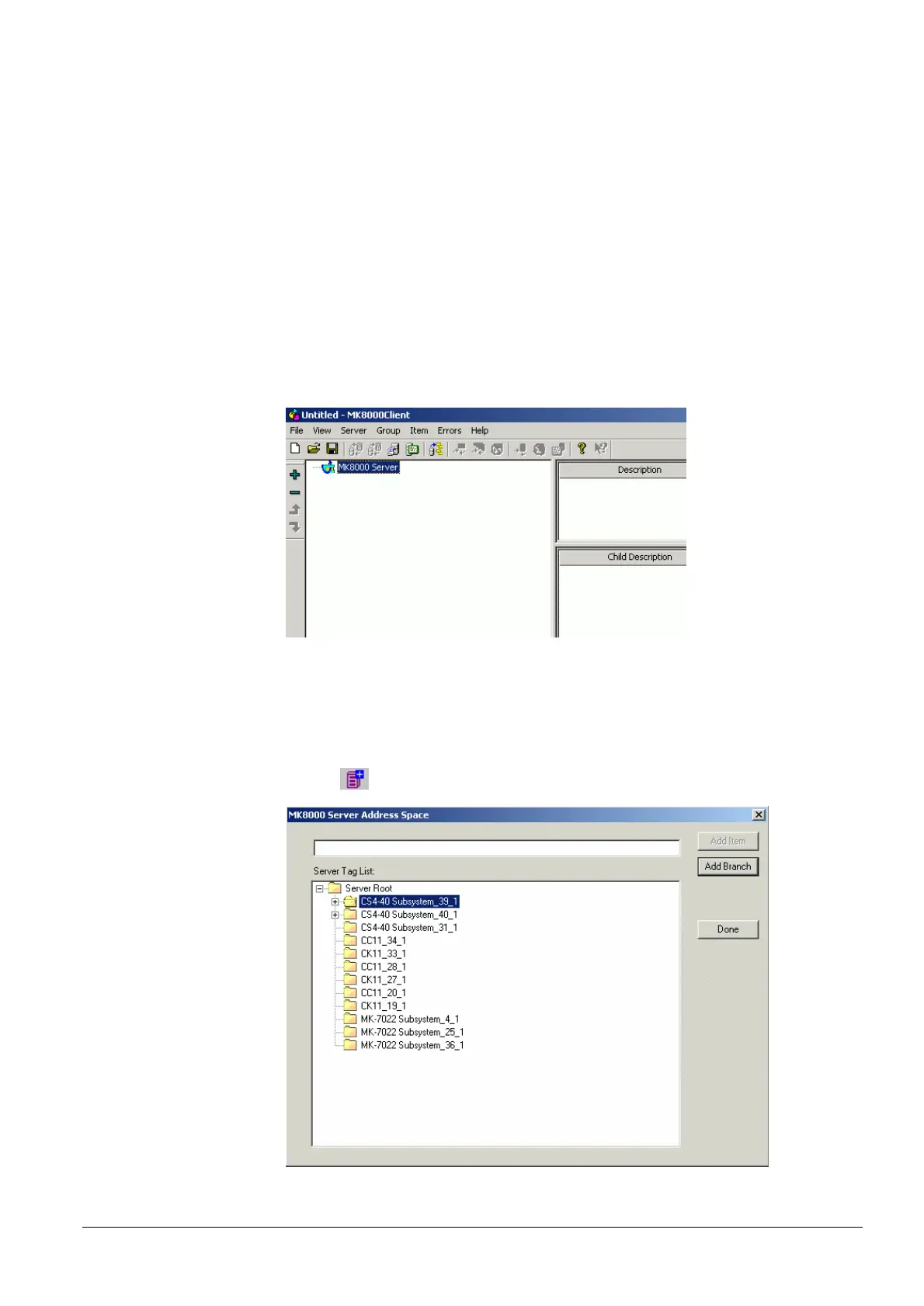
The MK8000 server appears in the left pane (see Fig 45).
Fig 45 Connecting to the MK8000 Server
Checking that all subsystems are present, and adding them to the client
To verify that all subsystems are present, and add them to the client, do the follow-
ing:
1. Open the Server Address Space dialog window with the Browser Server
icon.
Fig 46 Server Address Space Dialog Window



 To Next Page